






Definition and Meaning
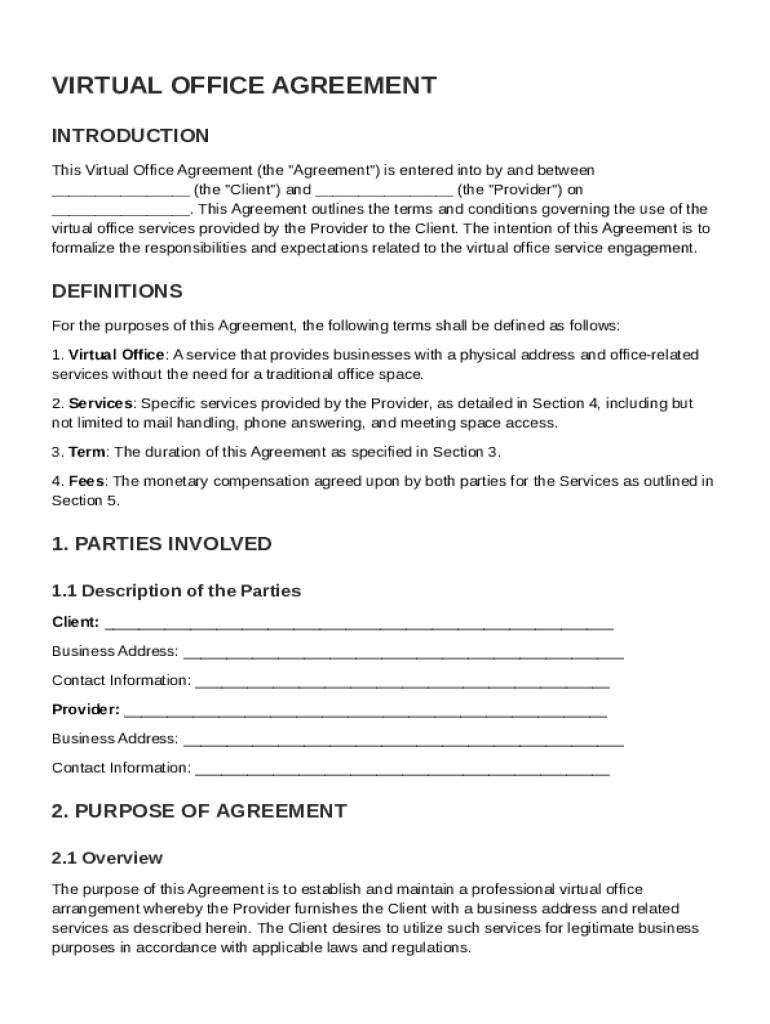
The Virtual Office Agreement Template serves as a formal contract between a client and a provider offering virtual office services. This agreement clarifies the terms under which services such as mail handling, phone answering, and access to meeting spaces are provided. It establishes the roles and responsibilities of both parties involved, setting a clear professional framework for the use of virtual office services. The agreement also ensures parties comply with applicable laws, providing legal clarity and preventing misunderstandings.
How to Use the Virtual Office Agreement Template
Using the Virtual Office Agreement Template involves several steps to ensure the agreement accurately reflects the needs of both the client and the provider. Begin by customizing the template to include specific details such as the names of the parties involved, the scope of services offered, and the payment arrangements. Adjust sections to align with any additional services or unique conditions present in the agreement. Once the document is tailored to your requirements, both parties should review the terms carefully and sign the document to formalize the agreement.
Step-by-Step Customization
- Identify Parties: Specify the names and contact information of the client and provider.
- Outline Services: Clearly define the virtual office services included, such as mail handling or phone services.
- Set Payment Terms: Include details on payment schedules, methods, and amounts.
- Review Legal Obligations: Ensure compliance with relevant laws by checking confidentiality clauses and termination conditions.
- Finalize and Sign: Both parties should review, agree, and sign the completed agreement.
Steps to Complete the Virtual Office Agreement Template
Completing the Virtual Office Agreement Template requires thorough attention to detail to ensure all necessary information is captured. Start by reviewing the template and identifying sections that need customization based on the specific services and terms relevant to your agreement.
Detailed Instructions:
- Collect Information: Gather all necessary details, such as service specifics and legal names of the parties involved.
- Populate Fields: Enter the collected data into the respective sections of the template.
- Verify Accuracy: Ensure all the entered information is accurate and up-to-date.
- Legal Review: Consider consulting a legal advisor to ensure the agreement complies with current regulations and standards.
- Execution: Finalize by both parties signing and dating the document.
Key Elements of the Virtual Office Agreement Template
The key elements in a Virtual Office Agreement Template are essential to ensure clarity and mutual understanding. These elements include:
- Service Description: Detailed information on the services provided, such as mail forwarding, call answering, and usage of meeting rooms.
- Duration and Renewal: Terms regarding the length of service and conditions for automatic renewal or extension.
- Termination Conditions: Conditions under which either party can terminate the agreement.
- Confidentiality Obligations: Provisions to protect sensitive information shared between parties.
- Payment Terms: Clarification on billing cycles, payment due dates, and accepted payment methods.
Legal Use of the Virtual Office Agreement Template
The legal use of a Virtual Office Agreement involves adherence to laws applicable in your jurisdiction. This agreement needs to ensure compliance with contract law, protecting both parties. For instance, incorporating clear dispute resolution mechanisms is crucial for legal enforceability.
Important Legal Considerations:
- Compliance with Laws: Ensure the agreement follows the laws relevant to service contracts in your state.
- Enforceability: Include clauses that are legally binding and clear in intention.
- Dispute Resolution: Outline methods for resolving any disputes, such as mediation or arbitration.
Who Typically Uses the Virtual Office Agreement Template
This template is primarily used by businesses and individuals seeking to establish a professional presence without physical office space. Common users include:
- Startups and Entrepreneurs: Looking to minimize overhead costs while maintaining a business address.
- Remote Companies: Needing to support remote workers with professional services.
- Legal and Financial Consultants: Demanding flexible office solutions for client meetings.


Software Compatibility
The Virtual Office Agreement Template should be compatible with widely used document management software to facilitate easy editing and sharing.
Compatible Software:
- DocHub: Fully supports importing and editing of templates for customization needs.
- Google Workspace: Seamless integration for sharing and storing completed agreements.
- Microsoft Office: Editable in Word, ensuring compatibility for most business users.
State-Specific Rules for the Virtual Office Agreement Template
Different states may have specific requirements regarding virtual office agreements, influenced by state business laws. Understanding and incorporating these nuances can prevent legal complications.
Examples:
- California: Requires detailed terms on service scope and consumer rights.
- New York: mandates clear cancellation policies and disclosure of any additional fees.