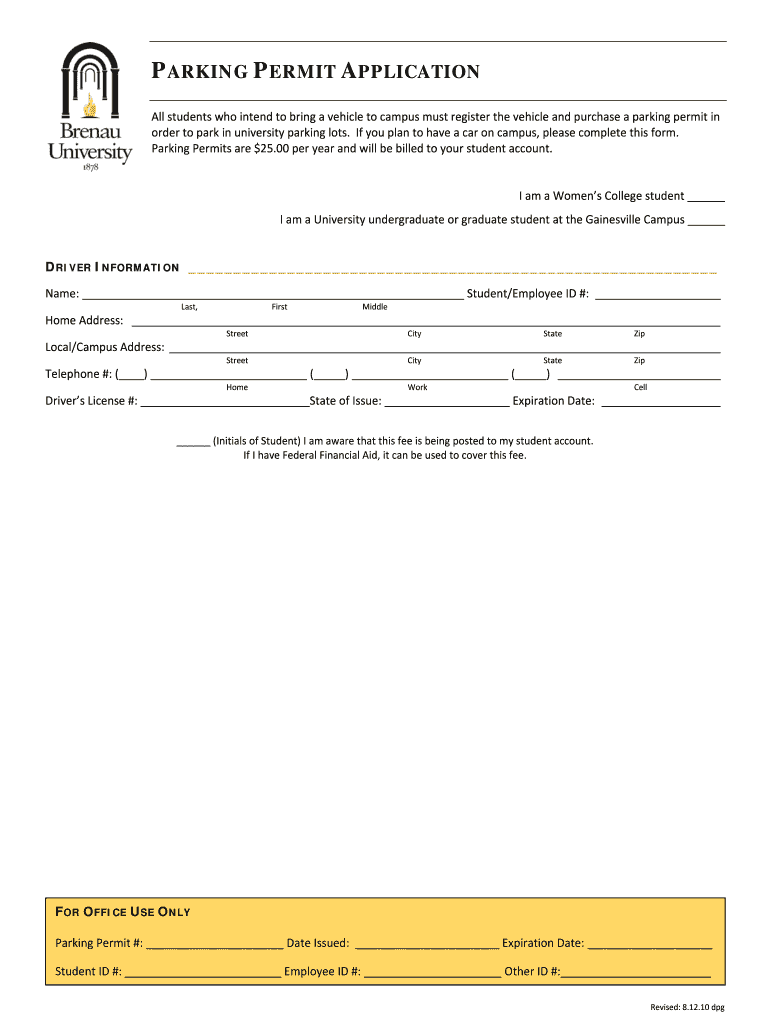
Parking permit microsoft 2026

Get Form
parking pass template microsoft word Preview on Page 1

Here's how it works

01. Edit your parking pass template microsoft word online
Type text, add images, blackout confidential details, add comments, highlights and more.
02. Sign it in a few clicks
Draw your signature, type it, upload its image, or use your mobile device as a signature pad.
03. Share your form with others
Send printable parking pass template word via email, link, or fax. You can also download it, export it or print it out.

How to use or fill out parking permit microsoft with our platform

Form edit decoration
9.5
Ease of Setup
DocHub User Ratings on G2
9.0
Ease of Use
DocHub User Ratings on G2
  1. Click ‘Get Form’ to open the parking permit application in the editor.
  2. Begin by selecting your status as either a Women’s College student or a University undergraduate/graduate student at the Gainesville Campus. Mark the appropriate checkbox.
  3. Fill in your driver information, including your full name (last, first, middle) and Student/Employee ID number.
  4. Provide your home address, including street, city, state, and zip code. Ensure all details are accurate for proper identification.
  5. Next, enter your local/campus address if different from your home address. Again, include street, city, state, and zip code.
  6. Input your telephone numbers: home, work, and cell. Make sure to format them correctly for easy contact.
  7. Lastly, enter your driver’s license number along with the state of issue and expiration date. Initial to confirm awareness of the fee being posted to your student account.

Start filling out your parking permit application today for free using our platform!

See more parking permit microsoft versions

We've got more versions of the parking permit microsoft form. Select the right parking permit microsoft version from the list and start editing it straight away!
Versions Form popularity Fillable & printable
2010 4.8 Satisfied (140 Votes)
be ready to get more

Complete this form in 5 minutes or less

Get form

Got questions?

We have answers to the most popular questions from our customers. If you can't find an answer to your question, please contact us.
Contact us
Parking Management System for your SharePoint intranet Give your employees full control over parking lot planning, access, and reservations with the Parking Management Software for SharePoint.
Microsoft Garage (@msftgarage) Redmond, WA.
Building 92 on the campus contains a visitor center (with interactive exhibits) and store that are open to the public.
A:The Microsoft Store and Visitor Center is located in Building 92 of our main campus in Redmond.
Permit parking is a system where vehicle owners get specific privileges to park in designated areas, such as residential neighborhoods, commercial spaces, or other urban zones.
be ready to get more

Complete this form in 5 minutes or less

Get form

People also ask

A:The Microsoft Store and Visitor Center is located in Building 92 of our main campus in Redmond. Visitor parking areas are on the east side of the building and are clearly marked with signage. Q:Is there a fee to visit? A:No, there is no fee to visit.

printable parking pass template word pdf