






Definition and Purpose of the Work From Home Request Form
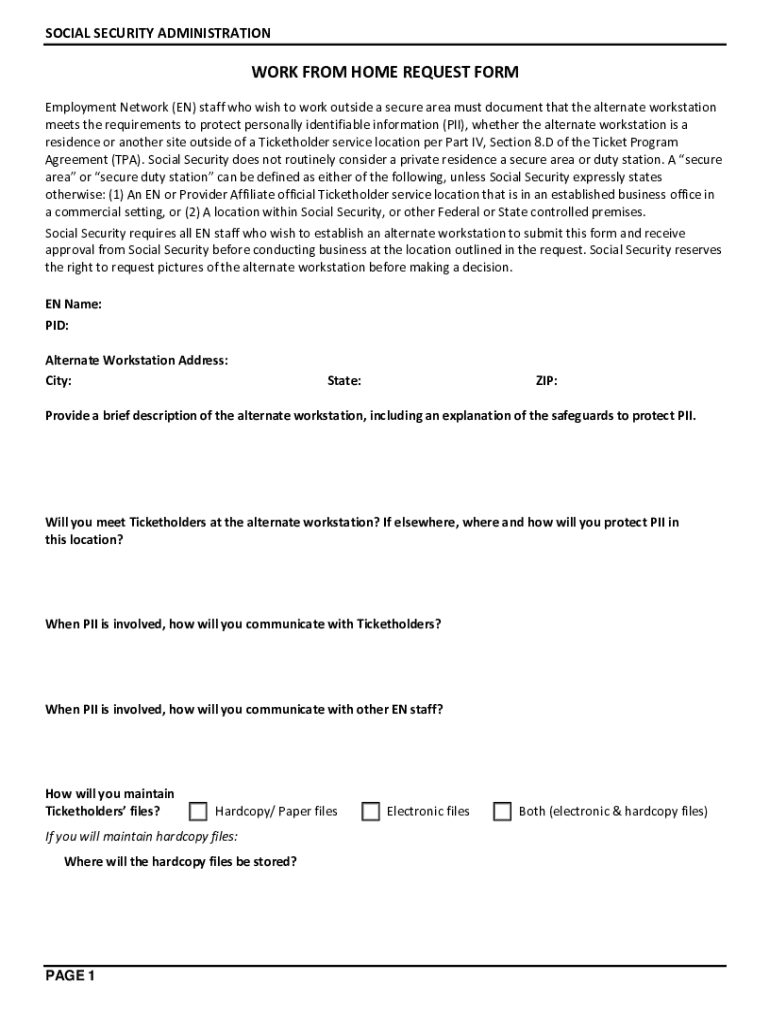
The Work From Home Request Form is a structured document used primarily by employees who seek approval to perform their job duties from a remote location rather than the traditional office setting. At its core, this form serves as an official request for flexible work arrangements, allowing employees to communicate their intention to work from a home office or another remote location. It is designed to gather detailed information on the proposed alternate workstation, ensuring compliance with company policies and safeguarding sensitive business information. While the form is specifically tailored for the Employment Network (EN) staff of the Social Security Administration, its utility can be adapted to various organizational contexts where remote work arrangements are considered.
How to Use the Work From Home Request Form
To successfully use this form, employees generally follow a systematic process to outline their remote working proposal. This involves:
-
Identifying the Need for Remote Work: Clearly state the reasons for requesting a work-from-home arrangement, whether to accommodate personal circumstances, enhance productivity, or align with organizational shifts toward flexible work.
-
Completing Required Information: Fill in specific sections relating to the alternate workstation setup, including location details and communication methods to be used with colleagues and clients.
-
Compliance with Security Protocols: Address safeguards for handling personally identifiable information (PII) to prevent data breaches from a remote location. This may involve outlining software and hardware measures, such as VPN use or encrypted storage.
-
Managing Communication: Present a coherent plan for maintaining effective communication with team members, supervisors, and clients while working remotely. This section ensures continued collaboration and support.
-
Submitting for Approval: Once completed, the form is submitted to the designated authority within the organization, often requiring managerial or administrative consent for final approval and execution.
Obtaining the Work From Home Request Form
Accessing the form often involves several straightforward steps, ensuring that employees have the necessary documentation ready for submission. These include:
-
Internal Resources: Many organizations provide access to the form through internal document management systems or HR portals, allowing employees to download and print, or fill out digitally.
-
Direct Request: Employees may request the form directly from human resources departments or their immediate supervisors, who can provide the latest version and any associated guidelines.
-
Online Platforms: Occasionally, forms may be available through the organization’s intranet or cloud-based document platforms like DocHub, ensuring that they are accessible and filled accurately.
Steps to Complete the Work From Home Request Form
Filling out the Work From Home Request Form involves a detailed methodology to ensure all necessary information is captured accurately:
-
Personal Information: Provide complete identification details, including name, employee ID, department, and current job title.
-
Proposed Remote Workspace: Detail the location of the intended workstation, mechanisms for handling sensitive data, and tools for communication.
-
Security Arrangements: Specify measures to protect PII, such as password-protected systems and secure internet connections at the remote site.
-
Maintaining Files and Records: Include methods for accessing, updating, and disposing of both digital and hardcopy files in compliance with company policies.
-
Approval and Confirmation: Determine additional sections requiring managerial signatures or confirmations, facilitating authorization at multiple organizational levels.
Importance of the Work From Home Request Form
The importance of the Work From Home Request Form cannot be overstated, as it serves several key functions within an organization:
-
Policy Compliance: Ensures that remote work arrangements align with internal policy standards and regulations.
-
Security Assurance: Mitigates risks associated with remote work by mandating robust data protection strategies.
-
Productivity Management: Supports organizational objectives by enabling flexible work arrangements that can improve employee satisfaction and output.
-
Accountability: Establishes a formalized agreement between the employee and employer, outlining expectations and responsibilities clearly.
Who Typically Uses the Work From Home Request Form
The form is primarily utilized by employees seeking formal permission to transition from on-site to remote work. This can include:
-
EN Staff Members: Employees within the Social Security Administration needing to work outside secure areas.
-
Remote-Eligible Employees: Individuals for whom remote work aligns with their job requirements and company policies.
-
Managers and Supervisors: These individuals use the form to assess and authorize remote work proposals and ensure alignment with team and organizational goals.


Key Elements of the Work From Home Request Form
Multiple critical components must be incorporated into the form to ensure comprehensive coverage and alignment with organizational policies:
-
Alternate Work Location Details: Full address and description of the intended remote site.
-
Data Protection Measures: Ensuring all PII and sensitive information are safeguarded remotely.
-
Communication Strategies: Outline robust mechanisms for maintaining contact with office counterparts.
-
Authorization Sections: Areas for required approvals from managerial positions or designated authorities.
Digital vs. Paper Version Considerations
Organizations may offer the Work From Home Request Form in both digital and paper formats, each with distinct advantages:
-
Digital Form: Allows for easier distribution and completion, often integrating with platforms like DocHub for seamless digital management. Real-time editing and distribution facilitate timely approvals.
-
Paper Form: Although less flexible, it can still be essential for organizations with traditional workflows or limited digital access, ensuring all employees have form accessibility.
By using these sections, the Work From Home Request Form can be understood and utilized effectively in a wide range of organizational settings, demonstrating its adaptability and essential role in today's workforce dynamics.