






Definition and Meaning of TRACK 1 TRACK 2
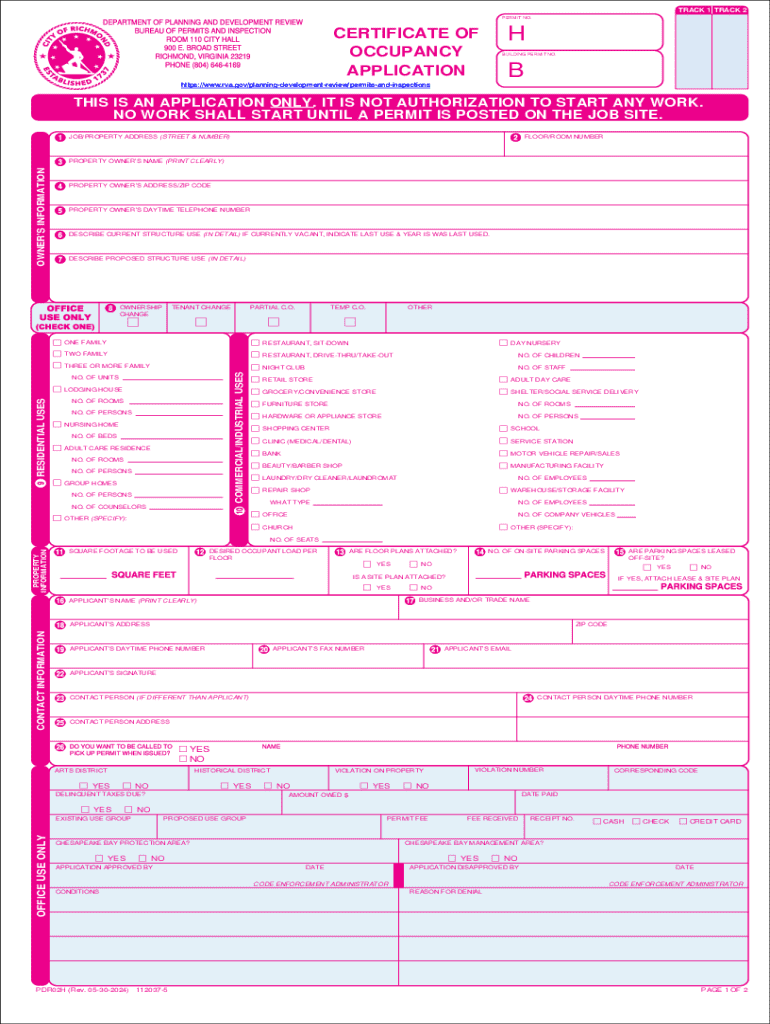
TRACK 1 TRACK 2 refers to a specific form used in various contexts within administrative or legal frameworks. This form is designed to track and manage specific processes or information, facilitating the collection and organization of data relevant to its designated purpose. The precise context and meaning can vary depending on the jurisdiction or the specific use case within a business or regulatory environment.
General Context and Purpose
- TRACK 1 TRACK 2 serves as a formal document to ensure compliance with specific rules and regulations.
- It acts as a record-keeping instrument to document transactions, agreements, or applications.
- The format of TRACK 1 TRACK 2 may include structured sections for detailed information capture.
Practical Applications
- Businesses often use TRACK 1 TRACK 2 to streamline operational processes.
- Legal entities may require TRACK 1 TRACK 2 for compliance verification.
- It is part of administrative procedures in government or corporate sectors.
How to Use the TRACK 1 TRACK 2
The use of TRACK 1 TRACK 2 involves understanding the specific requirements it fulfills within your operational needs. This form is crucial for maintaining accurate records and ensuring compliance with relevant guidelines or regulations.
Instructions for Effective Use
-
Review the Instructions:
- Begin by carefully reading any accompanying instructions to understand the details you need to provide.
-
Gather Necessary Information:
- Compile all relevant data required to complete the form, such as personal identification, business details, or application specifics.
-
Complete the Form:
- Fill out each section accurately and double-check for any errors or omissions.
- Utilize any provided guidance to ensure each field is completed correctly.
-
Submission:
- Depending on the guidelines, submit the form online, via mail, or in person.
Common Scenarios
- Administrative tasks: Ensuring all necessary protocols are met.
- Regulatory compliance: Utilizing TRACK 1 TRACK 2 for legal adherence.
Steps to Complete the TRACK 1 TRACK 2
Completing the TRACK 1 TRACK 2 requires attention to detail and adherence to specific instructions. Each step must be followed to ensure the form is filled out correctly.
Step-by-Step Process
-
Gather Required Documents:
- Ensure you have all the documentation needed to complete TRACK 1 TRACK 2, such as identification numbers, previous records, and supportive paperwork.
-
Review Instructions:
- Familiarize yourself with the guidelines and instructions provided with the form to understand requirements.
-
Fill Out Information:
- Carefully enter all required data in the assigned fields, ensuring accuracy and completeness.
-
Double-Check Entries:
- Review all the entered information for correctness and completeness before submission.
-
Submit the Form:
- Follow the specified submission method, which may include online, mail, or in-person submission.
Required Documents for TRACK 1 TRACK 2
Completing TRACK 1 TRACK 2 necessitates specific documents that support the data you're providing. Having all necessary documents ensures a smooth completion process.
Essential Document List
-
Identification Proof:
- Examples include a driver's license or social security card.
-
Business Documentation:
- For business-related forms, include business registration details or relevant tax documents.
-
Supporting Information:
- Any additional paperwork that substantiates the information on the form, such as previous applications or agreements.
Document Verification
- Ensure all documents are current and not expired.
- Copies may be required for submission, so verify if originals are necessary.
Legal Use of TRACK 1 TRACK 2
The legal use of TRACK 1 TRACK 2 ensures compliance with relevant laws and regulations. Understanding legal implications and responsibilities associated with the form is critical.
Applicable Laws and Regulations
- TRACK 1 TRACK 2 must comply with relevant local, state, and federal laws.
- It is often used as evidence of compliance in audits or legal reviews.
Responsibilities of the Filer
- Ensure all information is truthful and accurate.
- Maintain copies of submitted forms for future reference or audits.
Key Elements of TRACK 1 TRACK 2
Understanding the key components of TRACK 1 TRACK 2 allows for effective and accurate completion. Each element plays a crucial role in the form's overall purpose.
Structural Components
-
Identification Section:
- Collects basic identifying information.
-
Detail Sections:
- Encompass comprehensive details requisite for the form's intended function.
-
Sign-off:
- May include signatures or authorization checks, confirming the authenticity and completeness of the form.
Importance of Each Element
- Every section provides necessary data that collectively supports the form's use case.
- Missing or incorrect entries can invalidate the form, requiring refiling or additional steps.
Digital vs. Paper Version
The choice between digital and paper versions of TRACK 1 TRACK 2 can affect convenience and processing time. Each format has its advantages based on user needs and form requirements.
Comparative Analysis
-
Digital Version:
- Allows for quick submission and processing, with features like auto-fill and digital signatures.
- Ideal for those comfortable with digital platforms and faster turnarounds.
-
Paper Version:
- Useful for areas with limited digital access or for users preferring physical documentation.
- Easier to file and keep hard copies as backup records.
User Preferences
- Digital formats are typically preferred for environmental sustainability and efficiency.
- Paper is favored in traditional settings where digital infrastructure may not be present.
Form Submission Methods for TRACK 1 TRACK 2
Submitting TRACK 1 TRACK 2 can vary by organizational requirements and user preference, with options for online, mail, or in-person submission.
Overview of Submission Options
-
Online:
- Quick and efficient, often with instant confirmation of receipt.
-
Mail:
- Traditional, with the need for postage and possibly longer processing times.
-
In-Person:
- Direct submission, useful for ensuring immediate processing and for receiving in-person confirmations.
Considerations for Each Method
- Online submissions often require digital literacy and access.
- Mailing can involve tracking and potential delays due to postal service times.
- In-person submissions may offer the advantage of direct feedback or correction opportunities on submission.