




Here's how it works



How to use or fill out dodgeball registration form with our platform

- Click ‘Get Form’ to open the dodgeball registration form in the editor.
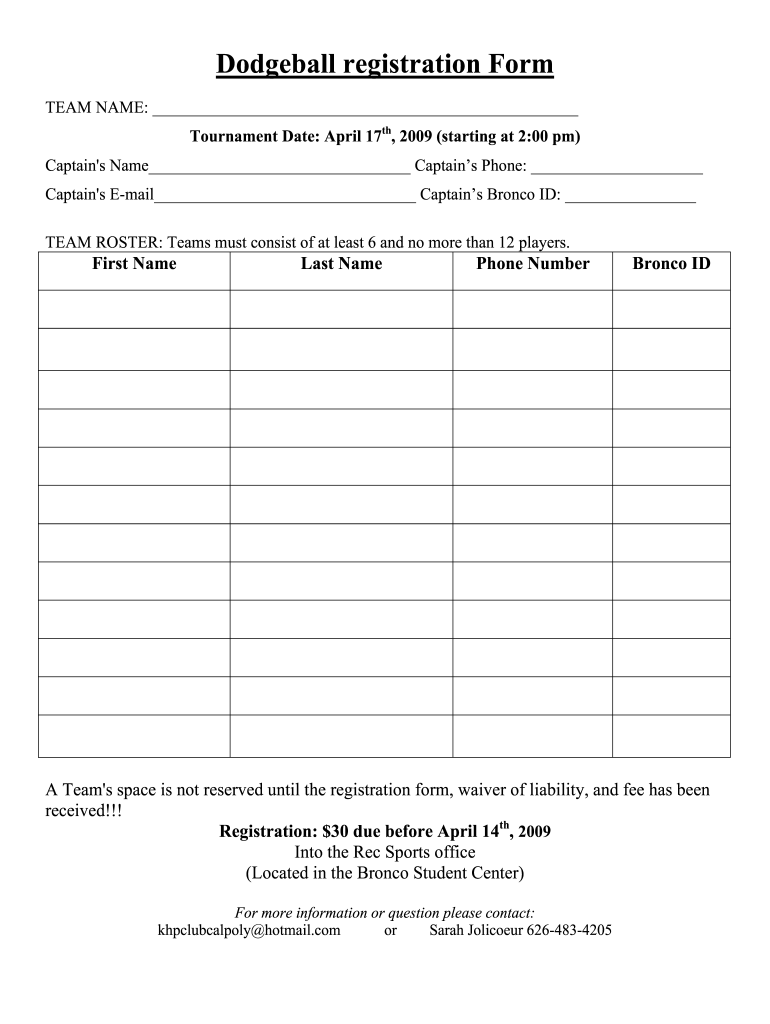
- Begin by entering your TEAM NAME at the top of the form. This identifies your team for the tournament.
- Fill in the TOURNAMENT DATE, which is April 17th, 2009, and ensure you note the starting time of 2:00 pm.
- Provide the CAPTAIN'S NAME, PHONE NUMBER, EMAIL, and BRONCO ID. This information is crucial for communication regarding your team.
- Complete the TEAM ROSTER section by listing each player's FIRST NAME, LAST NAME, PHONE NUMBER, and BRONCO ID. Remember that teams must have between 6 to 12 players.
- Review the RELEASE OF LIABILITY section carefully. Ensure all participants understand and agree to its terms before signing.
- Finally, submit your completed registration form along with the waiver of liability and fee to secure your team's spot in the tournament.
Start filling out your dodgeball registration form online for free today!
It's free
See more dodgeball registration form versions
| Versions | Form popularity | Fillable & printable |
|---|---|---|
| 2009 | 4.8 Satisfied (278 Votes) |
Got questions?
Can I sign my sample registration form in electronic format?
According to eSignature laws, forms approved digitally have the same validity as those approved with pen and paper. You can eSign almost any business and personal paperwork. Four types of paperwork still require wet signatures only - wills and testamentary trusts, court orders and other court papers, state statutes governing divorce, adoption, or other family law, and notice of cancellation of utility services. If you adhere to the guidelines and utilize a safe and compliant software solution, like DocHub, you can eSign your sample registration form without printing it.
How to manage my click get form to open teams spot in the tournament from Gmail?
In case your go-to email service is Gmail, it is simple to integrate your DocHub editor into your work. Modify your click get form to open teams spot in the tournament with DocHub tools and attach it to your drafts in Gmail. See how effortless it is to exchange files and collaborate with a swift PDF editing solution at hand.
How can we perform team work in dodgeball?
How to start a dodgeball club?
How to set up a dodgeball tournament?
Security and compliance
At DocHub, your data security is our priority. We follow HIPAA, SOC2, GDPR, and other standards, so you can work on your documents with confidence.
Learn more


