






Definition & Meaning
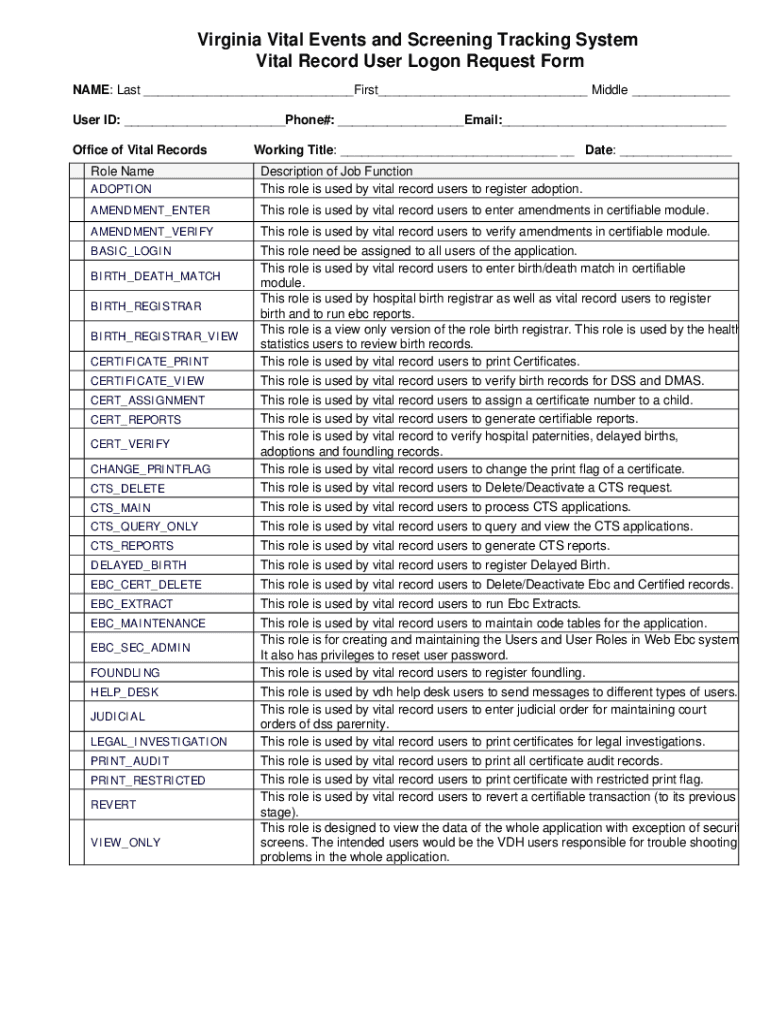
The Virginia Vital Events and Screening Tracking System Vital Record User Logon Request Form is a structured document that individuals use to request access to the Virginia Vital Events and Screening Tracking System. This system is essential in managing vital records, such as birth certificates, adoption records, and death certificates. This form is typically designed to capture necessary information from users and verify their eligibility to access the sensitive data within the system, ensuring that all interactions comply with legal and security standards.
How to Use the Form
To use the Virginia Vital Events and Screening Tracking System Vital Record User Logon Request Form effectively, begin by thoroughly reading the entire form to understand all requirements. Fill out all sections with detailed and accurate personal information, ensuring you provide the correct roles and responsibilities. Double-check for fields requiring signature or additional documentation before submission. Ensure you attach all necessary documents that verify your identity and role to avoid delays in processing.
Steps to Complete the Form
- Gather Required Information: Collect personal identification details, professional role descriptions, and any other information specified by the form.
- Fill Out Personal Information: Enter your name, address, contact details, and professional affiliations.
- Outline Roles and Responsibilities: Specify your involvement in vital records management tasks such as adoption registration or birth/death matching.
- Review Security Compliance: Confirm your understanding of confidentiality obligations and data access security.
- Verify and Sign: Double-check all entries for accuracy, sign the form where required, and gather necessary supporting documents.
- Submit the Form: Follow the instructions on the form for submission, whether online, by mail, or in person.
Key Elements of the Form
- Personal Identification Section: Captures essential user information, including name, position, and contact details.
- Role Specification: Requires detailing of specific duties related to the management of vital records, ensuring only authorized personnel gain access.
- Confidentiality Agreement: A mandatory section affirming the user's commitment to maintaining the security and confidentiality of the accessed data.
- Signature Field: This section requires the applicant's signature to validate their commitment to the terms and conditions outlined in the form.
Who Typically Uses the Form
This form is primarily used by professionals in the field of vital records management, such as government clerks, registration officers, and other administrative staff involved in the processing and handling of sensitive personal data. These professionals require system access to carry out their roles efficiently while ensuring compliance with state regulations regarding data security and privacy.


Legal Use of the Form
The form serves as a legal document to authorize user access to the Virginia Vital Events and Screening Tracking System. It upholds stringent adherence to state and federal laws governing the security and confidentiality of vital records. Misuse or unauthorized access related to the form can lead to legal action, emphasizing the importance of thorough understanding and compliance with its terms.
Important Terms Related to the Form
- Vital Records: Official documentation of significant life events such as births, deaths, marriages, and, in some cases, adoptions.
- Confidentiality: The obligation to protect sensitive information from unauthorized access.
- Authorization: The official approval to access specific areas within the system for carrying out designated job functions.
- Access Level: The specific permissions granted to a user, determining their ability to view, edit, or manage certain records within the system.
Examples of Using the Form
A county clerk in Virginia, responsible for updating birth records, may use this form to request logon credentials for the system to ensure up-to-date records management. Similarly, staff in an adoption agency would utilize the form to access system functionalities needed to process adoption records, providing both parties with secure and legal system access.
State-Specific Rules for the Form
In Virginia, adherence to specific state guidelines regarding data protection and privacy laws is mandatory. Users must comply with both federal and state regulations that govern the management of personal data, ensuring that all access and usage are monitored and recorded.