It 2664-2026

Get Form
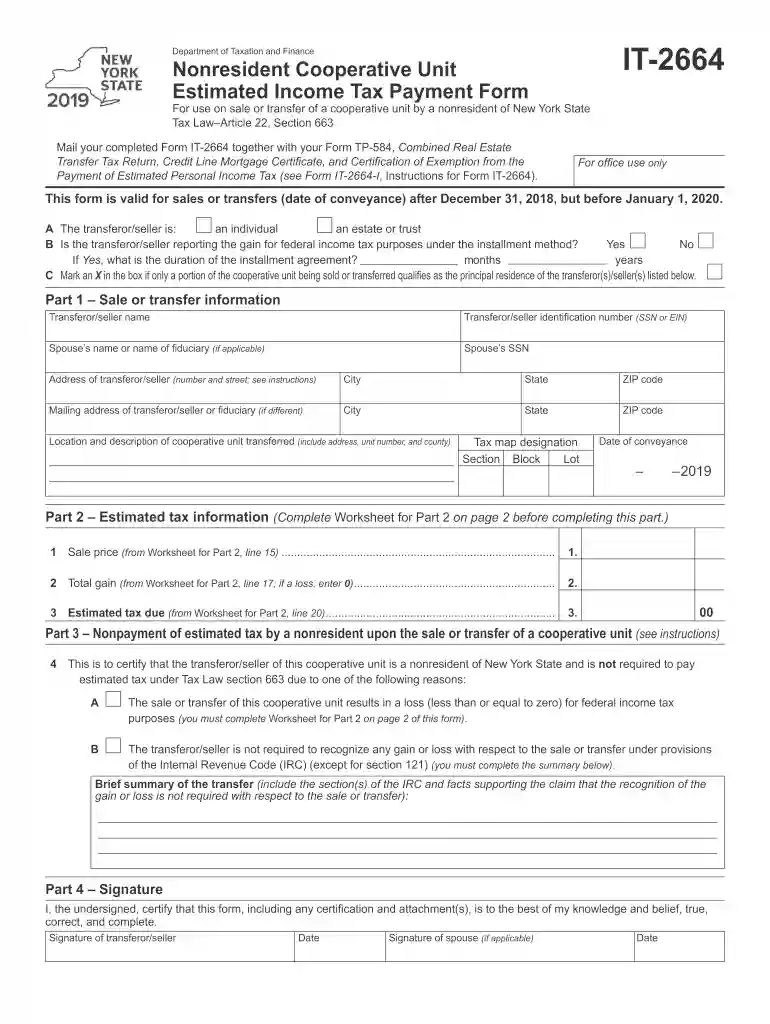
it 2664 Preview on Page 1

Here's how it works

01. Edit your it 2664 online
Type text, add images, blackout confidential details, add comments, highlights and more.

02. Sign it in a few clicks
Draw your signature, type it, upload its image, or use your mobile device as a signature pad.

03. Share your form with others
Send it2664 via email, link, or fax. You can also download it, export it or print it out.

How to use or fill out IT-2664 with our platform

Form edit decoration
9.5
Ease of Setup
DocHub User Ratings on G2
9.0
Ease of Use
DocHub User Ratings on G2
  1. Click ‘Get Form’ to open IT-2664 in the editor.
  2. Begin by filling in the transferor/seller's information, including name, identification number (SSN or EIN), and address. Ensure accuracy as this information is crucial for tax processing.
  3. In Part 1, provide details about the sale or transfer of the cooperative unit, including the date of conveyance and tax map designation. This section is essential for establishing the transaction's legitimacy.
  4. Move to Part 2 and complete the estimated tax information. Use the provided worksheet to calculate your gain or loss accurately before entering figures on the form.
  5. In Part 3, certify if you are a nonresident not required to pay estimated tax due to specific reasons. Provide a brief summary supporting your claim.
  6. Finally, sign and date the form in Part 4. If applicable, have your spouse sign as well. Review all entries for completeness before submission.

Start using our platform today for free to streamline your document editing and ensure a hassle-free experience!

See more it 2664 versions

We've got more versions of the it 2664 form. Select the right it 2664 version from the list and start editing it straight away!
Versions Form popularity Fillable & printable
2023 4.9 Satisfied (58 Votes)
2022 4.8 Satisfied (35 Votes)
2021 4.4 Satisfied (102 Votes)
2020 4.3 Satisfied (49 Votes)
2019 4.3 Satisfied (338 Votes)
2018 4 Satisfied (52 Votes)
2016 4.4 Satisfied (162 Votes)
2014 4 Satisfied (46 Votes)
2011 4 Satisfied (44 Votes)
be ready to get more

Complete this form in 5 minutes or less

Get form

Got questions?

We have answers to the most popular questions from our customers. If you can't find an answer to your question, please contact us.
Contact us
How can we help? Health Insurance Cost on W-2 - Code DD. Employers are required to report the cost of an employees health care benefits in Box 12 of Form W-2 Wage and Tax Statement, using code DD to identify the amount. This amount is reported for informational purposes only and is NOT taxable.
The W-2 Box 3 amount represents taxable wages subject to Social Security taxes; this differs from your Gross Earnings because certain deductions reduce your Social Security taxable wages, such as the pre-tax medical/dental and vision insurance, pre-tax parking deduction, FSA Medical, and Dependent Care.
Box 3 Social security wages: Social security wages are calculated as Federal Taxable Gross (Box 1) plus Retirement Deductions (Box 12).
To receive your New York Withholding Identification Number, you must file the New York State Employer Registration for Unemployment Insurance, Withholding and Wage Reporting Form (Form NYS-100N) if you havent already done so. The form can be filed online through New York Business Express.
New York Disability Benefits Law Employees would receive the benefit payout pre-tax, which will be reported on a Form W-2 as taxable, non-wage income.

Security and compliance

At DocHub, your data security is our priority. We follow HIPAA, SOC2, GDPR, and other standards, so you can work on your documents with confidence.

Learn more
ccpa2
pci-dss
gdpr-compliance
hipaa
soc-compliance

People also ask

Social Security wages refer to the income earned by an individual who is subject to Social Security taxes. These taxes are used to fund the Social Security program, which provides retirement, disability, and survivor benefits to eligible individuals.
1:30 3:28 They are separate components of your payroll taxes each with their own rates. And limits.MoreThey are separate components of your payroll taxes each with their own rates. And limits. Understanding this distinction can help you better manage your finances.
Social security wages: Total wages that are subject to social security tax. 4. Social security tax withheld: The amount of social security tax withheld from all OASDI taxable wages. This amount should be equal to 6.2% of the wages listed in Box 3 up to the maximum allowed.

it 2664 form