






Definition and Purpose of the HUD-27054E eLOCCS Access Authorization Form
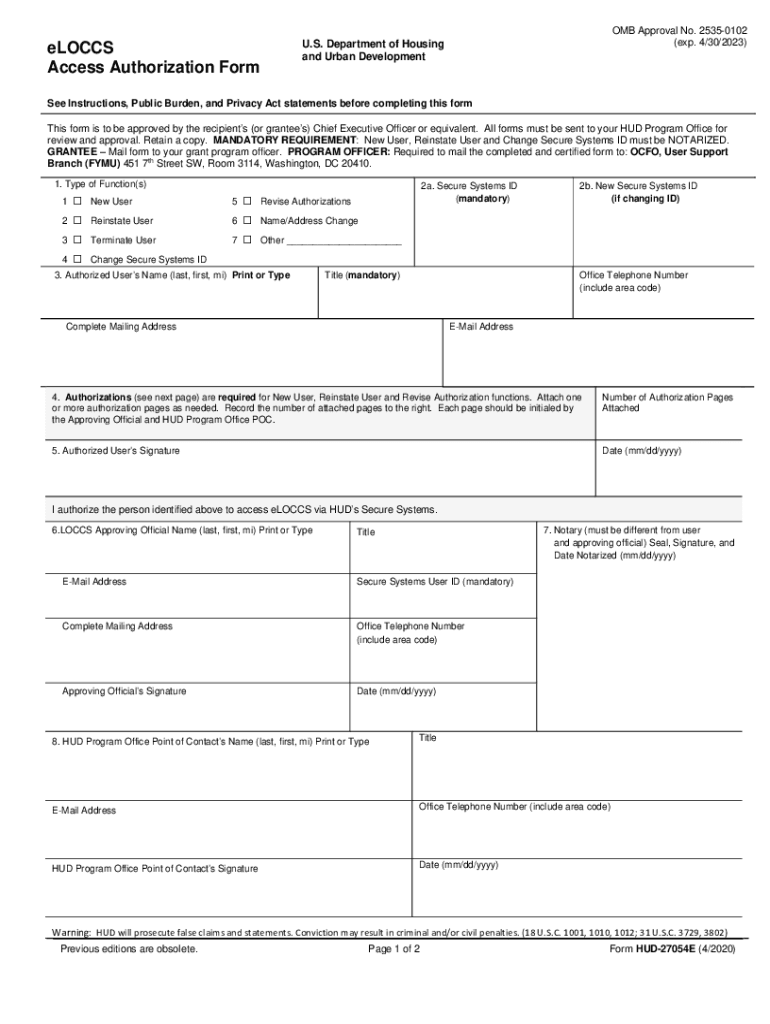
The HUD-27054E eLOCCS Access Authorization Form is an essential document used by the U.S. Department of Housing and Urban Development (HUD) to manage access to the eLOCCS (Electronic Line of Credit Control System) system. This form is primarily designed to assist grantees in obtaining, modifying, or terminating access to eLOCCS. The system facilitates the online request and approval of funds, allowing authorized personnel to access, manage, and monitor financial transactions related to HUD programs effectively. The form serves as a key tool in ensuring authorized access, thereby safeguarding sensitive financial information.
How to Use the HUD-27054E eLOCCS Access Authorization Form
Utilizing the HUD-27054E form requires careful attention to detail to ensure proper completion and submission. To begin, the form should be filled out by the individual seeking access, modified access, or termination of access to eLOCCS. All sections need to be completed with accurate details such as personal and organizational information. The user's identification number, as well as their role and responsibilities concerning the eLOCCS system, must be clearly specified. Once filled, the form must be signed by the grantee's Chief Executive Officer or an equivalent authority to confirm approval. Finally, submissions may require notarization depending on the action being requested, and the completed form should be directed to the appropriate HUD Program Office for processing.
Steps to Complete the HUD-27054E eLOCCS Access Authorization Form
- Fill Out Personal Information: Enter the user's name, contact details, and organization information.
- Indicate Action Requested: Clearly specify whether the request is for new access, modification of current access, or termination.
- Provide Secure Systems ID: Include the user's HUD Secure Systems identification number, if applicable.
- Authorization and Signatures: Obtain necessary approvals and signatures, including that of a Chief Executive Officer or authorized official.
- Notarization: If required, have the form notarized to verify authenticity.
- Submit the Form: Direct the completed form to the relevant HUD office for processing.
Key Elements of the HUD-27054E eLOCCS Access Authorization Form
The HUD-27054E form comprises several crucial elements vital for processing access requests effectively:
- User Identification: Details about the person requiring access, including secure systems ID and contact information.
- Authorization Details: Specification of the type of access or change being requested, supported by official endorsements.
- Notarization Section: A part of the form dedicated to notarization for legal validation, enhancing security provisions.
- Approval from HUD Program Office: Final approval section where the HUD Program Office verifies and approves access based on the provided information.
Eligibility Criteria for Using the HUD-27054E Form
Eligibility for using the HUD-27054E form largely depends on the individual's role within the organization and their responsibility towards HUD-financed programs. Typically, this form is for grantees or individuals with a direct need to access or manage financial transactions through the eLOCCS system. Users must be affiliated with HUD-recognized entities and need authorization from their organizational leaders, usually the Chief Executive Officer. Additional eligibility may require demonstration of a legitimate financial oversight role in relation to HUD projects.


Importance of Accurate Information in the HUD-27054E Form
Providing accurate information on the HUD-27054E form is imperative, as inaccuracies can lead to unauthorized access or denial of required access to vital financial systems. Incorrect data may result in delayed approvals or potential security breaches. Therefore, organizations are encouraged to verify all data before submission, ensuring every detail, from user identification to organizational information, is accurate and up-to-date. This diligence ensures that only authorized personnel gain access, maintaining the system's security integrity.
Legal Use and Compliance for the HUD-27054E Form
Compliance with legal protocols is essential when filling out and submitting the HUD-27054E form. The form must adhere to not only HUD guidelines but also broader federal regulations governing electronic document security and financial data management. Users are obligated to ensure that all submitted information meets authentication and authorization standards; failure to comply can lead to penalties, including revocation of access or other legal ramifications. Regular audits and internal reviews are advisable to maintain compliance.
Examples of Scenarios Using the HUD-27054E eLOCCS Access Authorization Form
Grantees who administer HUD-funded housing projects frequently use the HUD-27054E form to manage staff changes. For example:
- New Project Manager Setup: When a new project manager joins an organization, the form is used to grant initial access to the eLOCCS system.
- Access Termination: If an employee departs, the form serves as a tool to terminate their eLOCCS access, preventing unauthorized actions.
- Role Change Adjustments: Should an employee's responsibilities within HUD-related projects change, the form facilitates access updates to align with the new role.
These scenarios exemplify the practical application of the form in maintaining secure and efficient system access related to HUD-funded projects.