






Definition and Meaning of RS5420
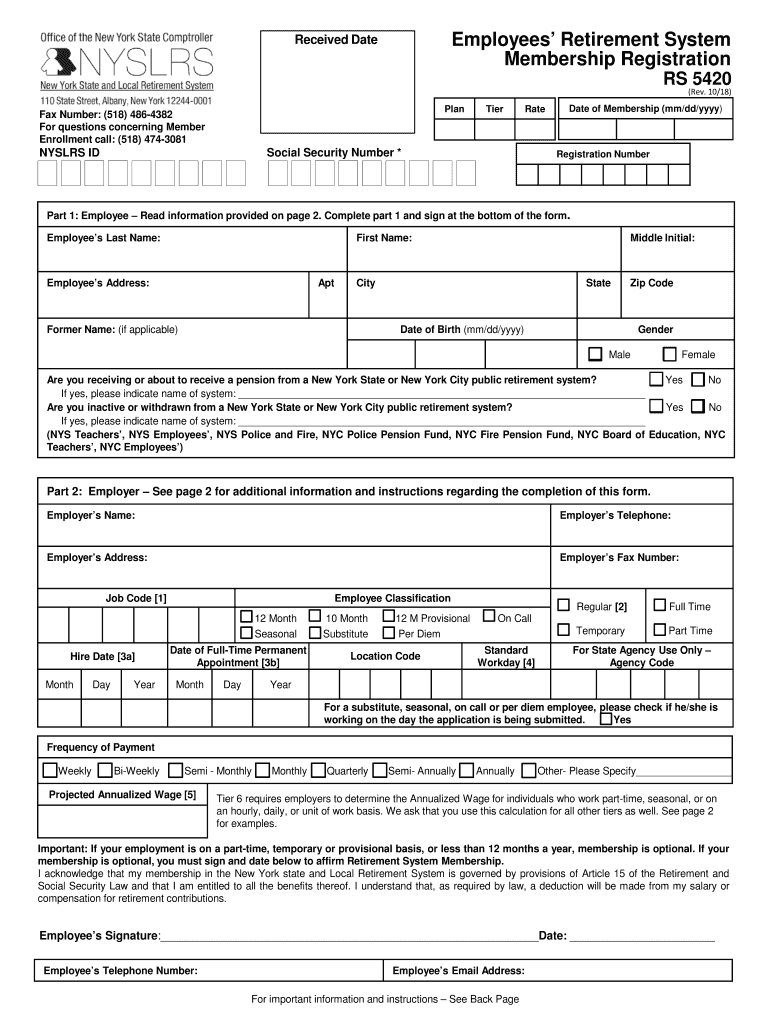
The RS5420 is a form associated with the Employees' Retirement System in New York. It plays a crucial role in documenting specific information pertinent to the employees and employers as part of the retirement registration process. Embedded within this document are various sections that aim to gather personal data, employment details, and options regarding retirement membership. The RS5420 ensures that both parties comply with the necessary regulations while providing options regarding retirement plan participation.
How to Use the RS5420
Using the RS5420 involves understanding its multiple sections and filling them out with accurate information. Here's a breakdown of how to use the form effectively:
-
Personal Details Section: This area requires input of basic information such as full name, address, date of birth, and Social Security number. It's essential that this information is accurate to avoid future discrepancies.
-
Employment Information: Details about the employee's current employment status, job title, and department should be clearly outlined. This section helps establish eligibility for specific retirement benefits.
-
Membership Options: Employees have the opportunity to decide if they wish to opt into optional membership plans based on their employment status. This decision can impact future retirement benefits.
How to Obtain the RS5420
To obtain the RS5420, employees or employers in New York can contact the Employees' Retirement System directly. Forms can often be accessed through the following means:
-
Official Websites: They might provide downloadable versions or guidance on obtaining physical copies.
-
Human Resources Departments: Employers usually provide new employees with necessary forms, including the RS5420, during the onboarding process.
-
In-Person Requests: Employees may visit specific administrative offices to request a form directly, which is useful for those who prefer face-to-face assistance.
Steps to Complete the RS5420
Completing the RS5420 involves a series of specific actions to ensure accuracy and compliance:
-
Read Instructions Carefully: Before entering any information, read all provided instructions to understand the requirements for each section.
-
Fill Personal Details Accurately: Enter basic personal information, ensuring that names and numbers are spelled and entered correctly.
-
Provide Employment Information: Complete this section with accurate job-related details, including your current employment status and job title.
-
Select Membership Options: Review available options and select any additional membership plans, if applicable.
-
Review and Sign: Double-check all entered information for accuracy, then sign and date the form before submission.
Who Typically Uses the RS5420
The RS5420 is primarily utilized by:
-
New York State Employees: Individuals entering the workforce in public sectors that offer retirement benefits.
-
Human Resources Personnel: Responsible for ensuring new employees complete the necessary paperwork related to employment and retirement.
-
Retirement System Administrators: Use the form to process employee information and manage retirement accounts.


Key Elements of the RS5420
Several elements are fundamental to the structure of the RS5420 form:
-
Personal Identification Information: Collects essential data to identify the employee uniquely.
-
Employment Details: Captures information about the employee's role and eligibility for retirement plans.
-
Membership Decision Sections: Allows employees to opt into additional plans that best suit their retirement goals.
State-Specific Rules for the RS5420
The RS5420 accommodates regulations specific to New York state regarding employee retirement systems:
-
Eligibility Criteria: Specific employment classifications within New York may impact eligibility for certain retirement benefits outlined in the form.
-
Optional Membership: The form addresses unique conditions under which employees can opt into additional retirement benefits, specific to New York state laws.
Legal Use of the RS5420
The RS5420 has several legal purposes:
-
Documentation: Provides a written account of an employee's decision regarding retirement membership, ensuring legal clarity for both the employee and employer.
-
Pension Eligibility: Assists in determining an employee's eligibility for pension benefits based on the information provided.
Use this comprehensive overview to understand and handle the RS5420 effectively. Each section is designed to streamline the process of completing the form to meet compliance and retirement system requirements.