







Definition and Meaning of the Alcohol Support Documentation Form
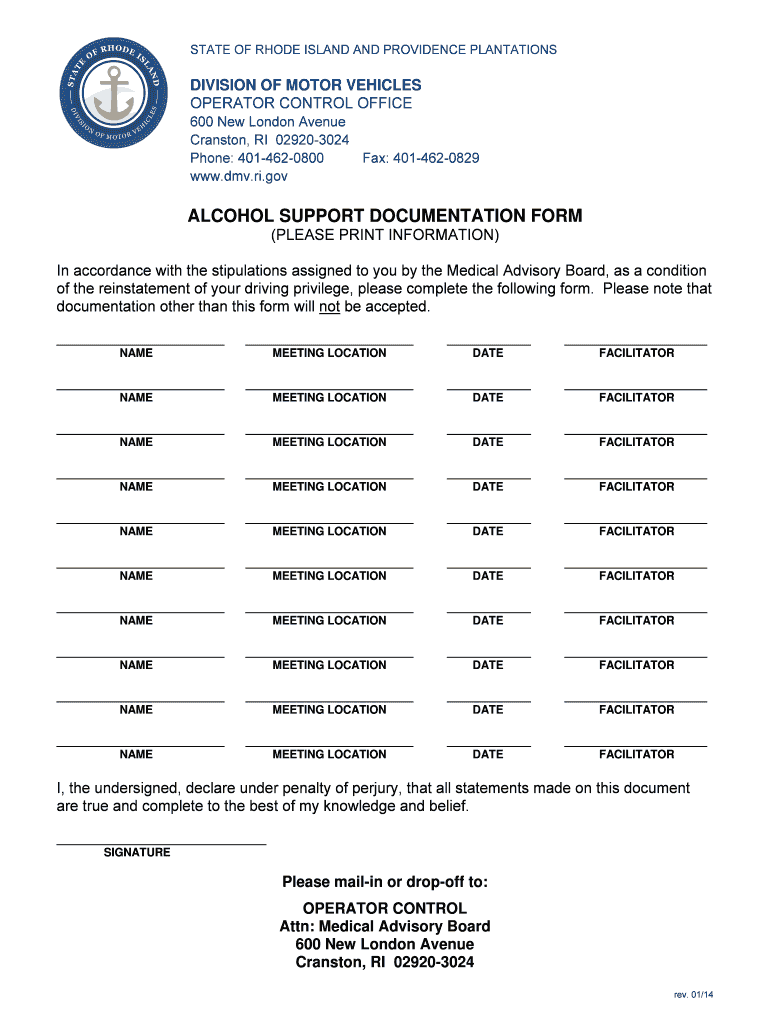
The Alcohol Support Documentation Form for the State of Rhode Island is administered by the Rhode Island Division of Motor Vehicles. This form is integral for individuals seeking reinstatement of their driving privileges, typically following a suspension due to alcohol-related offenses. The Medical Advisory Board mandates this document to ensure an applicant’s eligibility and commitment to adhering to the sobriety requirements before allowing them back on the road. It involves detailing compliance with support meetings and may include relevant assessments from facilitators or counselors.
How to Use the Alcohol Support Documentation Form
To use this form effectively, individuals must complete various sections regarding attendance at designated support meetings. This includes filling in details about the meetings, such as the dates attended and facilitator information. The form necessitates the inclusion of a declaration of truthfulness, confirming that all submitted details accurately reflect the individual’s participation in support activities. As a step towards license reinstatement, adherence to these instructions is crucial.
Obtaining the Alcohol Support Documentation Form
Individuals can obtain the Alcohol Support Documentation Form directly from the Rhode Island Division of Motor Vehicles. It may be available both as a downloadable document from the DMV’s official website and as a paper form at local DMV offices. Ensuring access to the correct form streamlines the process of regaining driving privileges. It’s advisable to reach out to the DMV if there are questions regarding access to this form.
Steps to Complete the Alcohol Support Documentation Form
-
Gather Meeting Details: Collect all necessary information about the support meetings attended, including dates, locations, and facilitator names.
-
Fill in Personal Information: Complete sections with personal details, such as full name, address, and DMV case number.
-
Sign the Declaration: Print and sign the declaration of truthfulness to affirm the accuracy and honesty of the information provided.
-
Facilitator’s Signature: Obtain a signature from the meeting facilitator, who may need to provide additional comments or evaluations.
-
Submit the Form: Submit the completed form to the Rhode Island DMV, either in person or as instructed by DMV guidelines.
Importance of the Alcohol Support Documentation Form
This form is important because it serves as evidence of an individual’s commitment to rehabilitation and conformity to legal requirements following an alcohol-related infraction. Submitting a thoroughly completed form is critical to demonstrate accountability and readiness to resume driving privileges. It also helps the Rhode Island DMV ensure public safety by vetting applicants for responsible behavior.
Typical Users of the Alcohol Support Documentation Form
The primary users of this form are individuals who have had their licenses suspended due to DUI or other alcohol-related incidents and are seeking reinstatement. Moreover, rehabilitation program facilitators, who verify and sign the form, play a key role in this process. The document ensures that the applicant has engaged in the necessary support systems before driving privileges can be reinstated.
Key Elements of the Alcohol Support Documentation Form
-
Personal Information: Fields for entering the applicant’s name, address, and contact information.
-
Meeting Records: Sections requiring the listing of support group meetings, with dates and facilitators.
-
Declaration and Signature: A mandatory self-declaration to assure truthfulness, including the applicant’s signature.
-
Facilitator’s Endorsement: An area dedicated for facilitators to verify attendance and participation.
State-Specific Rules for the Alcohol Support Documentation Form
Rhode Island-specific regulations dictate how this form should be completed, emphasizing rehabilitative involvement post-DUI. State laws necessitate continued engagement with support resources before considering the reinstatement of driving abilities. The form’s proper filing with the Rhode Island DMV is a legally binding commitment to fulfilling this condition.
Consequences of Non-Compliance
Failure to submit the Alcohol Support Documentation Form or providing false information can result in the denial of license reinstatement and potential legal penalties. Continuous non-compliance can lead to further sanctions, illustrating the importance of accurately and timely completing this document. It’s crucial for applicants to meet all requirements to avoid such repercussions.




