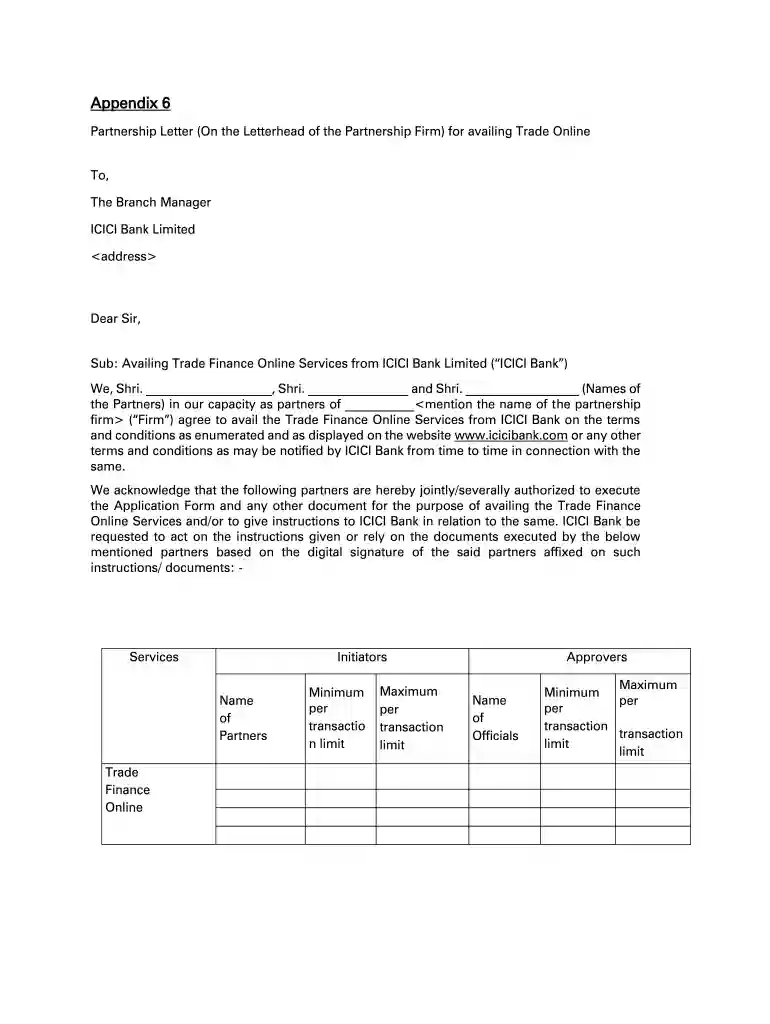
Icici Bank Letterhead - Fill Online, Printable, Fillable, Blank 2026

Get Form
Icici Bank Letterhead - Fill Online, Printable, Fillable, Blank Preview on Page 1

Here's how it works

01. Edit your form online
Type text, add images, blackout confidential details, add comments, highlights and more.

02. Sign it in a few clicks
Draw your signature, type it, upload its image, or use your mobile device as a signature pad.

03. Share your form with others
Send it via email, link, or fax. You can also download it, export it or print it out.

Definition & Meaning

The "Icici Bank Letterhead - Fill Online, Printable, Fillable, Blank" is designed to facilitate communication and transactions between ICICI Bank and its clients. This form is particularly geared towards businesses seeking authorization for trade finance services. The letterhead often includes formal requests or directives addressed to the bank, signed by authorized representatives of the involved parties.

How to Use the Icici Bank Letterhead Online

To use the Icici Bank letterhead effectively online through platforms like DocHub, users must navigate to a suitable document editor tool. This editor allows you to fill in the required sections directly in your browser. Use the fillable fields to enter relevant data, such as names, dates, and specific instructions, ensuring all provided information aligns with the bank's requirements.

Steps for Online Completion

  1. Select the appropriate template that corresponds to your needs.
  2. Open the document in a compatible online editor.
  3. Fill in text fields meticulously, ensuring accuracy.
  4. Add electronic signatures if necessary.
  5. Review the document to confirm all details are correct before submission.

How to Obtain the Icici Bank Letterhead

To obtain the Icici Bank letterhead, individuals can contact their local ICICI Bank branch. Alternatively, digital versions may be available through official bank channels or on trusted platforms providing document templates.

Sources for Acquisition

  • Directly from ICICI Bank offices.
  • Online through authorized document provider services.
  • Download from a digital repository linked to ICICI Bank's services.

Steps to Complete the Icici Bank Letterhead

Completing the Icici Bank letterhead involves a sequence of methodical steps to ensure all components are accurately filled. Paying attention to details is crucial as errors can lead to processing delays.

Detailed Procedure

  1. Initiate with Basic Information: Fill in company name, address, and contact details.
  2. Purpose Specification: Outline the specific request or instruction being conveyed to the bank.
  3. Authorized Signatories: Include names and signatures of individuals permitted to make requests.
  4. Review and Save: After all sections are filled, review the document thoroughly before saving or printing.

Why Use Icici Bank Letterhead

Using the Icici Bank letterhead provides a formal and recognized format for businesses to communicate requests and authorize transactions securely. It helps in maintaining consistency and professionalism in dealings with the bank.

Benefits of Adoption

  • Enhances credibility with official communications.
  • Simplifies the authorization process for banking services.
  • Provides a standardized format that aligns with ICICI Bank's operational protocols.

Who Typically Uses the Icici Bank Letterhead

The primary users of the Icici Bank letterhead are businesses, partnerships, and other entities that require formal communication with the bank, especially those involved in trade and finance requiring documentation for services.


decoration image ratings of Dochub

Common Users

  • Corporate clients.
  • Partnerships involved in trade finance.
  • Legal representatives managing financial affairs.
decoration image

Key Elements of the Icici Bank Letterhead

Understanding the key elements that constitute the Icici Bank letterhead is vital for accurate completion. Each section plays a role in ensuring that the document fulfills its intended purpose.

Core Components

  • Header Information: Includes the logo and contact details of ICICI Bank.
  • Recipient Details: Specifies the branch and manager to whom the letter is addressed.
  • Content Section: The main body that outlines the request or information.
  • Authorized Signatories: Designated spaces for signatures and additional notes.

Legal Use of the Icici Bank Letterhead

Utilizing the Icici Bank letterhead comes with legal responsibilities and implications. Users must ensure compliance with applicable regulations to avoid potential legal consequences.

Legal Considerations

  • Ensure that the letterhead is used for authorized and legitimate purposes.
  • Recognize the binding nature of the content once signed.
  • Understand the implications of electronic signatures under legal contexts like the ESIGN Act.

Examples of Using the Icici Bank Letterhead

Real-world scenarios illustrate the diverse applications of the Icici Bank letterhead, highlighting its utility across various settings.

Practical Use Cases

  • Partnership Authorization: Authorizing specific partners to engage in electronic trade services.
  • Financial Instruction: Directing the bank to execute financial transactions on behalf of an organization.
  • Service Requests: Applying for new banking services or modifications to existing arrangements.

Digital vs. Paper Version

In digitally-focused environments, understanding the differences between digital and paper versions of the letterhead becomes essential. This aids in selecting the appropriate format based on situational needs.

Considerations

  • Digital Advantage: Easier to edit, share, and store.
  • Paper Benefits: Preferred for traditional settings where hard copies are necessary.
  • Mixed Use: Combines elements of both for versatile application.
be ready to get more

Complete this form in 5 minutes or less

Get form

Got questions?

We have answers to the most popular questions from our customers. If you can't find an answer to your question, please contact us.
Contact us
Take your letters to a whole new level with Canvas free letterhead templates that you can readily personalize to your brand with our drag-and-drop tools.
You can make letterheads in Microsoft Word in two ways using templates (a great option if you lack design skills) or from scratch. Ill focus on making letterheads from a template because most people prefer that option.
There are two ways to use a letterhead template in Google Docs. You can either: Open a new template from the template gallery, or you can. Duplicate an existing doc and save a copy of the template as a new doc.
Using a Microsoft Word template Choose a letterhead template. Customize it with your information. Save it to your hard drive. Sketch your design on paper. Open a new document and save it as a template. Insert a header. Enter your text. Add other design elements.
Steps to follow: Log in to Internet Banking. Go to Bank Accounts e-Statements View Detailed Statement. Select your desired date range and download.

Security and compliance

At DocHub, your data security is our priority. We follow HIPAA, SOC2, GDPR, and other standards, so you can work on your documents with confidence.

Learn more
ccpa2
pci-dss
gdpr-compliance
hipaa
soc-compliance
be ready to get more

Complete this form in 5 minutes or less

Get form

People also ask

How to make a letterhead Open Canva. Open up Canva and search for the Letterhead design type to start. Select a template. Create a personalized design. Get creative with more design features. Order your prints.

Related links