







Definition & Meaning
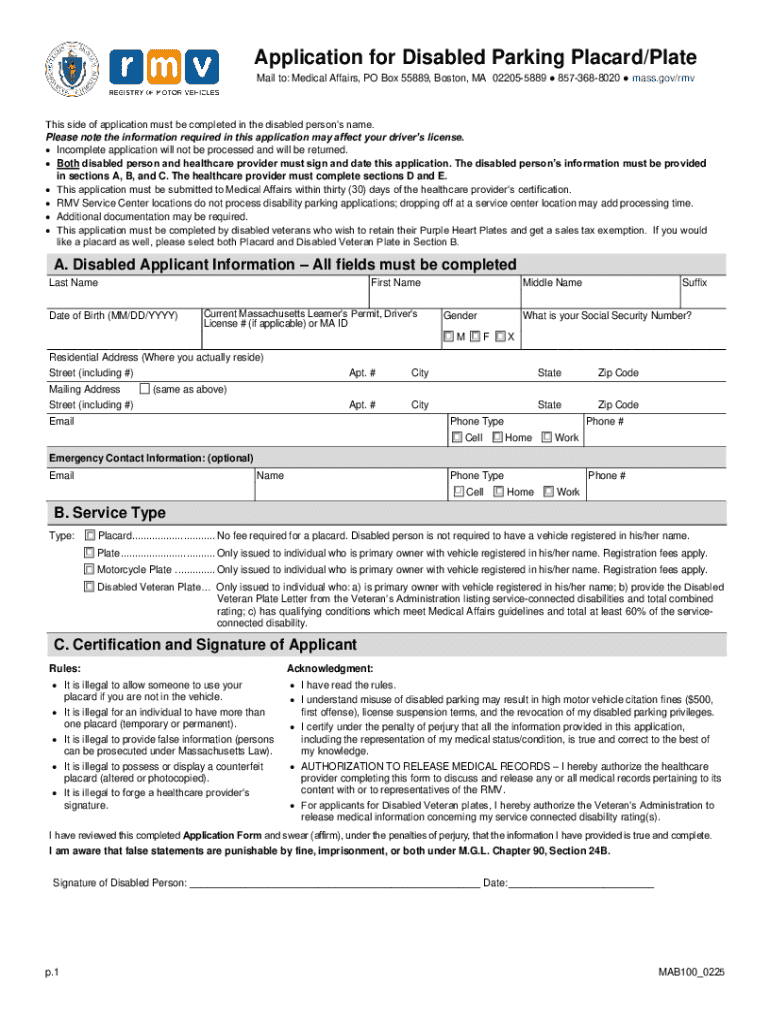
The "Application for Disabled Parking Placard Plate" is a form used by individuals seeking accessible parking privileges in Massachusetts. This application serves as a vital tool to facilitate mobility for those with disabilities, permitting them to use designated parking spaces close to buildings and other facilities. Often required to substantiate eligibility, this document must be completed by both the applicant and a healthcare provider, ensuring that all criteria are met for the placard or plate's issuance.
How to Use the Application for Disabled Parking Placard Plate
To utilize the application effectively, it is essential to follow instructions carefully. First, gather personal information and relevant medical documentation. This includes details such as name, address, and a description of the disability. The healthcare provider must fill out and certify the medical section, verifying the applicant’s condition. This certification ensures the applicant meets the legal requirements for disabled parking privileges. Submission of the completed form can usually occur via mail or electronically, depending on state specifications.
How to Obtain the Application for Disabled Parking Placard Plate
This application form is typically available through the Massachusetts Registry of Motor Vehicles (RMV) website or can be obtained in person at local RMV branches. Some community health centers and medical facilities also provide access. Ensure that you have the most current version of the form, as regulations and requirements may change. Completing the form promptly, within any specified deadlines, is crucial to adhere to any state-imposed timelines for processing.
Steps to Complete the Application for Disabled Parking Placard Plate
- Gather Required Information: Before beginning, collect personal details, including address and identification numbers.
- Medical Certification: Arrange a visit with a healthcare provider who can complete the medical certification portion.
- Fill Out Personal Sections: Enter personal information accurately and thoroughly.
- Review and Verify: Double-check all entries for correctness and completeness.
- Choose Submission Method: Decide whether to submit the application online, via mail, or in person.
- Track Submission Status: After submission, monitor the application's progress to ensure timely processing.
Important Terms Related to Application for Disabled Parking Placard Plate
- Healthcare Provider Certification: A required section that must be completed by a licensed medical professional.
- Placard vs. Plate: A placard is typically a removable sign placed on the dashboard or rearview mirror, while a plate is permanently affixed to the vehicle.
- Eligibility Criteria: Specific conditions that qualify an applicant, such as mobility impairments or respiratory disabilities.
- Renewal and Expiration: Understand the duration of validity and the process for renewal to avoid lapses in accessibility.
State-Specific Rules for the Application for Disabled Parking Placard Plate
Massachusetts has unique rules and regulations regarding disabled parking placards and plates. For example, the placard or plate must be displayed whenever the vehicle is parked in a designated space, and misuse of these items can result in penalties. It's also crucial for applicants to note any differences in requirements for temporary versus permanent placards and plates. Individual municipalities may have additional rules regarding the enforcement of disabled parking laws.
Required Documents
When submitting the application, supporting documents are necessary. This may include proof of identity, residence, and any medical documentation substantiating the disability. For minors or those under guardianship, additional legal documentation may be required. Review the application instructions to ensure all necessary paperwork accompanies the form to facilitate smooth processing.
Form Submission Methods (Online / Mail / In-Person)
The Massachusetts RMV typically allows multiple submission methods:
- Online: For convenience, applicants can submit forms electronically through the RMV's official website.
- Mail: Traditional mailing is an option, requiring copies of identification and medical certification attached.
- In-Person: Visiting an RMV office allows for personal interaction, which can be beneficial if there are questions or additional guidance is needed during submission.
By understanding and navigating these submission methods, applicants can effectively manage their application process.




