Definition & Meaning
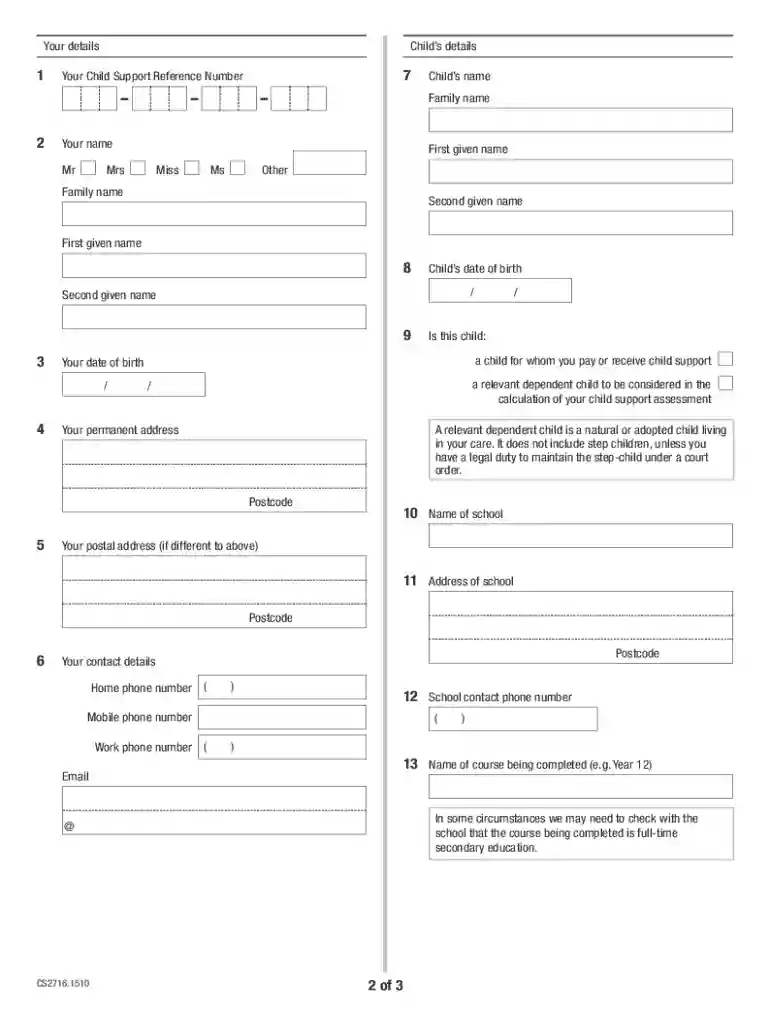
The CS2716 form is designed for applying for an extension of child support assessment for children over 18 years of age who are still in full-time secondary education. This extension form allows parents to request the continuation of child support payments under specific educational circumstances. It plays a crucial role in ensuring that financial support is sustained beyond the typical cut-off age, which is beneficial for students who have not yet completed their secondary education.
Key Elements of the CS2716
- Eligibility Criteria: The form is applicable only if the child is above 18 but still in full-time secondary education. This ensures support continuity during the final stages of secondary schooling.
- Entitled Parent Role: The parent eligible for receiving the support must complete and submit the form, indicating their continued need for financial assistance for the child's education.
- Privacy Protection: As with any form dealing with personal information, there are protocols to ensure the privacy and protection of sensitive data.
How to Obtain the CS2716
The CS2716 form can be obtained via several channels to increase accessibility.
Online Availability
- Official Websites: Visit the official child support agency websites, where forms are readily available for download.
- Digital Platforms: Several government portals offer electronic versions that can be filled out and submitted directly online for convenience.
Physical Copies
- Local Offices: Physical copies of the form can often be acquired at local child support offices.
- Request via Mail: Parents can also request to have the form mailed to their address by contacting the relevant office.
Steps to Complete the CS2716
Completing the CS2716 accurately is essential to ensure a timely response.
- Gather Required Information: Collect all necessary details about the child, including proof of enrollment in full-time education.
- Fill Out Personal Details: Include the information of both the parent and the child along with specific identifiers like Social Security numbers.
- Provide Education Verification: Attach documentation from the school verifying the child’s full-time attendance.
- Submit the Form: Once completed, the form can be submitted online, by mail, or in-person, depending on the chosen method.
Submission Methods
- Online Submission: Utilize digital submission forms via the official portal for faster processing.
- Mail and In-Person Options: Fill out the form, ensuring all fields are completed, then either mail it or deliver it directly to the respective office.
Legal Use of the CS2716
Utilizing the CS2716 form is bound by certain legal guidelines.
Compliance Requirements
- ESIGN Act Adherence: If submitting electronically, the form requires a digital signature in compliance with the ESIGN Act, ensuring it is legally recognized.
- Accuracy of Information: Providing false information or failing to disclose necessary details can lead to penalties, including denial of the extension request.
Why Should You Use the CS2716
Using the CS2716 form can significantly aid families in maintaining financial support for secondary education.
Benefits of Using the Form
- Continued Support: Ensures that child support continues aiding in covering educational costs beyond the age of 18.
- Easing Financial Burdens: Relieves financial pressure from families who rely on this support for completing secondary education.
Important Terms Related to CS2716
Understanding specific terms related to the CS2716 form can facilitate smoother completion and submission.
Common Terms
- Entitled Parent: The parent who is eligible to receive child support payments.
- Full-time Secondary Education: The child must be enrolled in classes equating to a full-time status according to the institution’s standards.
State-Specific Rules for the CS2716
Each state in the U.S. can have its own guidelines regarding the use and processing of the CS2716 form.
Variations Across States
- State-specific Eligibility: While the overall criteria of being over 18 and in secondary education are consistent, additional state-specific requirements may apply.
- Processing Times: Different states might have varying processing times for applications. Parents should check their local child support office for specific details.
Examples of Using the CS2716
Real-world applications of the CS2716 form provide insight into its practical utility.
Case Studies
- High School Seniors: When a student turns 18 during their senior year, the form ensures continued financial support to complete their schooling.
- Special Educational Needs: Students requiring full-time secondary school support due to delays or specialized programs can benefit from this provision.
Detailed coverage of each of these blocks ensures comprehensive assistance to those needing to use and understand the CS2716 form.