




01. Edit your wine making log online
Type text, add images, blackout confidential details, add comments, highlights and more.

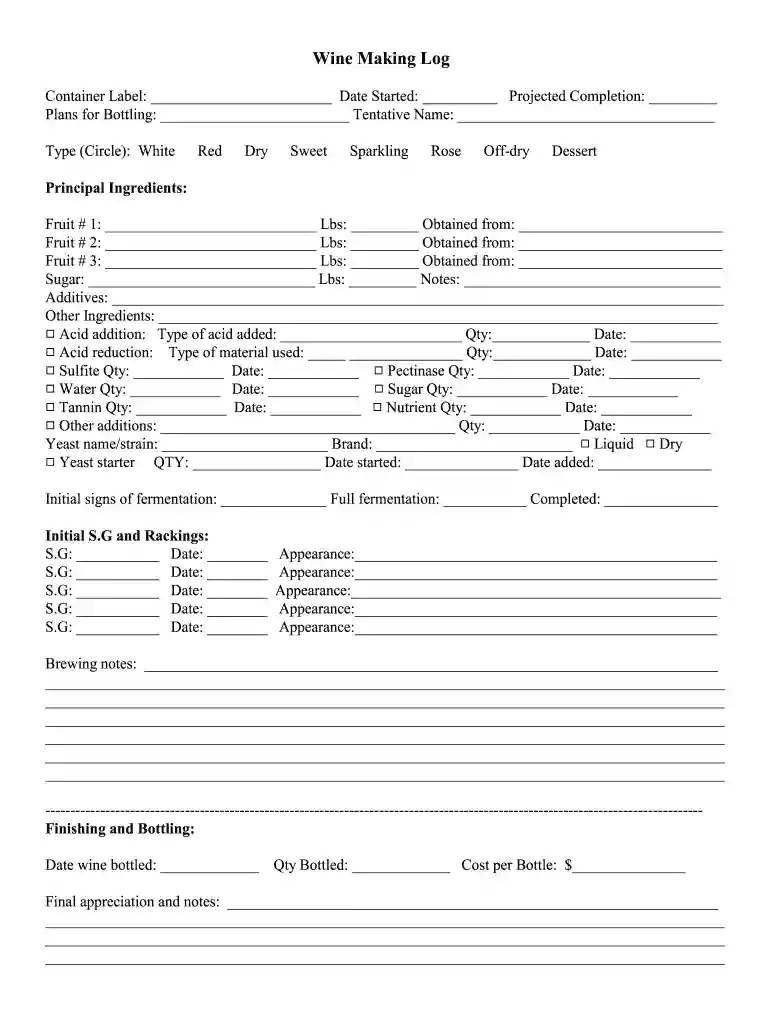
Type text, add images, blackout confidential details, add comments, highlights and more.

Draw your signature, type it, upload its image, or use your mobile device as a signature pad.

Send winemaking log template excel via email, link, or fax. You can also download it, export it or print it out.
The winemaking log template in Excel serves as a comprehensive record-keeping tool specifically designed for documenting all aspects of the winemaking process. It allows winemakers to meticulously track the progression of their wine from its initial stages to the final bottling. This template typically includes sections for recording details such as container size, grape or fruit type, yeast strain selection, additives used, fermentation stages, and specific gravity readings. By offering a structured format, it ensures that every critical detail is captured, facilitating a thorough understanding and control over the winemaking process.
To effectively utilize the winemaking log template, begin by downloading it to your preferred Excel software. Familiarize yourself with the various sections and fields. Start by entering preliminary details such as the type of wine being produced, batch number, and the start date of fermentation. As the winemaking progresses, continue to update the log with information on ingredients added, temperature conditions, specific gravity readings, and any observations regarding the wine's appearance and aroma. This continual updating process provides invaluable insight into the wine's development and assists in maintaining consistency across batches.
The winemaking log template is an essential tool for both amateur and professional winemakers. Small winery owners, home brew enthusiasts, and even hobbyists use this template to ensure precision and consistency in their craft. By keeping detailed records, they can refine techniques and maintain quality control across different batches. Additionally, it is utilized by educators in viticulture to teach students about the intricacies of the winemaking process.


The template is composed of several key elements that structure the recording process:
The winemaking log template is primarily designed for Excel, ensuring broad compatibility with most versions of Microsoft Office. It can also be opened and edited using compatible software such as Google Sheets, Numbers for Mac, and OpenOffice. These platforms allow for real-time collaboration and sharing, making it easier for teams to work jointly on the data.
A small winery tracks their entire winemaking process using the template. By analyzing data over time, they discover trends in fermentation rates linked to seasonal temperature shifts. This insight leads to adopting new control measures for temperature regulation during fermentation.
A home brewer uses the template to experiment with different fruit blends. By recording detailed notes and observations, they successfully replicate a popular batch and share their methods with fellow enthusiasts.
To fully understand and utilize the winemaking log template, it is essential to be familiar with key terminologies:
Understanding these terms is crucial for accurately completing and interpreting the data within the winemaking log template.
We've got more versions of the wine making log form. Select the right wine making log version from the list and start editing it straight away!
| Versions | Form popularity | Fillable & printable |
|---|---|---|
| 2011 | 4.7 Satisfied (33 Votes) |
At DocHub, your data security is our priority. We follow HIPAA, SOC2, GDPR, and other standards, so you can work on your documents with confidence.
includes spreadsheets (e.g., Microsoft Excel, Apache. Calc, Google Docs Spreadsheet, Zoho Sheet, etc.), many statistical calculations and tests are built
by R Franco-Duarte 2025 Cited by 7 The winemaking industry faces unprecedented challenges due to climate change and market shifts, with profound commercial and socioeconomic repercussions.


