




Here's how it works



How to use or fill out sc 2644 on line hacienda 2012 form with our platform

- Click ‘Get Form’ to open it in the editor.
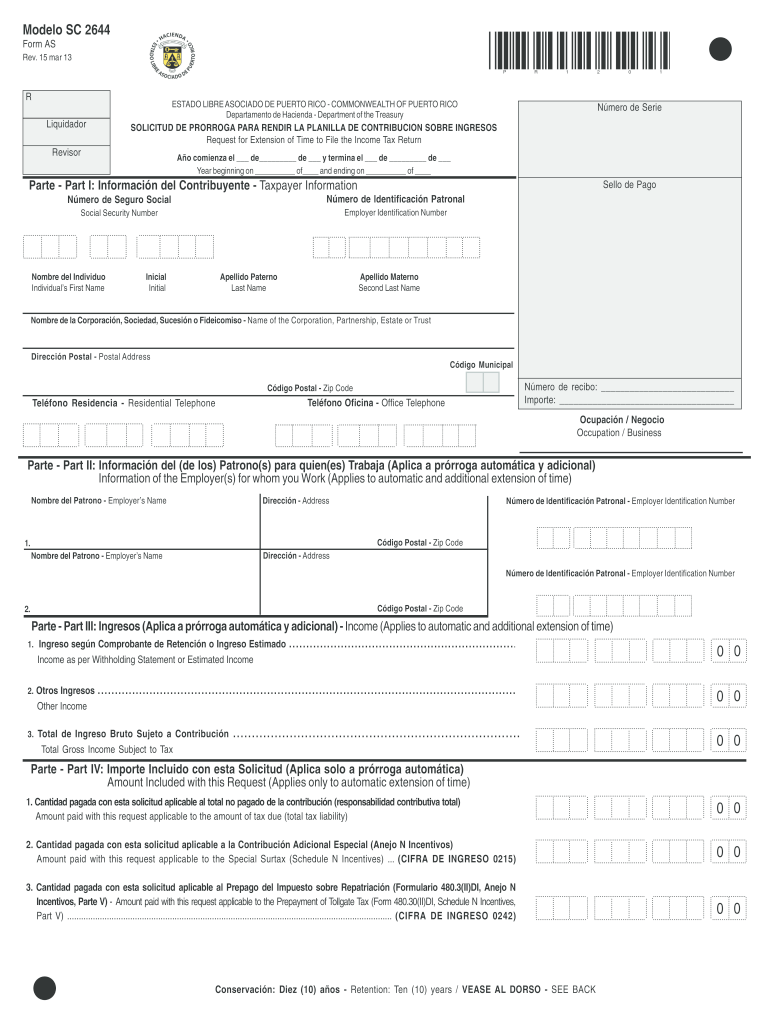
- Begin by entering your Taxpayer Information in Part I. Fill in your full name, Social Security Number, and Employer Identification Number as required.
- In Part II, provide details about your employer(s). Include their names, addresses, and identification numbers.
- Proceed to Part III to report your income. Enter your income from withholding statements or estimated income in the designated fields.
- In Part IV, indicate any amounts included with this request for extension. Ensure you specify the total tax liability and any applicable payments.
- Complete Parts V and VI by selecting your taxpayer type and signing the declaration under penalty of perjury.
- Finally, review all entries for accuracy before submitting the form through our platform for a seamless filing experience.
Start using our platform today to fill out your SC 2644 form online for free!
It's free
See more sc 2644 on line hacienda 2012 form versions
Got questions?
Can I sign my sc 2644 on line hacienda 2012 form with my mobile phone?
Yes, it is possible with DocHub. This trustworthy and compliant online service has a phone-based signing option. After you log in to your DocHub account and import your sc 2644 on line hacienda 2012 form to our editor, complete all required areas and use the Sign feature on the top barf. Click on Create your signature and choose Phone from the available options. Here, you scan a QR code with your smartphone and draw your signature on your phone screen, as you usually do when approving hard copies. If you access DocHub right from your mobile device, you can electronically sign your form by drawing your electronic signature, uploading its photo, or simply with a typed name.
How do you get sc 2644 on line hacienda 2012 form for my state?
If you are looking for a state-specific sc 2644 on line hacienda 2012 form sample, you can find it in our DocHub Forms & Templates catalog. Use the search field, enter your form’s name, and search through the results for your state. You may also filter out irrelevant results while browsing our catalog by categories.
Security and compliance
At DocHub, your data security is our priority. We follow HIPAA, SOC2, GDPR, and other standards, so you can work on your documents with confidence.
Learn more


