




01. Edit your form 45 registration certificate judgment online
Type text, add images, blackout confidential details, add comments, highlights and more.

Type text, add images, blackout confidential details, add comments, highlights and more.

Draw your signature, type it, upload its image, or use your mobile device as a signature pad.

Send it via email, link, or fax. You can also download it, export it or print it out.
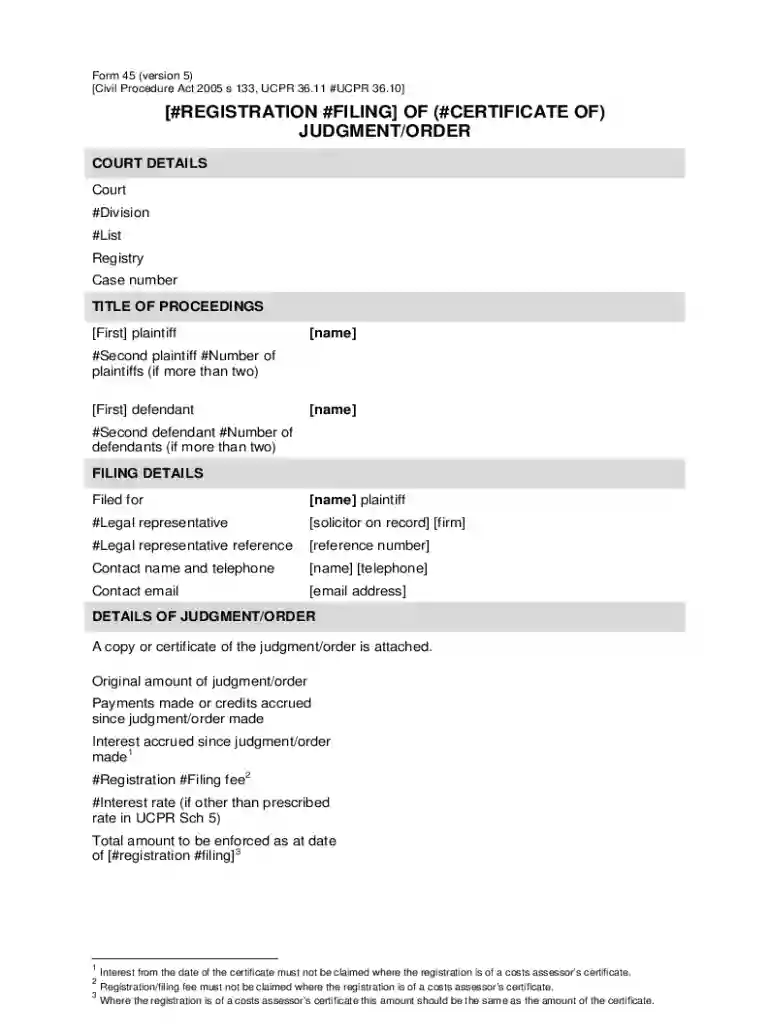
Ucpr Form 45, officially recognized under the Civil Procedure Act 2005, serves as a registration or filing document for a certificate of judgment or order. It is utilized primarily within legal contexts where a judgment requires formal registration for enforcement. This form is comprehensive, covering critical aspects such as court details, parties involved, and specifics about the judgment, including amounts owed and interest accrued. The inclusion of an affidavit section mandates personal information and payment details from applicants registering a costs assessment certificate, ensuring adherence to legal requirements.
Using the online template of UCPR Form 45 through platforms like DocHub revolutionizes the traditional filing process. Users can seamlessly fill in the required sections, such as personal or court details, using digital tools designed for ease. The template facilitates electronic entries for text, checkboxes, and signature fields, making it easy to complete the form from any location with internet access. This adaptability benefits users who need to process legal forms efficiently and accurately.
Access and Load: Begin by accessing UCPR Form 45 on DocHub, selecting the correct version suitable for your needs.
Filling Details: Input the court and party details, ensuring all fields are accurately filled. This includes sections that require applicant and judgment information.
Affidavit Completion: Fill in the affidavit section with requisite personal information and payment details. Ensure any costs assessment certificates are completed as necessary.
Review and Edit: Use annotation tools to review entries, making adjustments where necessary. Ensure accuracy in legal particulars like amounts and interest rates.
Signing: Utilize the electronic signature options to validate and finalize the document. You can draw your signature or use pre-saved versions for convenience.
Submit: Once complete, the form can be submitted electronically or printed for physical submission, following the designated legal procedures for your jurisdiction.
Form 45 is integral to legal processes, allowing for the formal registration of judgments and orders. It ensures transparency and compliance with the Civil Procedure Act 2005, facilitating legal actions such as enforcement and appeals. Proper use of Form 45 can help mitigate legal disputes and streamline judicial procedures by providing a standardized approach to documentation and validation of judgments.
DocHub ensures compatibility with major software and online platforms, allowing seamless integration and use of UCPR Form 45. This includes importing and exporting documents from Google Drive, Dropbox, and Microsoft tools. The flexibility of document management across different software ecosystems streamlines operations for individuals and legal professionals engaging with these forms.
Various iterations of Form 45 exist depending on jurisdiction-specific amendments and updates. It is crucial to refer to the most current version that complies with changes in legal standards. Alternatives may include localized forms that cater to specific court requirements, highlighting the importance of understanding regional legal nuances when handling UCPR forms.
The UCPR Form 45 lies within the legislative framework outlined by the Civil Procedure Act 2005, with its issuance managed by judicial bodies or court registries across relevant jurisdictions. These institutions ensure that the form aligns with current legal practices and reflects any legislative updates or local judicial adjustments.
We've got more versions of the form 45 registration certificate judgment form. Select the right form 45 registration certificate judgment version from the list and start editing it straight away!
At DocHub, your data security is our priority. We follow HIPAA, SOC2, GDPR, and other standards, so you can work on your documents with confidence.

Jul 5, 2023 For current single copy or back issues, call 847-513-6030. a guide will include a template for the hole cutter crisp cuts occur.
a person who, in violation of unlawful creation or possession of a recording (UCPR) may be charged with felony UCPR instead of two misdemeanor charges of UCPR


