01. Edit your jdf 76 form online
Type text, add images, blackout confidential details, add comments, highlights and more.

Type text, add images, blackout confidential details, add comments, highlights and more.

Draw your signature, type it, upload its image, or use your mobile device as a signature pad.

Send colorado court form jdf 76 via email, link, or fax. You can also download it, export it or print it out.
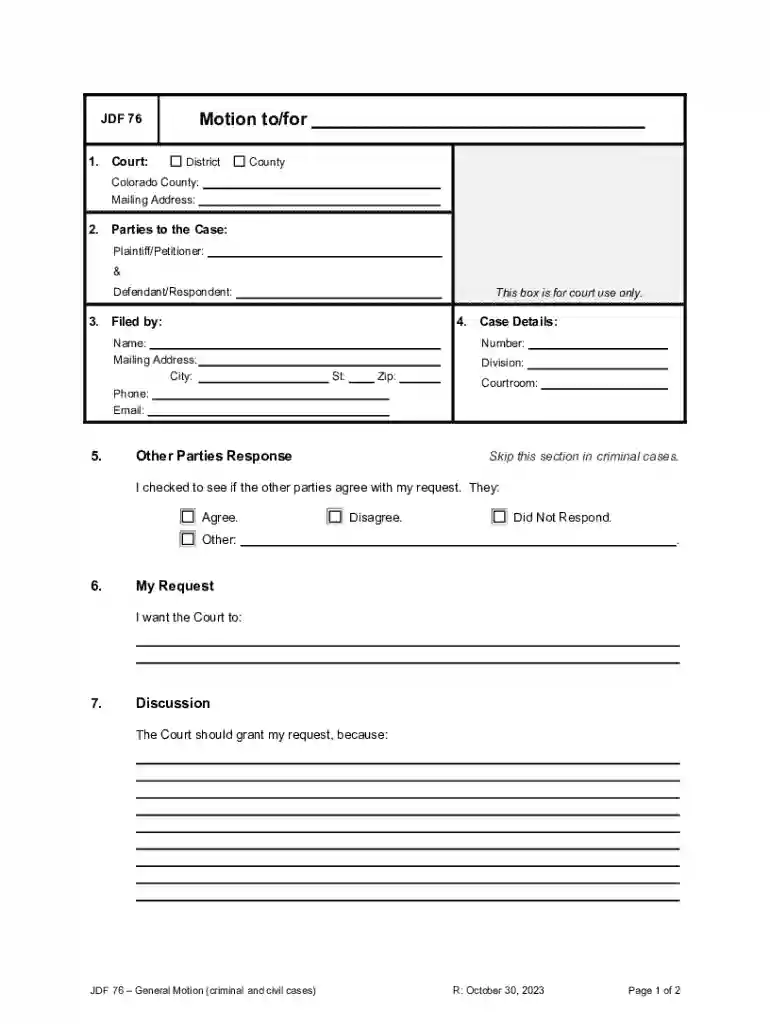
The JDF 76 General Motion form is an official document used in Colorado's court system for both criminal and civil cases. It serves the purpose of submitting motions or requests to the court for a specific action or decision related to the case. The form includes sections that require information about the court, involved parties, case details, and the nature of the motion being filed. This document is crucial for making formal requests in legal proceedings, allowing the filer to petition the court for various actions, such as extensions, dismissals, or reconsiderations.
To effectively utilize the JDF 76 General Motion form, one must first understand its structure and requirements. Here are the primary steps for using the form:
Identify the Purpose: Determine the specific request or motion you need to make. This could range from asking for more time to respond to a judicial order to requesting vacation of a trial date.
Complete the Form: Fill out all required sections of the form, including court details, case numbers, and the parties involved.
Detail the Motion: Clearly explain the motion or request in the designated section. This should include the legal basis for the request and any supporting arguments or evidence.
Certificate of Service: Document how and when you served the motion on the opposing party. This section requires attention to ensure proper legal procedure is followed.
Signature and Date: The filer must sign and date the form, attesting to the accuracy and legitimacy of the request.
Filing a motion using the JDF 76 form involves several critical steps to ensure compliance with court standards:
Gather Required Information: Before starting, compile all relevant case details, including the case number and names of all parties involved.
Fill Out Court Information: Enter the court’s name and location, along with the department or division handling the case.
Specify the Motion Details: Clearly articulate the specific action you are requesting from the court. Include any necessary legal citations or references that support your motion.
Serve the Opposing Party: After completing the form, you must ensure that the opposing party is properly served with a copy. Include this information in the Certificate of Service section.
File with the Court: Submit the completed form to the appropriate court clerk. Be mindful of any filing fees or additional paperwork required.
Await Court Decision: After filing, monitor the case status for any responses or decisions from the court regarding your motion.
The JDF 76 form consists of several critical components that must be accurately filled out:
This form is used within the legal framework of Colorado state courts to facilitate various judicial processes:
The form is integral to ensuring procedural fairness and allowing parties the opportunity to formally present requests before a judge.
Colorado courts have specific rules and guidelines governing the use of the JDF 76 General Motion form:
These examples showcase the versatility of the form in addressing diverse legal needs within the Colorado court system.
Accompanying the JDF 76 form, some additional documentation may be required:
Properly preparing these documents is essential to bolster the motion’s validity and persuasiveness in court.
We've got more versions of the jdf 76 form form. Select the right jdf 76 form version from the list and start editing it straight away!
At DocHub, your data security is our priority. We follow HIPAA, SOC2, GDPR, and other standards, so you can work on your documents with confidence.