Definition & Meaning
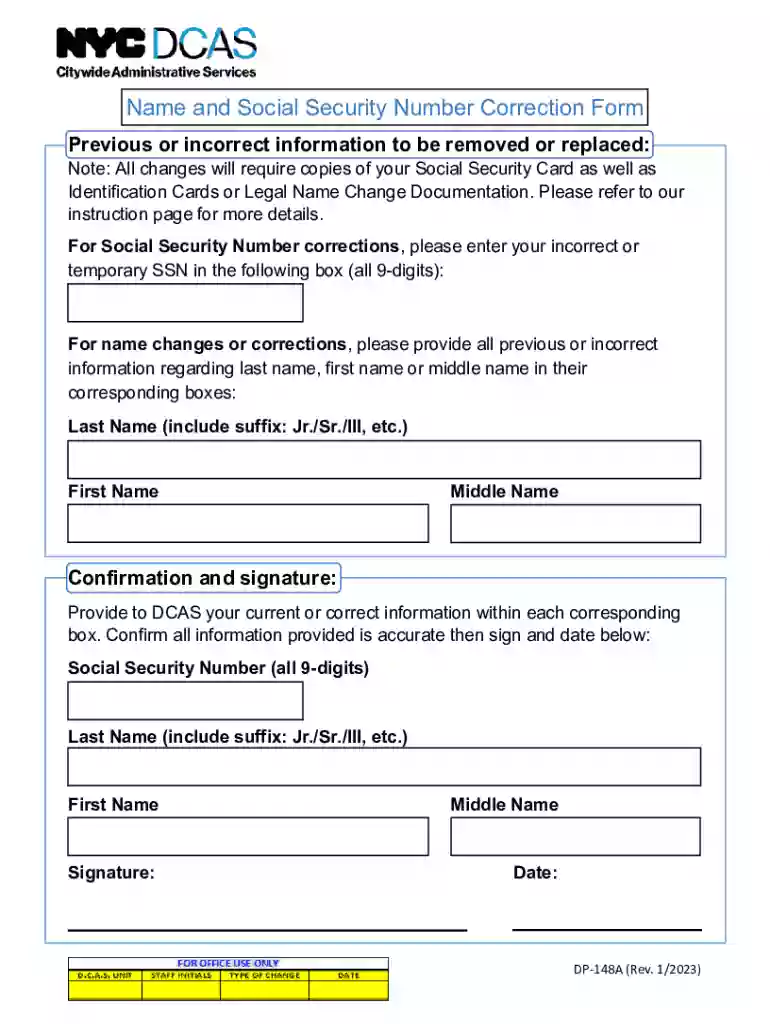
The "Data Correction Form (Candidate's Use Only) - NET" is designed to facilitate the process of updating or amending personal information, specifically focusing on an individual's name and Social Security Number (SSN) records. This form is particularly utilized within administrative systems that require candidates to have accurate identification and personal data on file, ensuring records align with various legal and procedural standards.
How to Use the Data Correction Form
To properly use the Data Correction Form, follow these detailed steps:
- Download the Form: Obtain the electronic or paper version of the form from a trusted source, ensuring it's the latest version approved for use.
- Review Instructions: Carefully read any provided instructions that accompany the form to understand the requirements and process.
- Prepare Required Information: Gather all necessary details, including current and corrected information regarding your name and SSN.
- Complete the Form: Enter the corrected data in the specified fields. Double-check for accuracy to avoid further corrections.
- Attach Supporting Documents: Provide any required documentation that verifies the changes being requested, such as a legal name change certification or SSN documentation.
- Submit the Form: Follow the submission guidelines, which may include options like mailing, emailing, faxing, or in-person delivery.
How to Obtain the Data Correction Form
Candidates can obtain the Data Correction Form through several methods:
- Online Download: Access the form through official websites or platforms that manage candidate information.
- Request by Mail: Some institutions allow candidates to request the form via postal mail.
- In-Person Collection: Visit the relevant administrative office to collect a physical copy of the form.
Steps to Complete the Data Correction Form
Completing the form involves precise steps:
- Identification Information: Enter your candidate ID, current name, and contact details.
- Correction Details: Clearly specify the current and corrected information.
- Reason for Change: Briefly describe why the change is necessary, whether due to a typographical error or a legal name change.
- Sign and Date: Affix your signature to confirm the accuracy and authenticity of the information provided.
- Verification Documents: Attach required proof to validate the changes.
Why Use the Data Correction Form
Utilizing the Data Correction Form ensures:
- Accuracy: Maintain correct records which are vital for identification verification.
- Compliance: Adhere to administrative requirements and avoid potential legal complications.
- Efficiency: Streamline the process of data updates, preventing delays in personal or professional documentation procedures.
Key Elements of the Data Correction Form
The form comprises several critical elements:
- Section for Current Information: Allows input of existing details to be changed.
- Correction Fields: Dedicated areas to specify the corrected data.
- Certification Statement: Confirms the truthfulness of submitted information.
- Signature Line: Validates candidate acknowledgment and consent.
- Instructional Guide: Provides guidance on completing and submitting the form.
Important Terms Related to the Form
- Candidate ID: A unique identifier assigned to each candidate for tracking and record-keeping.
- SSN: Social Security Number, crucial for identity verification.
- Verification Documents: Documents that substantiate the corrections being made.
- Correction Fields: Sections designated for inputting amended information.
Form Submission Methods
Candidates can submit the Data Correction Form through various channels:
- Online: Upload the completed form to a designated portal.
- Mail: Send via postal services to the specified address.
- In-Person: Drop off at a designated administrative office, providing immediate confirmation of receipt.
Required Documents
When submitting the form, certain documents are usually required:
- Proof of Identity: Such as a driver's license or passport.
- Legal Name Change Document: Court order or marriage certificate, if applicable.
- SSN Card: For SSN-related corrections.
Understanding these elements ensures candidates complete and submit the form correctly, facilitating efficient processing and reducing the likelihood of errors or rejections.