Definition and Purpose of the FASTag Maintenance Form - kotak
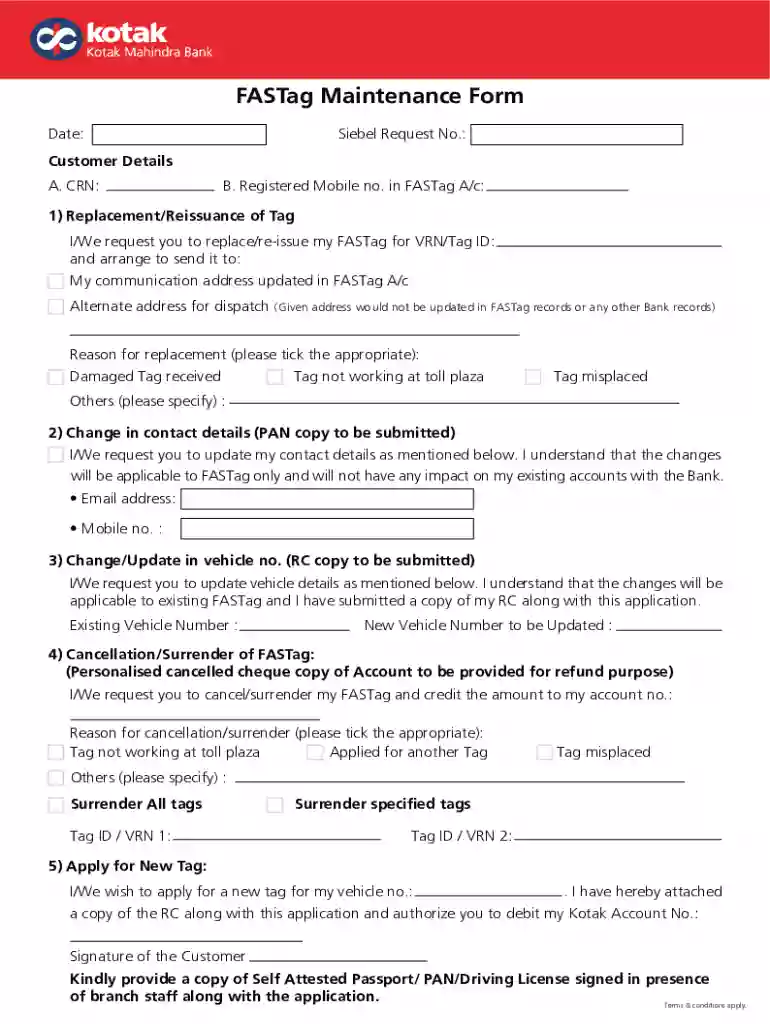
The FASTag Maintenance Form, specifically for users associated with Kotak, is designed to facilitate various requests pertaining to your FASTag account. FASTag is an electronic toll collection system that uses radio frequency identification (RFID) technology to enable seamless toll payments directly from prepaid accounts linked to a vehicle's registration. The maintenance form serves several purposes:
- Requesting replacement or reissuance of a lost, damaged, or expired FASTag.
- Updating personal or vehicle information linked to the FASTag account, such as contact details or vehicle registration numbers.
- Initiating cancellation or surrender of a FASTag, whether due to selling a vehicle or opting out of the system.
- Applying for new FASTags for additional vehicles under the same account, ensuring all your vehicles have their individual tags for toll payments.
The form is crucial for maintaining the integrity of user information and ensuring the efficient operation of the FASTag system.
How to Use the FASTag Maintenance Form - kotak
Using the FASTag Maintenance Form involves several key steps to ensure compliance with the requirements and successful processing:
- Identify Your Requirement: Determine the specific need, such as updating information, replacing a tag, or surrendering a FASTag linked with your Kotak account.
- Access the Form: Obtain the form either through Kotak's official website or a designated portal handling FASTag services. It is also often available at toll plazas or by contacting customer service.
- Fill Out the Form: Complete the form meticulously, providing accurate and up-to-date information. Ensure all required fields are filled to prevent delays in processing.
- Attach Required Documents: Each request type might require supporting documents, such as identification proof, vehicle registration certificates, or previous tag details.
- Submit the Form: Submit the completed form through the preferred method—whether online, via mail, or in-person at a designated center.
Steps to Complete the FASTag Maintenance Form - kotak
Completing the FASTag Maintenance Form entails several steps and attention to specific details:
- Personal Details: Enter personal information such as your full name, contact numbers, and email address. Ensure that they match what is on file with Kotak’s records for verification purposes.
- Vehicle Information: Provide accurate details of the vehicle, including the registration number, make, model, and any changes if applicable.
- Request Specification: Clearly indicate the type of maintenance request you are filing: replacement, reissuance, update, cancellation, or new application.
- Supporting Documents: Organize and attach copies of necessary documents. For instance:
- Replacement requests may require evidence of damage or loss.
- Updates might need proof of the new vehicle or contact information.
- Signature and Declaration: Carefully read any declaration statements to understand terms and conditions before signature.
Required Documents
The FASTag Maintenance Form requires careful preparation of documents, ensuring all necessary papers accompany your submission:
- Identification Proof: A valid government-issued ID such as a driver’s license or passport.
- Vehicle Ownership Documents: Copies of the vehicle’s registration certificate.
- Proof for Change Requests: If updating personal details, additional documentation like utility bills or updated IDs may be necessary.
- Damage or Loss Proof: For replacement or reissuance, include any relevant incident reports or damage assessments.
Submission Methods for the FASTag Maintenance Form
There are various methods available to submit the FASTag Maintenance Form:
- Online Submission: Easiest method through Kotak’s official systems or affiliated platforms, requiring scanned documents to be uploaded.
- Mail Submission: A more traditional approach by sending the form and documents to the address specified in the form's instructions.
- In-person Submission: Directly at designated Kotak branches or authorized partners dealing with FASTag requests.
Key Elements of the FASTag Maintenance Form - kotak
Understanding the main components of the FASTag Maintenance Form enhances your ability to complete it accurately:
- Personal and Contact Information: Ensures communication and verification.
- Vehicle Details: Specifics about the vehicle linked with the FASTag.
- Type of Request: Indicates the maintenance action requested.
- Required Documentation Section: Outlines what supporting documents need to be attached.
- Authorized Signatures and Date: Verifies consent and submission authenticity.
Legal Implications and Compliance
Using the FASTag Maintenance Form accurately is vital for legal compliance and advantageous operation:
- Adhere to Guidelines: Following the format and guidelines provided by Kotak ensures legal compliance and reduces the risk of application rejection.
- Accurate Information: Providing false or inaccurate information may lead to complications or penalties.
- Secure Transactions: Ensures secure processing and management of financial transactions related to toll payments, enhancing trust and security.
Examples and Scenarios of FASTag Maintenance Form Usage
Practical scenarios help illustrate the utility of the FASTag Maintenance Form:
- Scenario 1: A vehicle owner replaces their vehicle and needs to update their FASTag details to reflect the new registration without needing a complete reissuance.
- Scenario 2: A driver has relocated and needs to update contact information swiftly to ensure continuous notifications of toll transactions.
- Scenario 3: A business managing a fleet uses the form to streamline the exit of old vehicles and the entry of new ones into their toll account, ensuring accuracy and efficiency across operations.