E-mail CANhistorychecksdcyf 2026

Get Form
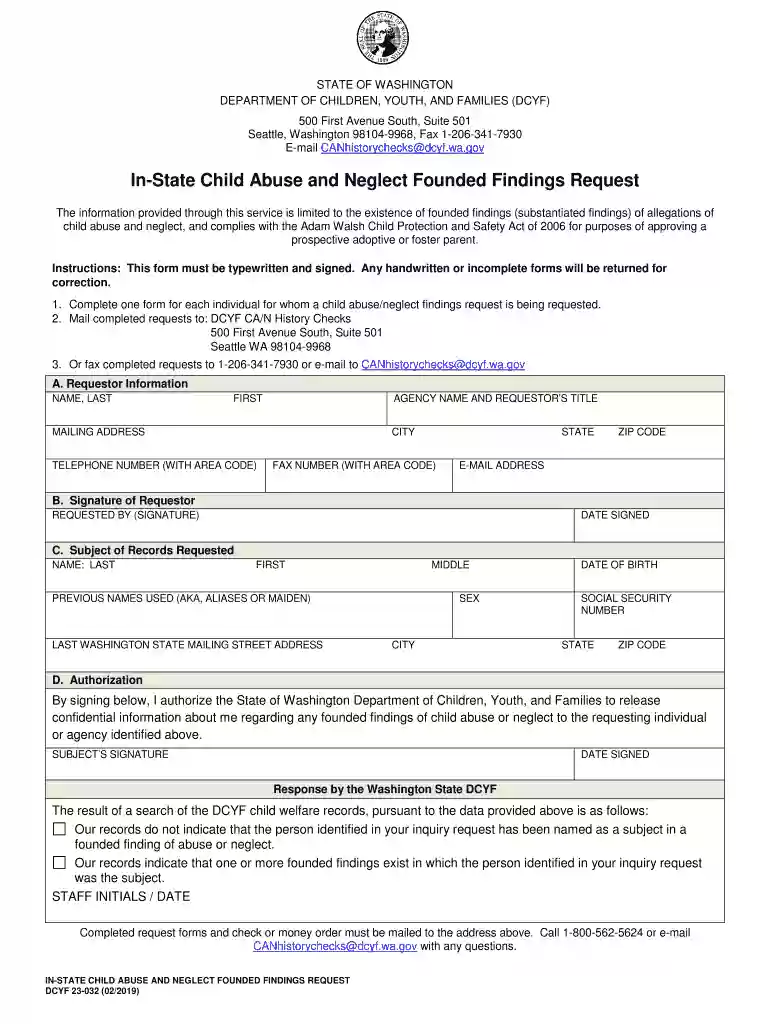
E-mail CANhistorychecksdcyf Preview on Page 1

Here's how it works

01. Edit your form online
Type text, add images, blackout confidential details, add comments, highlights and more.

02. Sign it in a few clicks
Draw your signature, type it, upload its image, or use your mobile device as a signature pad.

03. Share your form with others
Send it via email, link, or fax. You can also download it, export it or print it out.

Definition & Meaning

The "E-mail CANhistorychecksdcyf" is a form used for requesting information related to findings of child abuse and neglect. The acronym CAN stands for "Child Abuse and Neglect," and DCYF represents the Department of Children, Youth, and Families. This form serves as an official means of obtaining documented findings specifically about substantiated cases of abuse or neglect, rather than unfounded allegations or investigations still ongoing. These types of requests are integral to ensuring child welfare and are often part of broader background checks in sensitive environments such as schools, childcare facilities, and adoption processes.

How to Use the E-mail CANhistorychecksdcyf

Utilizing the E-mail CANhistorychecksdcyf involves submitting a request for documented findings through email, which provides a convenient avenue for those unable to visit a physical office or portal. Here are the essential steps:

  1. Download the Form: Visit the DCYF website to obtain the latest version of the form.
  2. Fill Out the Form: Enter all necessary information about both the requestor and the subject under investigation, ensuring accuracy in details.
  3. Attach Required Documents: Include any supporting documentation as outlined in the form's instructions.
  4. Submit Via Email: Send the completed form and attachments to the designated DCYF email address provided in the instructions.

By following these steps, requestors can efficiently gain access to the needed information while adhering to privacy and procedural guidelines.

Steps to Complete the E-mail CANhistorychecksdcyf

When completing the form, attention to detail is vital. Here is a detailed step-by-step approach:

  1. Requestor Information: Provide complete details including full name, address, and contact information.
  2. Subject Information: Enter the full name, date of birth, and any known aliases of the individual whose records you seek.
  3. Relevant Case Details: Input any known case numbers, dates, or locations of the investigations.
  4. Declaration Section: Certify that the information provided is true and correct, and affirm your authority to request the details.
  5. Sign and Date: Ensure the form is signed and dated by the requestor to validate the request.

Completing these steps ensures the request is processed smoothly and quickly.

Key Elements of the E-mail CANhistorychecksdcyf

This form contains several critical components designed to protect both privacy and the legal integrity of the information requested:

  • Verification of Identity: Establishes the need for authenticating individuals making the request to protect sensitive data.
  • Purpose of Request: Documents the intended use of the information to ensure compliance with legal and ethical standards.
  • Data Protection Sections: Outlines measures for safeguarding the information once it's been released, including restrictions on further dissemination.

These elements ensure a secure and efficient process for handling such sensitive requests.

Important Terms Related to E-mail CANhistorychecksdcyf

Understanding the terminology associated with this form is crucial for proper use, such as:

  • Substantiated Findings: Refers to cases where evidence has confirmed instances of abuse or neglect.
  • Mandated Reporter: Individuals required by law to report suspicions of child abuse, such as teachers or healthcare providers.
  • Confidentiality Clause: Legal provisions that restrict the sharing of information by unauthorized persons.

Knowing these terms helps users navigate the process more effectively.

Who Typically Uses the E-mail CANhistorychecksdcyf

The form is primarily used by professionals in sectors where child safety is paramount:

  • Childcare Providers: To ensure employees do not have any substantiated abuse records.
  • Adoption Agencies: To vet potential adoptive parents thoroughly.
  • Educational Institutions: To comply with statutory requirements for staff background checks.

These users rely on the form to make informed decisions that impact child safety and welfare.

decoration image ratings of Dochub

Legal Use of the E-mail CANhistorychecksdcyf

Legal consent is a cornerstone of using the form:

  • Authorization Requirement: Users may only request records if authorized or mandated by law, ensuring no breach of privacy.
  • Compliance with State Laws: Users must adhere to specific state regulations governing the use of child protection information.
  • Retention Policies: Information must be used solely for the declared purpose and retained only as long as necessary for that purpose.

These provisions ensure the form is used ethically and lawfully.

State-specific Rules for the E-mail CANhistorychecksdcyf

Different states may have additional regulations and requirements:

  • Jurisdictional Variations: States may impose unique filing procedures or additional information requirements.
  • Local DCYF Guidelines: Local offices may have distinct protocols regarding processing times and review processes.
  • Inclusion of State-specific Forms: Some states may require supplemental forms alongside the standard request.

Understanding these state-specific nuances is critical for seamless processing of requests.

be ready to get more

Complete this form in 5 minutes or less

Get form

Got questions?

We have answers to the most popular questions from our customers. If you can't find an answer to your question, please contact us.
Contact us
All records maintained by state and local agencies are available for public inspection unless law specifically exempts them.
If the CPS investigation is founded, and charges have been filed, it will appear on a criminal background check and CPS records. If the case finds no wrongdoing, it will not appear on a criminal background check but will remain on CPS records.
Each CPS agency has a standard form for you to use if you want to request copies of your own records. The form typically requires you to provide information about yourself and any adults listed in your records, such as your parents or a legal guardian. You may not know all the information requested on the form.
CPS doesnt require your permission; they can come to your house at any time. CPS also doesnt need a warrant to enter your home and can interview your children without your permission. They can also remove your children from the home if they have a court order.
Due to confidentiality of agency records, inspection and copying of records is available by appointment only, during the customary office hours of the agency. For public inspection of records, please contact the Public Disclosure Unit at dcyf.publicdisclosure@dcyf.wa.gov.

Security and compliance

At DocHub, your data security is our priority. We follow HIPAA, SOC2, GDPR, and other standards, so you can work on your documents with confidence.
Learn more
ccpa2
pci-dss
gdpr-compliance
hipaa
soc-compliance
be ready to get more

Complete this form in 5 minutes or less

Get form