01. Edit your form online
Type text, add images, blackout confidential details, add comments, highlights and more.

Type text, add images, blackout confidential details, add comments, highlights and more.

Draw your signature, type it, upload its image, or use your mobile device as a signature pad.

Send it via email, link, or fax. You can also download it, export it or print it out.
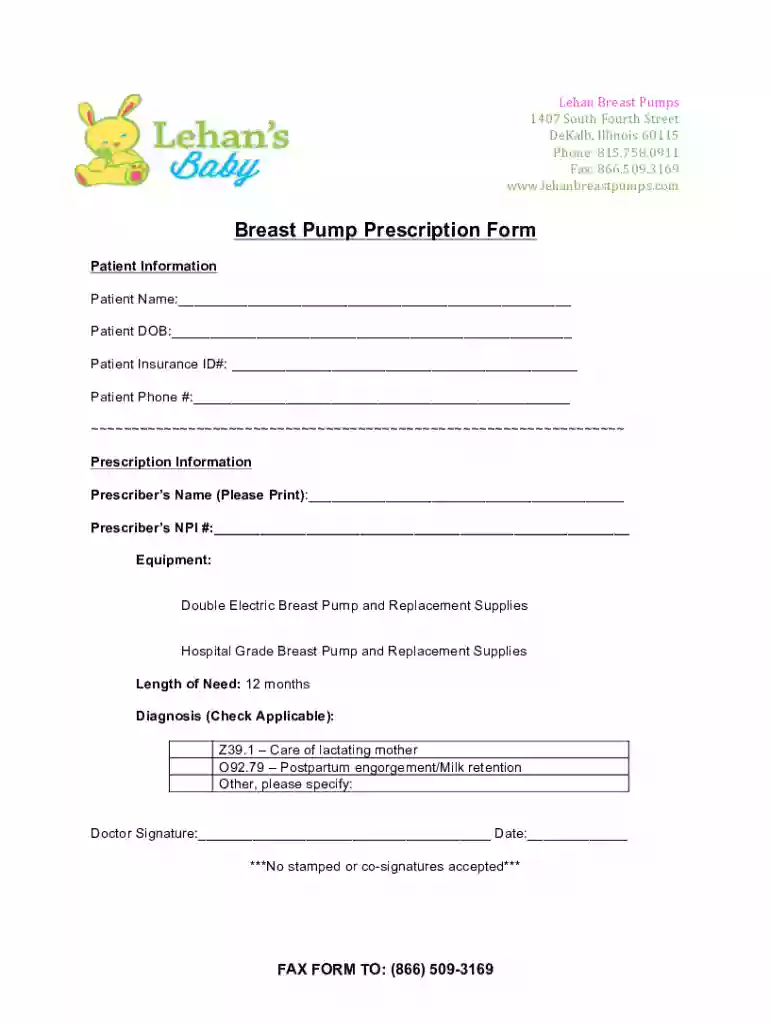
The Breast-Pump-Prescription-Form docx is an official document utilized primarily for prescribing breast pumps to new mothers. This form serves as a formal request submitted by a healthcare provider to obtain a breast pump, which may be covered by insurance plans under certain conditions. Typically, the form includes sections requiring details about the patient, the medical necessity for the breast pump, and relevant diagnosis codes related to lactation or postpartum issues. This document is essential for streamlining the process of acquiring breast pumps through insurance, ensuring that both the provider’s and the recipient’s information is documented accurately.
To effectively use the Breast-Pump-Prescription-Form docx, healthcare professionals should follow a systematic approach:
Download and Prepare the Form: Obtain the docx version from a trusted source, such as a medical facility or insurance provider website. Ensure the form is up-to-date with the latest requirements.
Populate Patient Information: Complete the patient details section, including name, contact information, and insurance details. This information is crucial for processing the request.
Specify Equipment Needs: Indicate the type of breast pump being prescribed, such as double electric or hospital-grade options, depending on the patient's requirements.
Provide Medical Justification: Include relevant lactation or postpartum diagnosis codes to justify the prescription, ensuring that these align with the insurance policy’s coverage criteria.
Obtain Required Signatures: A registered healthcare provider must sign the form. Digital signatures may be accepted, but check with the insurance company for specific requirements.
Submit the Form: Send the completed form to the relevant insurance provider via their preferred submission method, which could be online, by mail, or through a secure portal.
Completing this form effectively involves several key steps:
Begin with Patient Information: Clearly fill out personal details, including full name, address, and insurance policy number. Accuracy is vital to avoid processing delays.
Describe Medical Necessity: In this section, record the pertinent medical codes that substantiate the necessity for a breast pump, such as lactation difficulties or postpartum recovery conditions.
Detail Prescriber Information: Input the prescriber’s credentials, including their medical license number and practice location. This ensures legitimacy and accountability.
Select Equipment: Specify the type and duration of breast pump required. For example, a 12-month need may suffice for standard postpartum situations.
Sign and Date the Form: The prescriber needs to sign and date the form, confirming the authenticity and urgency of the request.
Review and Submit: Proofread the form for completeness and accuracy before submission to avoid rejections or resubmissions.
The form contains several crucial components:
Patient Information Section: Collects key details such as the patient's name and health insurance information.
Prescriber Details: Includes the name, contact information, and credentials of the healthcare provider.
Equipment Specification: Allows for specification of the type of breast pump, making the selection precise according to patient need.
Diagnosis Codes: Provided for documenting the medical necessity of a breast pump.
Signature Field: Requires the prescriber’s signature for validation, ensuring the form is processed legitimately.
In the United States, the Breast-Pump-Prescription-Form docx must comply with healthcare regulations and insurance mandates. It is used legally to secure breast pumps via insurance coverage, a benefit under policies following the Affordable Care Act. Patients are eligible to receive breast pumps with a doctor’s prescription without prior authorization from insurers. Legal use entails full and accurate completion of the form, adhering to HIPAA regulations, and ensuring any sensitive patient data is protected during submission.
This form is predominantly used by:
Healthcare Providers: Physicians, lactation consultants, and midwives who prescribe breast pumps to new mothers.
Patients: New mothers seeking breast pumps as part of their postpartum care, leveraging insurance benefits.
Insurance Companies: As part of the claims processing system to review and approve breast pump requests under a patient’s health insurance plan.


Although federal rules govern breast pump coverage, individual states may have additional stipulations. For instance, certain states might require further documentation or offer expanded coverage for various pump models or accessories. It's essential for healthcare providers to be familiar with both state-specific requirements and insurance policy nuances that may affect the approval and processing of these forms.
The Breast-Pump-Prescription-Form docx is most conveniently managed using commonly available software such as Microsoft Word or Google Docs, ensuring broad accessibility and ease of use. Tools like DocHub facilitate online edits, annotations, and signatures directly on the form. The compatibility with cloud storage services adds flexibility, allowing healthcare providers to seamlessly integrate the form management with existing digital workflows.
We've got more versions of the Breast-Pump-Prescription-Form docx form. Select the right Breast-Pump-Prescription-Form docx version from the list and start editing it straight away!
At DocHub, your data security is our priority. We follow HIPAA, SOC2, GDPR, and other standards, so you can work on your documents with confidence.