Sc nurse aide registry renewal form 2026

Get Form
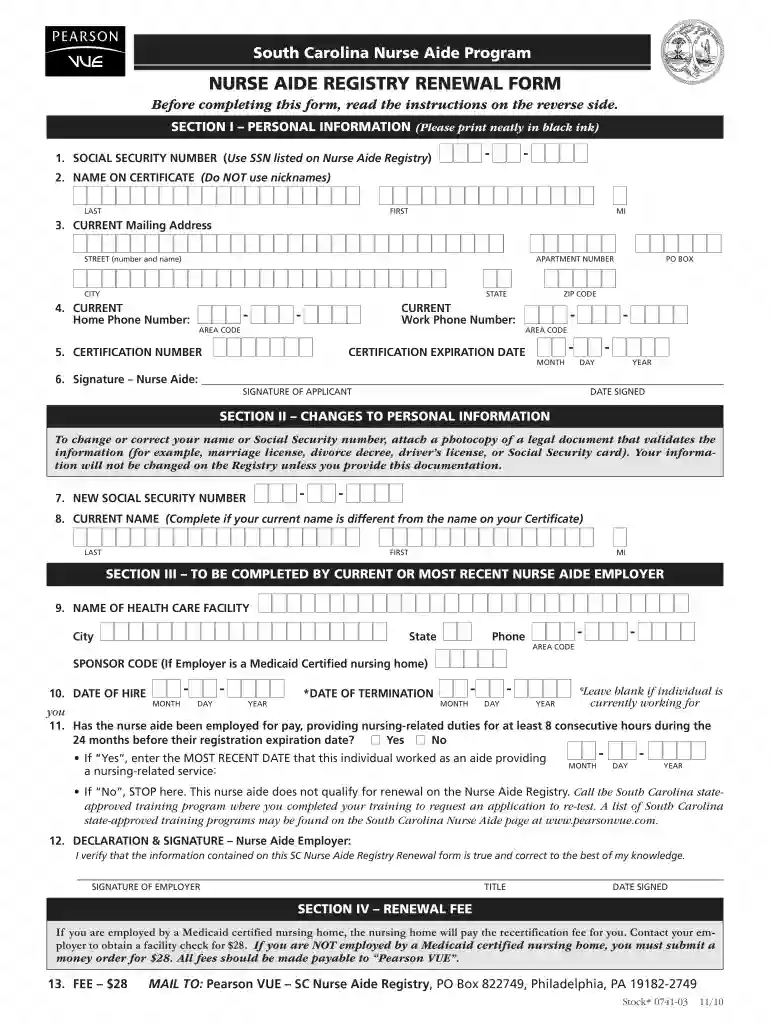
cna registry renewal Preview on Page 1

Here's how it works

01. Edit your cna registry renewal online
Type text, add images, blackout confidential details, add comments, highlights and more.

02. Sign it in a few clicks
Draw your signature, type it, upload its image, or use your mobile device as a signature pad.

03. Share your form with others
Send south carolina nurse aide registry renewal via email, link, or fax. You can also download it, export it or print it out.

How to use or fill out SC Nurse Aide Registry Renewal Form with DocHub

Form edit decoration
9.5
Ease of Setup
DocHub User Ratings on G2
9.0
Ease of Use
DocHub User Ratings on G2
  1. Click ‘Get Form’ to open the SC Nurse Aide Registry Renewal Form in our editor.
  2. In Section I, enter your Social Security Number, full name (last, first, middle initial), current mailing address, and telephone numbers. Ensure accuracy as this information is crucial for your eligibility.
  3. For Section II, if there are any changes to your personal information, provide a new Social Security number or updated name along with legal documentation as proof.
  4. In Section III, your current or most recent employer must complete this section. They will need to provide the facility's name, date of hire, and confirm your work history.
  5. Finally, in Section IV, ensure that the renewal fee of $28 is addressed correctly. If employed by a Medicaid-certified facility, they will cover this fee; otherwise, you must submit a money order.

Start using our platform today to easily fill out and manage your SC Nurse Aide Registry Renewal Form online for free!

be ready to get more

Complete this form in 5 minutes or less

Get form

Got questions?

We have answers to the most popular questions from our customers. If you can't find an answer to your question, please contact us.
Contact us
0:21 3:02 Provided. Once you have completed all the necessary. Details click on the submit button to send theMoreProvided. Once you have completed all the necessary. Details click on the submit button to send the renewal request. Note that some state renewals may have a renewal fee to be paid.
The following are the steps to send the renewal request for the registration certificate: Step 1: Log in to the Credentia Platform. Step 2: Navigate to the registry section. Step 3: Select the renewal button. Step 4: Fill in the required details and submit.
Receiving a CNA license isnt a one-and-done experience, though, and most states require a CNA renewal online about every two years. Some states require CNA renewal online more frequently while others require continuing education credits or a certain number of paid work hours to renew.
If youre a CNA, youll renew your certification through Credentia. Log in to your CNA365 account to complete the renewal, change your address, and update your personal information. Once your license is renewed, you can search for RN, LPN, CNA, and NP jobs in South Carolina.

Security and compliance

At DocHub, your data security is our priority. We follow HIPAA, SOC2, GDPR, and other standards, so you can work on your documents with confidence.
Learn more