




01. Edit your philhealth konsulta registration online
Type text, add images, blackout confidential details, add comments, highlights and more.

Type text, add images, blackout confidential details, add comments, highlights and more.

Draw your signature, type it, upload its image, or use your mobile device as a signature pad.

Send konsulta registration online via email, link, or fax. You can also download it, export it or print it out.
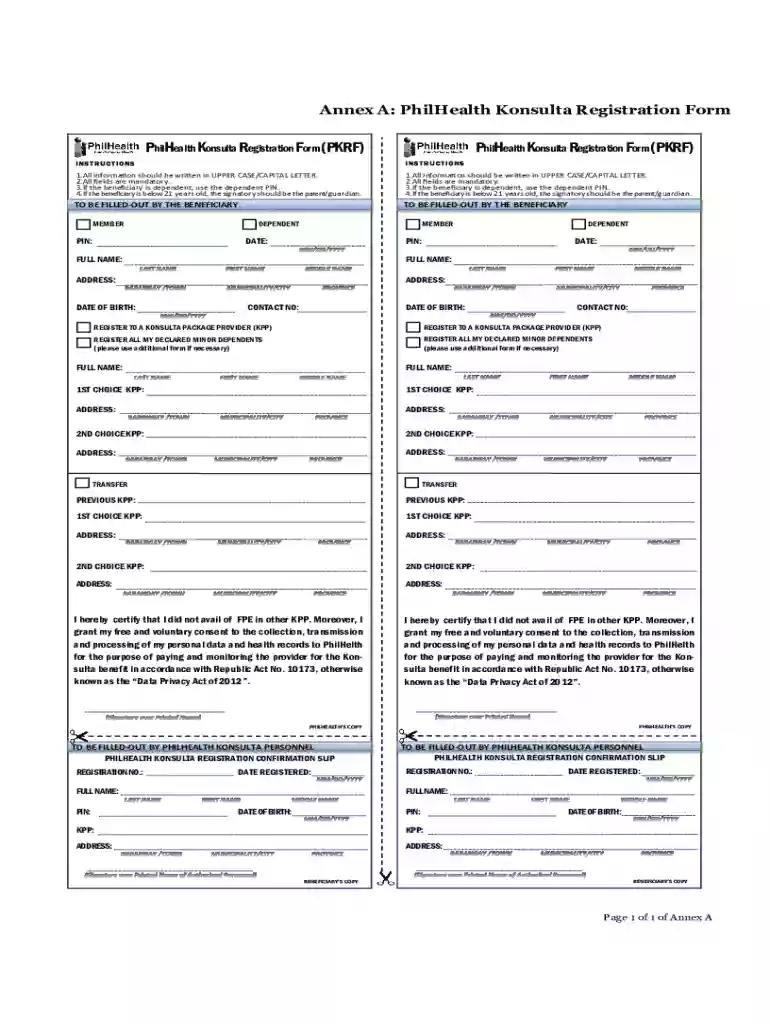
The PhilHealth Konsulta Registration Form (PKRF) serves as a crucial document for beneficiaries seeking to enroll in the Konsulta package offered by the Philippine Health Insurance Corporation (PhilHealth). This package is designed to provide individuals with access to preventive and primary healthcare services. The form facilitates the enrollment process by collecting necessary personal information and ensuring compliance with legal and operational requirements.
Completing the PKRF entails providing personal details, selecting desired Konsulta Package Providers (KPP), and certifying the non-duplication of benefits. The requirement for all fields to be filled out in uppercase ensures clarity and uniformity in data entry. Moreover, individuals must give consent for data processing, aligning with the standards set forth by the Data Privacy Act, which mandates responsible handling of personal data.
The PKRF is not just a formality; it establishes the foundation for health service coverage, enabling users to take advantage of preventive health measures, consultations, and other medical services that promote well-being.
Filling out the PhilHealth Konsulta Registration Form online can streamline the registration process. The following steps outline how to effectively complete the form:
Access the Form: Locate the official PhilHealth website or a trusted partner platform where the PKRF is available for download or online completion. Ensure that you have a stable internet connection for a smooth process.
Fill Out Personal Information: Enter your full name, address, date of birth, and other required personal details in uppercase letters as specified. Accuracy is essential in this section to prevent delays in processing your registration.
Select Konsulta Package Providers: Review the available Konsulta Package Providers and select your preferred option. This choice determines the network of healthcare professionals and facilities that will be accessible under your plan.
Indicate Dependents: If applicable, include information for any dependent beneficiaries. Ensure that all fields are completed as this information is critical for the coverage to be extended to your dependents.
Consent for Data Processing: Clearly mark your consent regarding the handling of your personal data. This step is vital in compliance with data protection regulations.
Review and Submit: Before finalizing your submission, double-check all entries for accuracy. Once confirmed, submit the form online or print it for mailing, depending on the submission method you choose.
Following these structured steps ensures a comprehensive and honest submission, facilitating a smooth registration experience.
Understanding the key elements of the PhilHealth Konsulta Registration Form is essential for ensuring accurate completion and compliance with the requirements. The primary components include:
Personal Details: This section requires accurate information including your full name, address, age, and contact information.
Konsulta Package Selection: You must select from the available Konsulta Package Providers, which align with your healthcare needs.
Dependent Information: This includes details of any individuals you wish to enroll under your coverage. Proper documentation of dependents is crucial for eligibility.
Data Processing Consent: A section where you agree to the processing of your data as per the guidelines set by the Data Privacy Act. This demonstrates an understanding of the privacy policies associated with your information.
Certification of Non-Duplication of Benefits: You must affirm that you are not availing other benefits that conflict with the services offered under the Konsulta package. This prevents fraud and abuse of the healthcare system.
Being aware of these elements allows for focused and accurate completion of the form, ensuring a quick turnaround in processing.
The legal implications surrounding the PhilHealth Konsulta Registration Form are significant. Legally, the information provided in this form must be accurate, as false information could lead to penalties or denial of coverage. Key legal considerations include:
Compliance with Data Privacy Act: The submission of this form is subject to regulations under the Data Privacy Act, requiring that personal data be processed transparently and securely.
Eligibility Verification: PhilHealth has the right to verify the information provided, ensuring that all applicants meet the eligibility criteria for the Konsulta package.
Enrollment Confirmation: Upon successful registration, beneficiaries will receive a Konsulta registration confirmation slip, which serves as legal proof of enrollment in the program.
Understanding these aspects of legal usage reinforces the importance of accuracy and honesty in filling out the PKRF.
Submitting the PhilHealth Konsulta Registration Form online offers convenience and efficiency. The following methods are available for submitting the form:
Website Submission: Many users opt to complete and submit the PKRF directly through the official PhilHealth website or affiliated platforms equipped to handle online registrations.
Email Submission: Some authorized platforms may allow submissions via email, where you can attach a signed copy of the completed form.
Mobile Application: PhilHealth has developed mobile applications that facilitate online registration, making the process accessible from smartphones and tablets.
Utilizing these methods not only ensures a quicker processing time but also enhances the security of your submission.
Practical scenarios demonstrate how the PhilHealth Konsulta Registration Form can be utilized effectively:
Individual Enrollment: A first-time registrant, John, completes the PKRF to avail of preventive health services. After successfully submitting the form online, he accesses healthcare services with peace of mind.
Family Registration: Sarah fills out the form to enroll both herself and her three children. By providing accurate information and selecting a family-friendly Konsulta Package Provider, she secures comprehensive coverage for her family.
Dependent Coverage: Mark, a registered member, fills out the PKRF to include his spouse as a dependent. After submitting the form, he receives a confirmation slip, clarifying her eligibility for covered services.
These examples reflect the versatility of the form in facilitating different types of registrations and providing healthcare access to diverse groups.
We've got more versions of the philhealth konsulta registration form. Select the right philhealth konsulta registration version from the list and start editing it straight away!
At DocHub, your data security is our priority. We follow HIPAA, SOC2, GDPR, and other standards, so you can work on your documents with confidence.






PhilHealth Services (Konsulta, TB DOTS, MCP, NCP, ABTC packages) The parent or guardian must fill out the paperwork and bring in the childs old immunizationRead more
by JB Lava 2024 Cited by 5 Konsulta patient registration, using paper-based forms; registration and service outputs for COVID-19 vaccination, services in the Konsulta


