Type text, add images, blackout confidential details, add comments, highlights and more.
02. Sign it in a few clicks
Draw your signature, type it, upload its image, or use your mobile device as a signature pad.
03. Share your form with others
Send imm5283 via email, link, or fax. You can also download it, export it or print it out.
How to use or fill out imm 5283 with our platform
Ease of Setup
DocHub User Ratings on G2
Ease of Use
DocHub User Ratings on G2
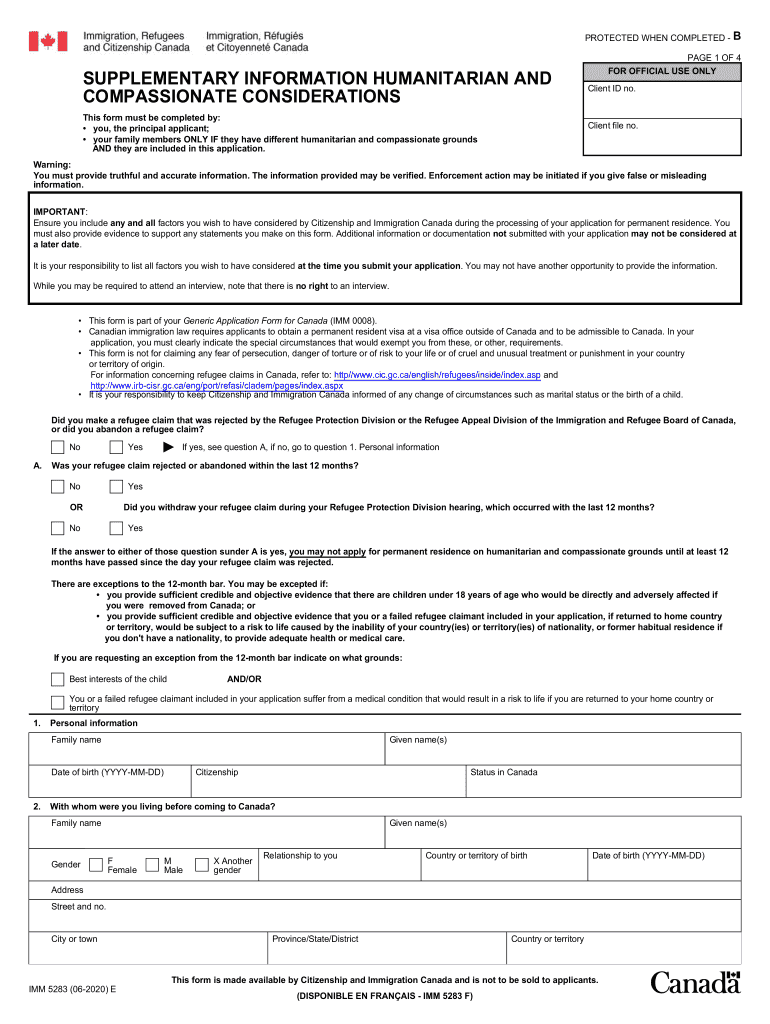
Click ‘Get Form’ to open the imm 5283 in the editor.
Begin by filling out your personal information in Section 1. Include your family name, given names, and date of birth. Ensure accuracy as this information is crucial for processing.
In Section 2, provide details about your citizenship and status in Canada. This section helps establish your eligibility for humanitarian and compassionate grounds.
Proceed to Section 7 where you will explain the humanitarian and compassionate reasons preventing you from leaving Canada. Be thorough and provide any supporting evidence directly within the form.
Complete the declaration at the end of the form by signing and dating it. This confirms that all information provided is truthful.
Start using our platform today to fill out your imm 5283 easily and for free!
Feb 19, 2026 You (or your attorney or accredited representative) may contact the USCIS Contact Center at 800-375-5283 or chat with Emma, our virtualRead more
Postal Bulletin 22530 (October 10, 2019). Keep the Mail Safe
Oct 10, 2019 Effective October 10, 2019, the Postal Service is revising the Individual Country Listing for Guatemala in. Mailing Standards of the UnitedRead more
Cookie consent notice
This site uses cookies to enhance site navigation and personalize your experience.
By using this site you agree to our use of cookies as described in our Privacy Notice.
You can modify your selections by visiting our Cookie and Advertising Notice.