




Here's how it works



How to use or fill out real services online application with our platform

- Click ‘Get Form’ to open the real services online application in the editor.
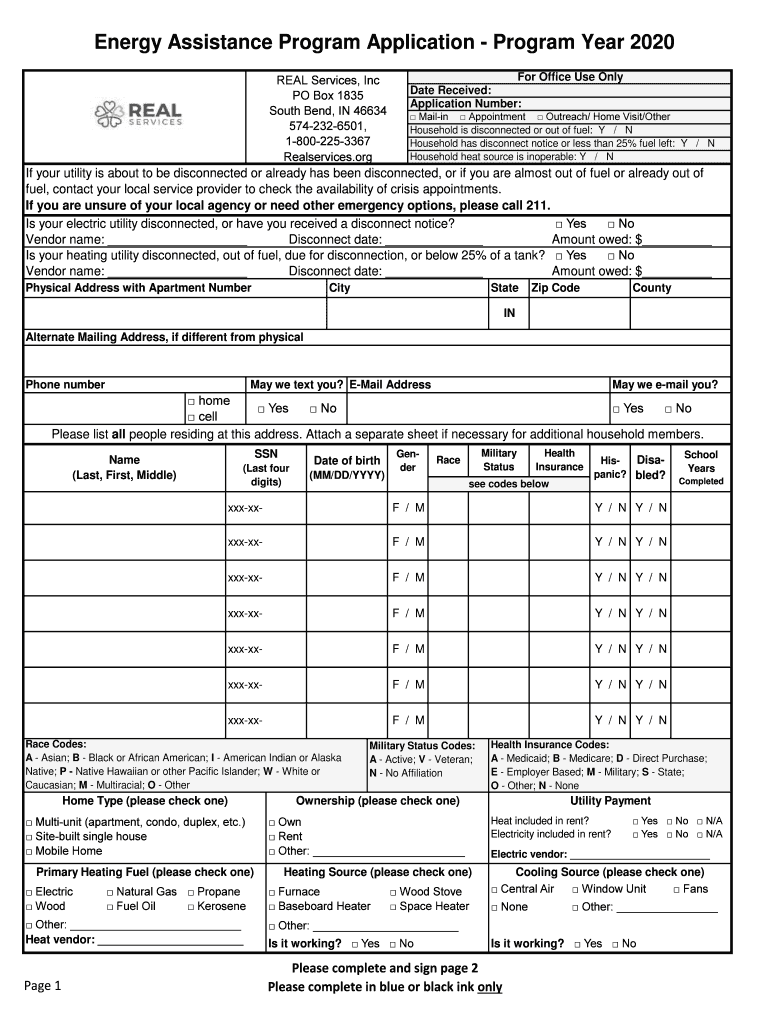
- Begin by filling in your contact information, including your physical address and alternate mailing address if applicable. Ensure all fields are completed accurately.
- Indicate your household's utility status by answering the questions regarding disconnection notices and fuel levels. Provide vendor names and amounts owed where required.
- List all household members, including their names, Social Security numbers (last four digits), dates of birth, and health insurance details. Use a separate sheet if necessary.
- Select your home type and primary heating fuel from the provided options. Make sure to check if heat is included in your rent.
- Complete the income section by checking all applicable sources of income received in the past three months. Include any child support payments as well.
- Review all sections for completeness before signing at the bottom of page two. Attach any required supporting documents as specified.
Start using our platform today to fill out your real services online application for free!
It's free
See more real services online application versions
| Versions | Form popularity | Fillable & printable |
|---|---|---|
| 2020 | 4.8 Satisfied (180 Votes) |
Got questions?
What is the best way to electronically sign my real services application?
A lot of software applications are available on the market for document editing and signing. DocHub is one of the most in-demand online solutions that comply with all data protection and compliance requirements and guarantees your eSigned paperwork is legally enforceable. All you need to give it a try is to register an account, upload your real services application, fill out the required details, and click Sign. Create your eSignature by typing, drawing it, uploading its picture to your document, or scanning a unique QR code.
Can I edit real services energy assistance on my phone?
As a comprehensive document modifying platform, DocHub is accessible on smart phones. Open DocHub in your choice of mobile browser and employ our smart mobile-friendly toolset to fill out your real services energy assistance.
Security and compliance
At DocHub, your data security is our priority. We follow HIPAA, SOC2, GDPR, and other standards, so you can work on your documents with confidence.
Learn more


