Type text, add images, blackout confidential details, add comments, highlights and more.
02. Sign it in a few clicks
Draw your signature, type it, upload its image, or use your mobile device as a signature pad.
03. Share your form with others
Send it via email, link, or fax. You can also download it, export it or print it out.
How to use or fill out VA Form 22-0989 with our platform
Ease of Setup
DocHub User Ratings on G2
Ease of Use
DocHub User Ratings on G2
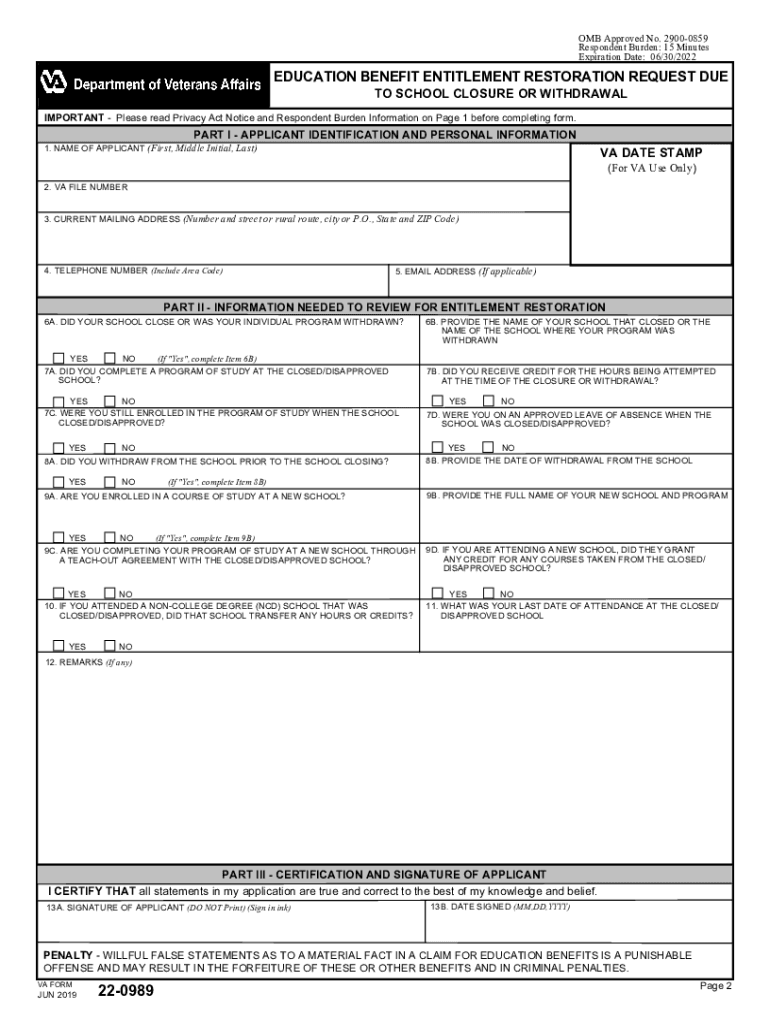
Click ‘Get Form’ to open VA Form 22-0989 in the editor.
Begin with Part I, where you will enter your personal information. Fill in your name, VA file number, current mailing address, telephone number, and email address if applicable.
Move to Part II. Answer questions regarding your school’s closure or withdrawal. For example, indicate whether your school closed or if your program was withdrawn by selecting 'Yes' or 'No' for Item 6A.
Continue answering the required questions in this section. Provide details about your enrollment status and any credits received at the time of closure in Items 7A through 10.
In Part III, certify that all statements are true by signing and dating the form. Ensure that you sign in ink as required.
Once completed, save your form and submit it via mail to the Muskogee Regional Processing Office or electronically through the Internet Inquiry System.
Start using our platform today to easily fill out VA Form 22-0989 for free!
New Brunswick Libraries U.S. Government Depository Item Number Split List Home Page. The Item Number Split List identifies categories of material that areRead more
Jun 30, 2020 This report was prepared under contract to the Department of Defense Environmental. Security Technology Certification Program (ESTCP).Read more
Agency Information Collection Activity: Education Benefit
Feb 16, 2024 Abstract: The VA Form 22-0989 allows students to apply for restoration of entitlement for VA education benefits used at a school that closed,Read more
Cookie consent notice
This site uses cookies to enhance site navigation and personalize your experience.
By using this site you agree to our use of cookies as described in our Privacy Notice.
You can modify your selections by visiting our Cookie and Advertising Notice.