01. Edit your multi dose vial expiration calendar online
Type text, add images, blackout confidential details, add comments, highlights and more.

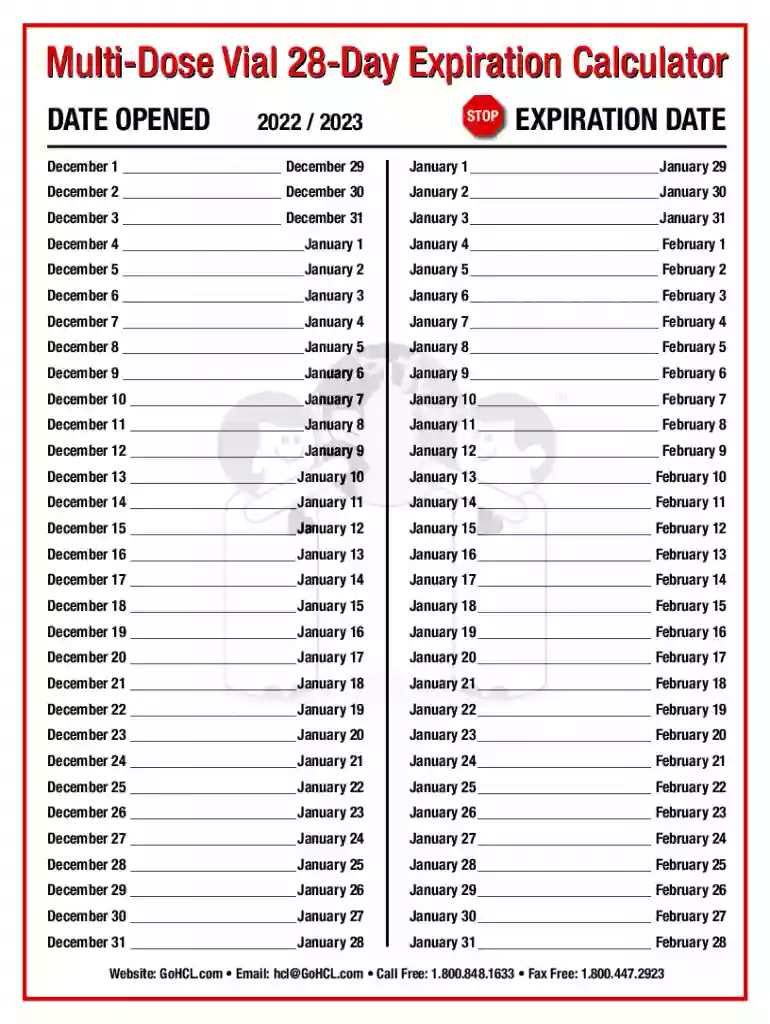
Type text, add images, blackout confidential details, add comments, highlights and more.

Draw your signature, type it, upload its image, or use your mobile device as a signature pad.

Send multi dose vial 28 day expiration via email, link, or fax. You can also download it, export it or print it out.
The term "form online" refers to any document or application that can be filled out and submitted digitally through an internet-based platform. These forms are widely used for various purposes, including personal, business, legal, and governmental processes. Filling them out typically involves entering data into predefined fields that may range from basic contact information to detailed responses depending on the purpose of the form. The convenience of the "form online" process is underscored by the ability to complete and submit documents without using paper, making it an essential tool in modern document management and workflow optimization.
Using an online form involves several straightforward steps designed to simplify the process of data entry and submission. First, users must access the form through an internet browser, often provided as a link or through an organization’s website. Next, individuals can select and enter their information into various types of fields, such as text boxes, checkboxes, and dropdown menus. Some forms offer interactive elements that guide the user to complete mandatory fields before allowing submission. Once all required sections are filled out, the form can be reviewed for accuracy and submitted by clicking a button, often labeled "submit" or "send".
Obtaining a form online is typically a hassle-free process. Most forms can be downloaded or accessed directly from official websites, such as governmental or organizational sites. This ensures the forms are up-to-date and legally compliant. Often, forms are accessible under sections labeled "Resources," "Forms," or "Documents." For easier access, forms are often categorized by use case or sector (e.g., tax forms, business applications). Upon locating the form, users can either complete it directly within the browser or download it for offline completion, depending on the form's design.
Using online forms offers numerous advantages, particularly in efficiency, accessibility, and ecological impact. First, they promote efficiency by reducing the time required to fill out, submit, and process documents. Accessibility is enhanced as forms can be completed from any device with internet connectivity, allowing users to participate in necessary processes remotely. Additionally, online forms reduce paper waste, contributing to environmentally sustainable practices by minimizing the use of paper, ink, and physical storage.
Several critical components are consistent in online forms regardless of their specific use:
Online forms are used by a wide range of individuals and organizations across various sectors. Businesses utilize them for customer interactions and data collection, while educational institutions use them for student admissions and records. Government bodies employ them for applications, registrations, and public feedback. The demographic breadth can include students, job seekers, employees, business owners, and citizens engaging with government services. Tailored options make it accessible for all users, regardless of technical proficiency.


Many real-world examples illustrate the versatility of online forms:
Online forms carry the same legal weight as their paper counterparts, provided they meet certain requirements. Compliance with regulations, such as the ESIGN Act in the U.S., ensures that electronic forms and signatures are recognized legally. This is particularly relevant for contracts, agreements, and any legally binding submissions. Users should be aware that adhering to specific submission guidelines and ensuring authenticity through electronic verification are critical for maintaining legal validity.
While online forms offer standardized capabilities, variations may occur due to state-specific regulations. Certain types of forms, especially those related to taxes, permits, and licenses, may have unique requirements depending on state laws. Users must be informed about regional compliance guidelines, which might affect elements like filing deadlines, submission methods, and required documentation. Engaging with official governmental resources or legal advisors can ensure full compliance.
When considering digital versus paper forms, several factors should influence the preference for online submissions. Digitally completed forms expedite processing and ensure that errors can be minimized through automated checks. Moreover, digital versions can be stored securely with cloud services, allowing easy retrieval and improved organization. However, certain scenarios might still mandate paper versions, such as when physical signatures are explicitly required by particular institutions or for specific transactions.
We've got more versions of the multi dose vial expiration calendar form. Select the right multi dose vial expiration calendar version from the list and start editing it straight away!
At DocHub, your data security is our priority. We follow HIPAA, SOC2, GDPR, and other standards, so you can work on your documents with confidence.