




01. Edit your form online
Type text, add images, blackout confidential details, add comments, highlights and more.

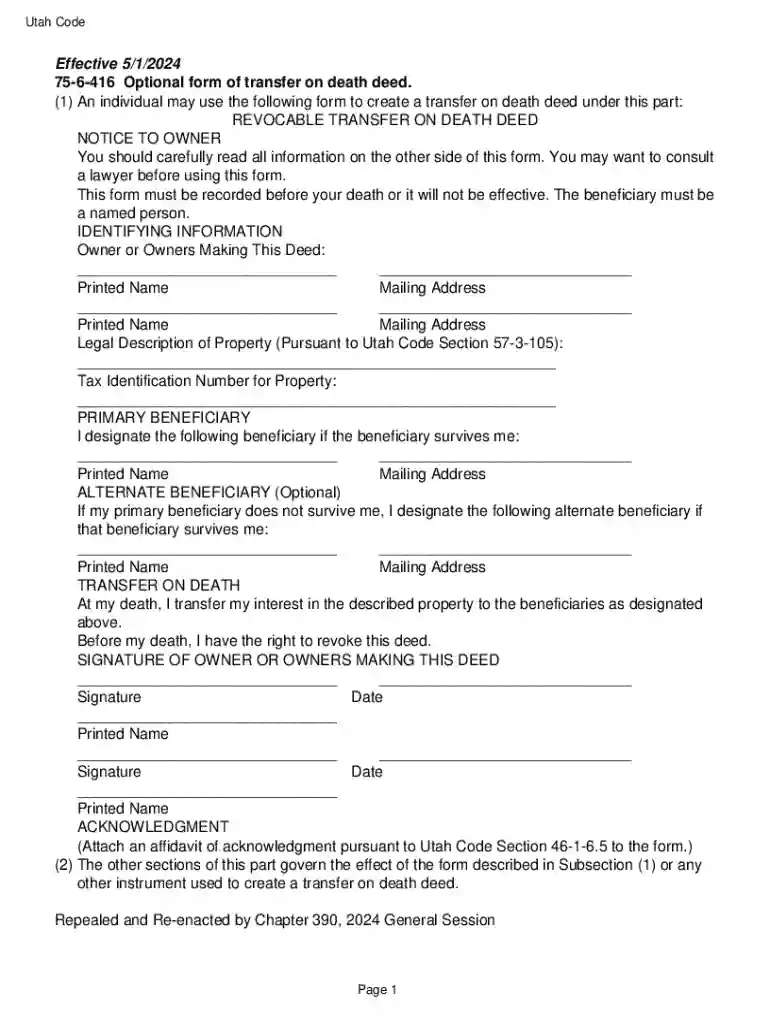
Type text, add images, blackout confidential details, add comments, highlights and more.

Draw your signature, type it, upload its image, or use your mobile device as a signature pad.

Send it via email, link, or fax. You can also download it, export it or print it out.
The term "form online" refers to the digital formats of documents designed to gather information or facilitate transactions over the internet. These forms cater to a wide range of applications, from tax submissions and legal agreements to simple sign-up sheets. They provide a convenient and efficient alternative to traditional paper forms, allowing users to fill out, submit, and manage their documents through digital platforms. Online forms are typically integrated with various functionalities to enhance user interaction, such as autofill features, real-time validation, and the ability to upload attachments.
Using a form online involves several straightforward steps. Users begin by accessing the document through a digital platform, such as DocHub, which enables interaction with the form seamlessly. Once the form is open, users can fill in the required fields, which may include personal information, specific details related to the form's purpose, or attached documents. Many platforms, including DocHub, provide tools for adding electronic signatures, ensuring legal and binding agreements. Upon completion, users can review their entries to avoid errors and omissions before submitting the form through digital submission tools, integration with email services, or by generating a downloadable version for offline handling.
To obtain a form online, users can typically download or access it via websites that host the specific document. For example, tax forms can be sourced from the IRS website, and legal forms might be available directly from governmental portals or legal document services like DocHub. Digital platforms often allow forms to be imported from cloud storage, ensuring accessibility from multiple devices and locations. Access may require user authentication, especially if the form contains sensitive data, ensuring the user's information remains secure.
Each of these steps is facilitated by user-friendly interfaces commonly found in platforms like DocHub, which guide users through the process with intuitive design and automated instructions.
Online forms typically consist of several key components, including:
These elements ensure users can efficiently complete their forms with minimal hassle while maintaining compliance with regulatory standards.
Online forms must adhere to relevant legal standards to ensure their enforceability. For instance, electronically signed documents should comply with the ESIGN Act in the United States, confirming their legal recognition. Businesses and individuals should verify that the platform used to handle forms online employs robust encryption and data protection measures, such as SSL encryption, to safeguard sensitive information. Some forms may require additional security measures, including multi-factor authentication or additional verification processes, to bolster legal standing and security.
Online forms may be subject to variations in rules and regulations depending on the state in which they are used. For example, real estate forms might have specific disclosure requirements depending on state laws, while notary forms may require a different process for electronic signatures. Users should consult relevant legal resources or legal counsel to ensure compliance with local laws and regulations. The flexibility of platforms like DocHub allows users to customize forms according to these state-specific rules, ensuring tailored and legally compliant documentation.
Online forms are versatile and can be applied in many scenarios, including:
These examples highlight the convenience of online forms in diverse industries, showcasing their adaptability to streamline processes and reduce the need for physical documentation.
DocHub and other online form platforms are often designed to be compatible with a variety of software applications, enhancing their utility. For instance, they can integrate with accounting software like QuickBooks to facilitate invoicing processes or connect with customer relationship management (CRM) systems to streamline data entry and client communication. The interoperability of these platforms ensures that users can incorporate online forms into existing workflows, maximizing efficiency and effectiveness across different systems.
While online forms offer numerous advantages, variations exist to cater to different needs:
Each alternative provides unique benefits, accommodating users who may prefer or require different form submission formats due to accessibility, technology constraints, or personal preference.
Various businesses can significantly benefit from using online forms, particularly:
These sectors can leverage the efficiency and flexibility offered by online forms to enhance operational workflows, reduce errors, and improve overall productivity.
We've got more versions of the Utah Transfer on Death Deed Form form. Select the right Utah Transfer on Death Deed Form version from the list and start editing it straight away!
At DocHub, your data security is our priority. We follow HIPAA, SOC2, GDPR, and other standards, so you can work on your documents with confidence.


by S Emrick 2018 Cited by 14 A transfer on death deed is a form of deed that allows real property assets to pass at death outside of the probate process.
An individual may use the following form to create a transfer on death deed. This form must be recorded before your death or it will not be effective. The


