




01. Edit your form online
Type text, add images, blackout confidential details, add comments, highlights and more.

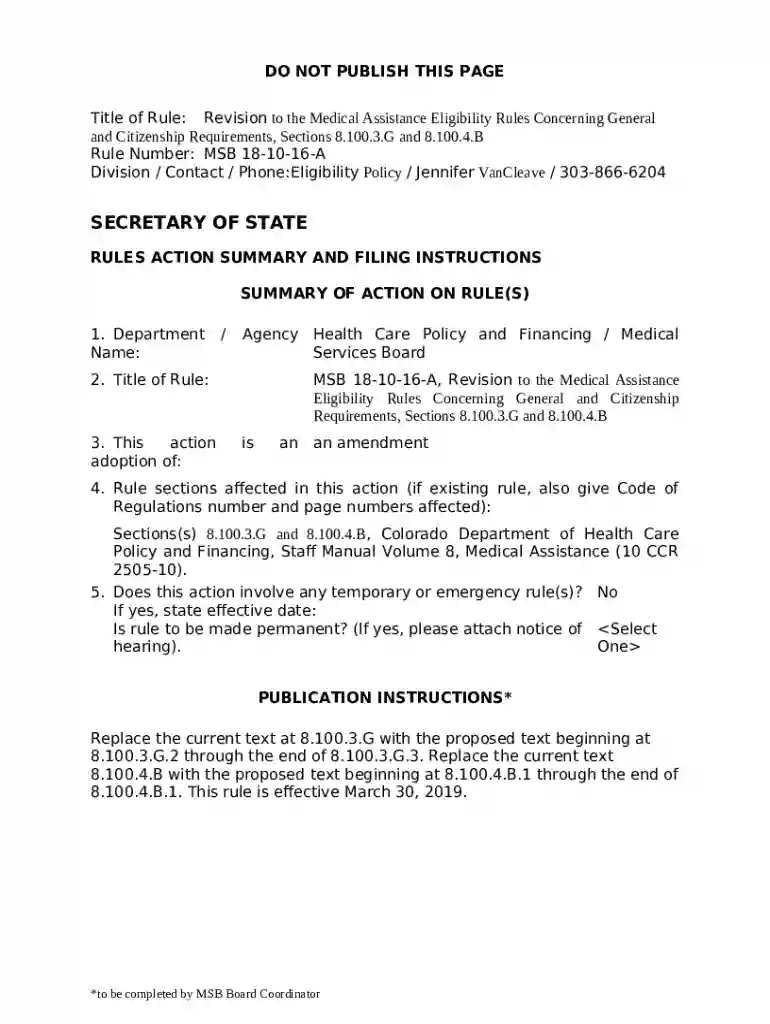
Type text, add images, blackout confidential details, add comments, highlights and more.

Draw your signature, type it, upload its image, or use your mobile device as a signature pad.

Send it via email, link, or fax. You can also download it, export it or print it out.
The "Verify Lawful Presence Interface - Language Update - OP Forms" refers to a structured process enabled by a set of documents used primarily for verifying an individual’s immigration status within the United States. These forms facilitate the electronic verification of lawful presence as required under certain government programs. By ensuring compliance with the Department of Homeland Security and the Centers for Medicare and Medicaid Services, these forms are pivotal in maintaining updated citizenship data without changing eligibility criteria for non-citizens.
To effectively use these forms, the process begins with accessing the relevant documents via authorized interfaces. Users must comply with federal guidelines that define how each section of the form should be completed. The interface typically allows for the input of personal details, including citizenship status and legal documentation numbers, ensuring all required fields are filled accurately.
These forms serve as an official channel for lawful presence verification required for various federal benefits and services. Their legal use aligns with ensuring that non-citizens comply with U.S. immigration laws when accessing government programs. All data submitted may be subject to legal checks by authorized government bodies.
Different states may enforce unique requirements or additional paperwork needed alongside federal guidelines. These variations might include state-specific identification numbers or local verification protocols. Users must be aware of their state’s particular guidelines to ensure full compliance during the form submission process.
Failure to accurately complete and submit the required forms can result in penalties, such as denial of access to federal benefits, fines, or legal action. Non-compliance may also trigger additional audits or investigations by the DHS, ensuring adherence to immigration standards.
We've got more versions of the Verify Lawful Presence Interface - Language Update - OP Forms form. Select the right Verify Lawful Presence Interface - Language Update - OP Forms version from the list and start editing it straight away!
| Versions | Form popularity | Fillable & printable |
|---|---|---|
| 2020 | 4.5 Satisfied (26 Votes) |
At DocHub, your data security is our priority. We follow HIPAA, SOC2, GDPR, and other standards, so you can work on your documents with confidence.
by F Derakhshan 2023 Cited by 2 The TEE programming language requirement is driven by having to: (a) interface with the OS kernel and device driver components which are mostly written in C forRead more
Apr 2, 2025 The designated school official must update Form I-20 to indicate an OPT recommendation. F-1 students must obtain an EAD from USCIS before they
PBX System provides a web management portal that allows you to quickly set up and manage the system. This topic describes how to log in to PBX management por


