




01. Edit your form online
Type text, add images, blackout confidential details, add comments, highlights and more.

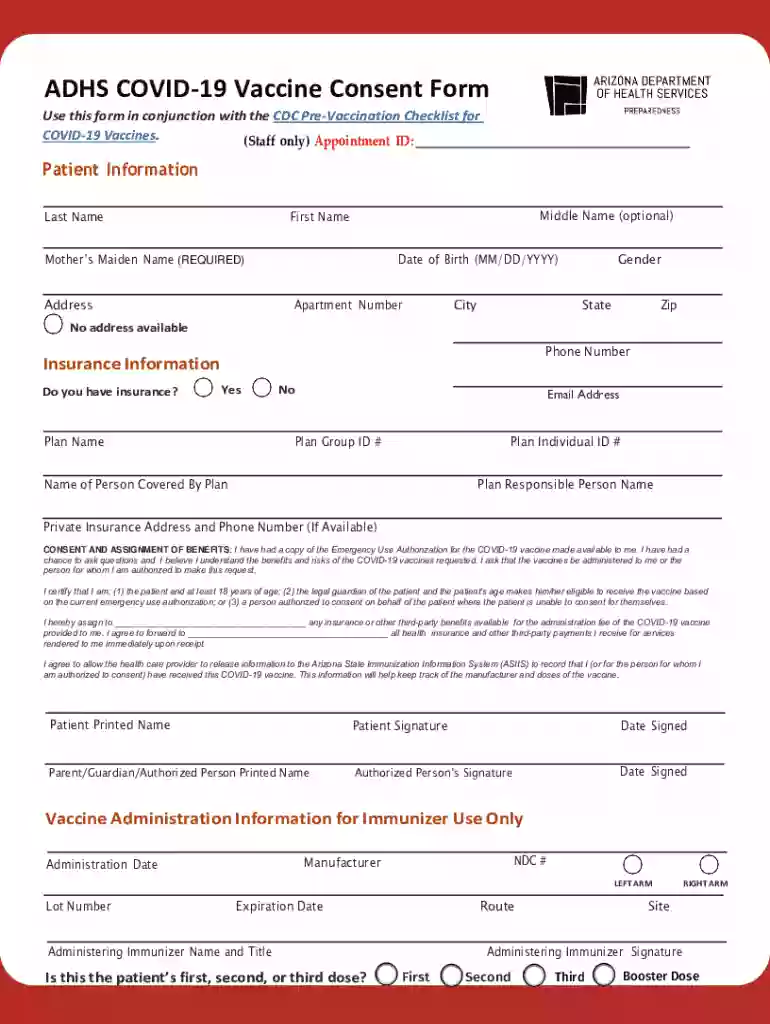
Type text, add images, blackout confidential details, add comments, highlights and more.

Draw your signature, type it, upload its image, or use your mobile device as a signature pad.

Send it via email, link, or fax. You can also download it, export it or print it out.
The term "form online" refers to the digital version of traditional paper forms that have been adapted for electronic completion and submission. These online forms can range widely in their purposes and complexity, serving various industries and needs. From consent forms and applications to financial and legal documents, online forms have become a standard tool for efficient data collection and processing in the digital age. Utilizing an intuitive interface, they allow users to input information, attach necessary documents, and submit the form with ease. This digital shift enhances accessibility and expedites form handling.
Using online forms typically involves accessing a form via a web link, which could be sent through email or found on a website. Once opened, users will navigate through the fields, carefully inputting the required data. Here's a step-by-step process for using forms online effectively:
Obtaining an online form often requires navigating to a trusted source, like an organization's official website or an email link received from a credible sender. Depending on the type of form, users might need to create an account or log in to access it. Steps to obtain an online form generally include:
Completing an online form efficiently ensures accuracy and expedites processing. Here's a structured guide:
Opting to use an online form offers numerous benefits compared to traditional paper methods. Key advantages include:
A wide array of individuals and organizations utilize online forms for various purposes. Common users include:
Several essential terms are associated with online forms:
Online forms are governed by legal frameworks ensuring their recognition and enforceability. In the U.S., the E-SIGN Act provides electronic signatures the same legal status as handwritten signatures, granting legitimacy to online forms for contracts, consent, and official statements. It's vital to ensure that forms are hosted on secure platforms and comply with privacy laws, such as HIPAA for health-related forms, to protect sensitive data.
We've got more versions of the ADHS COVID-19 Vaccine Consent Form form. Select the right ADHS COVID-19 Vaccine Consent Form version from the list and start editing it straight away!
At DocHub, your data security is our priority. We follow HIPAA, SOC2, GDPR, and other standards, so you can work on your documents with confidence.

Informed consent is supposed to occur before any medical procedure, including receipt of a vaccine. Families are given information called a Vaccine
COVID-19 may be a disease of the nicotinic cholinergic system. Nicotine improves working memory via augmenting nicotine may have a beneficial effect on
All providers submitting claims for the administration fee for COVID-19 vaccines must use the CMS 1500 claim form or the 837P format.


