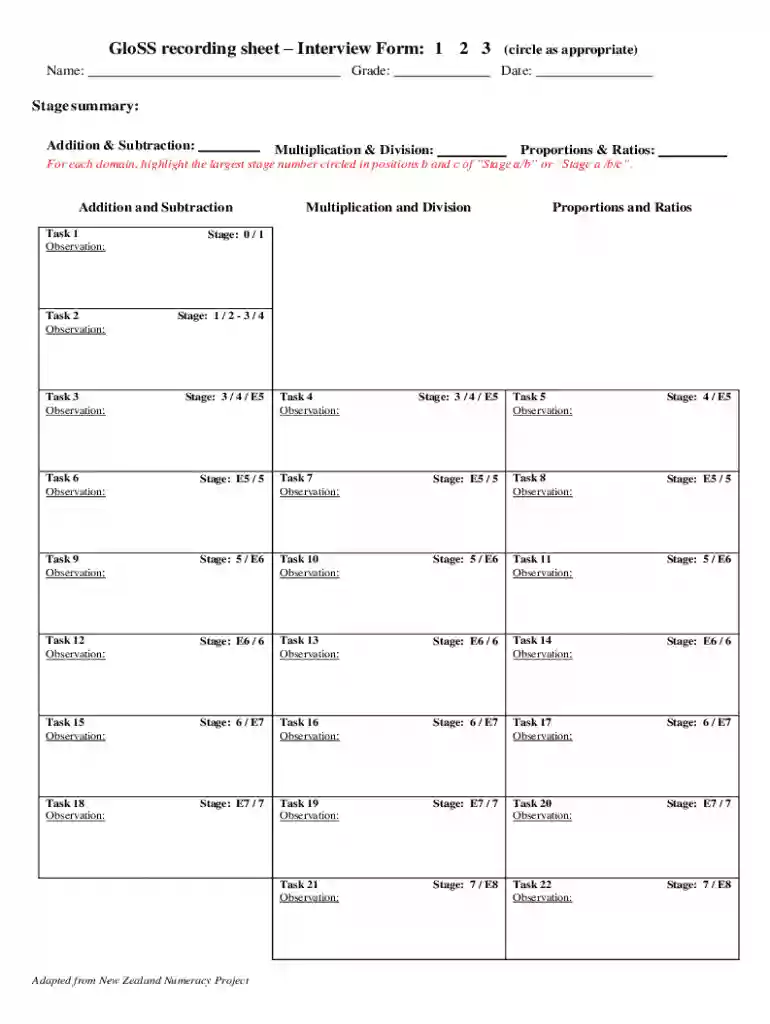
Understanding the GloSSRecordingSheet Doc
The GloSSRecordingSheet doc, or Global Strategy Stage Recording Sheet, is an educational document utilized for assessing students' mathematical abilities. This form is primarily used to track progress in various mathematical domains, such as Addition & Subtraction, Multiplication & Division, and Proportions & Ratios. Educators rely on it to systematically record observations and stage numbers for different tasks, making it an essential tool for gauging student development and proficiency in numeracy.
Key Elements of the GloSSRecordingSheet Doc
- Task Observations: Spaces for educators to record detailed observations of student performance during mathematical tasks.
- Stage Numbers: A system to categorize and track students' proficiency levels via specific stage numbers associated with their performance.
- Domains Covered: Focus on crucial mathematical areas — Addition & Subtraction, Multiplication & Division, Proportions & Ratios.
- Progress Tracking: Designed to follow student growth across different stages, providing a clear overview of their learning trajectory.
How to Use the GloSSRecordingSheet Doc
The GloSSRecordingSheet doc is used by educators to assess and document student progress in mathematics:
- Select Domain: Begin by choosing the mathematical domain to assess.
- Conduct Task: Involve students in tasks designed to evaluate their understanding and skills.
- Record Observations: Note detailed observations, focusing on how students complete tasks and their problem-solving strategies.
- Assign Stage Numbers: Use provided guidelines to assign stage numbers, reflecting each student’s proficiency.
- Review Progress: Regularly review documented data to identify trends in student learning and areas needing improvement.
Steps to Complete the GloSSRecordingSheet Doc
- Preparation: Familiarize yourself with the domains and tasks in the GloSSRecordingSheet doc.
- Task Assignment: Assign mathematical tasks to students that align with the domains being assessed.
- Observation and Documentation: Observe student performance and document their strategies and outcomes in the sheet.
- Evaluation: Use observations and stage numbers to evaluate student progress.
- Feedback and Strategy Adjustment: Provide feedback to students and adjust teaching strategies as per the recorded data.
Why Use the GloSSRecordingSheet Doc
The GloSSRecordingSheet doc offers a structured approach to documenting and analyzing students’ mathematical abilities. It helps educators:
- Identify Strengths and Weaknesses: Quickly detect which areas students excel in or struggle with.
- Tailor Instruction: Adjust teaching strategies to meet individual student needs based on data.
- Track Growth Over Time: Monitor how students progress through mathematical stages, supporting long-term educational planning.
Software Compatibility with the GloSSRecordingSheet Doc
While the GloSSRecordingSheet doc is primarily a manual form, educators often seek to digitize this data for ease of analysis. Platforms like DocHub can facilitate this by allowing:
- PDF Editing: Convert the physical form to a digital version for easier annotation and storage.
- Cloud Integration: Import forms from cloud services like Google Drive for streamlined access and sharing.
- Form Creation Tools: Utilize features for annotation and form field management to enhance the digital GloSSRecordingSheet doc experience.
Digital vs. Paper Version of the GloSSRecordingSheet Doc
- Digital Version: Allows for easy sharing, better editing capabilities, and integration with educational data management systems. Enhances data analysis and collaborative review processes among educators.
- Paper Version: Useful in environments with limited digital access, allows immediate documentation during classroom activities but requires manual storage and can be more cumbersome for data analysis.
Practical Examples of Using the GloSSRecordingSheet Doc
- Case Study 1: A classroom where teachers track student improvement in multiplication through described observations and stage numbers, adapting methods based on data insights.
- Case Study 2: A school district using the collected data to refine its teaching curriculum and resources distribution by identifying common deficiencies in mathematical comprehension.
These detailed examples illustrate how the GloSSRecordingSheet doc plays a vital role in educational settings focused on enhancing student learning experiences and outcomes in mathematics.