




01. Edit your form online
Type text, add images, blackout confidential details, add comments, highlights and more.

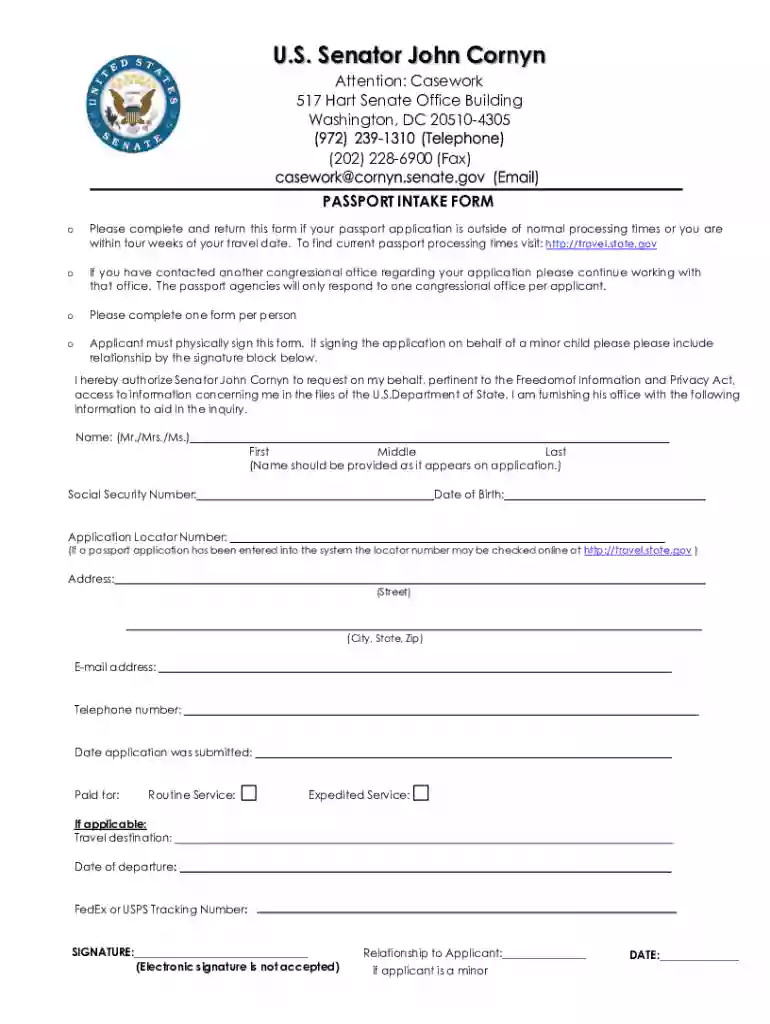
Type text, add images, blackout confidential details, add comments, highlights and more.

Draw your signature, type it, upload its image, or use your mobile device as a signature pad.

Send it via email, link, or fax. You can also download it, export it or print it out.
The Passport Intake Form is primarily utilized for streamlining communication with U.S. Senator John Cornyn's office regarding passport-related inquiries. It functions as an official document to assist individuals who encounter delays in their passport applications or are nearing their travel dates. Designed to facilitate a structured approach to problem-solving, the form allows applicants to provide relevant details that aid in the inquiry process with the U.S. Department of State.
The form acts as a formal gateway to seek expedited assistance, ensuring that essential information is gathered accurately and promptly. This facilitates efficient communication between applicants and the office, potentially accelerating the resolution of passport issues. Individuals use this structured approach to outline their situations comprehensively, ensuring no critical detail is overlooked.
Completing the Passport Intake Form requires careful attention to detail to ensure all necessary information is accurately provided. Here is a step-by-step guide to assist applicants in navigating the process:
Collect Your Information: Before beginning, gather essential personal details such as your full name, date of birth, and passport application number, if available. This will ensure a smooth completion process.
Fill Out Personal Details: The form will prompt you to provide your contact information, including your current address, phone number, and email. Ensure these details are current to facilitate prompt communication.
State the Issue: Clearly describe the nature of your inquiry or issue. This section is crucial as it informs the Senator’s office about the specific assistance needed. Include any previous communication with the Department of State that might be relevant.
Sign the Form: A physical signature is mandatory to validate the form. This ensures the authenticity of your request and complies with internal processing requirements.
Attach Required Documentation: Gather any supporting documents that substantiate your request. Common examples include proof of travel plans or any correspondence with passport agencies.
Submit the Form: Follow the specified submission method—mail, email, or in-person delivery as per the office’s requirements. Ensure that your submission method aligns with any guidelines provided for expedited processing.
The legal significance of the Passport Intake Form lies in its role as a formal document used to seek intervention from a U.S. Senator's office. This form should be used responsibly, only in contexts where individuals face genuine delays or complications in their passport applications.
Applicants should be aware that by signing the form, they declare the provided information to be true and correct to the best of their knowledge. Misrepresenting facts on the form could lead to complications not only in the assistance process but also potential legal repercussions. Proper use for the intended purpose is crucial to ensure the validity of the process and safeguard the integrity of assistance provided by the Senator’s office.
Understanding the structure of the Passport Intake Form can help applicants provide the most accurate and relevant information. Key elements typically included in the form are:
These elements work together to provide a seamless channel for assisting individuals with passport-related troubles.
The primary users of the Passport Intake Form are U.S. citizens whose passport applications face unexpected delays, potentially jeopardizing travel plans. The form facilitates a structured approach to seeking expedited assistance, aimed at ensuring that travelers receive their documentation in a timely manner.
Frequent travelers, professionals with impending international commitments, or individuals facing emergency travel requirements often rely on this form to secure necessary interventions for passport-related delays. The form is equally useful for families or groups who need a coordinated effort to resolve collective issues with their passport applications.


Accessing the Passport Intake Form is a straightforward process, designed to be as user-friendly as possible to ensure applicants can quickly secure assistance. The form is available through Senator John Cornyn's official website, typically located in the constituent services section dedicated to passport assistance.
For those unable to access the internet, contacting the Senator’s local office via phone can provide alternative arrangements for obtaining the form. Staff members are trained to guide constituents through the process, ensuring everyone has equitable access to this crucial service.
Providing the correct documentation along with the Passport Intake Form is essential for a smooth and effective resolution process. Applicants should attach:
These documents collectively strengthen the applicant’s case, allowing the Senator’s office to act swiftly and effectively.
Using the Passport Intake Form is not limited to a single scenario. For example, a business executive experiencing sudden delays with a passport renewal might use the form to prevent the cancellation of international meetings. Similarly, a family planning a long-awaited vacation could seek assistance if their child’s passport has not arrived close to their departure date.
These scenarios illustrate the utility of the form across various dependent travel plans, highlighting its importance in ensuring timely receive of passport documentation. Through such structured forms, individuals can navigate bureaucratic bottlenecks more effectively to secure their travel plans.
We've got more versions of the Passport Intake Form form. Select the right Passport Intake Form version from the list and start editing it straight away!
At DocHub, your data security is our priority. We follow HIPAA, SOC2, GDPR, and other standards, so you can work on your documents with confidence.
Proof of U.S. citizenship is required for a new passport. Visit the U.S. Department of States website for application details. call 1-877-487-2778.
Please complete and return this form if your passport application is outside of normal processing times or within four weeks of your travel date.


