Type text, add images, blackout confidential details, add comments, highlights and more.
02. Sign it in a few clicks
Draw your signature, type it, upload its image, or use your mobile device as a signature pad.
03. Share your form with others
Send proforma pdf via email, link, or fax. You can also download it, export it or print it out.
How to use or fill out proforma invoice pdf with our platform
Ease of Setup
DocHub User Ratings on G2
Ease of Use
DocHub User Ratings on G2
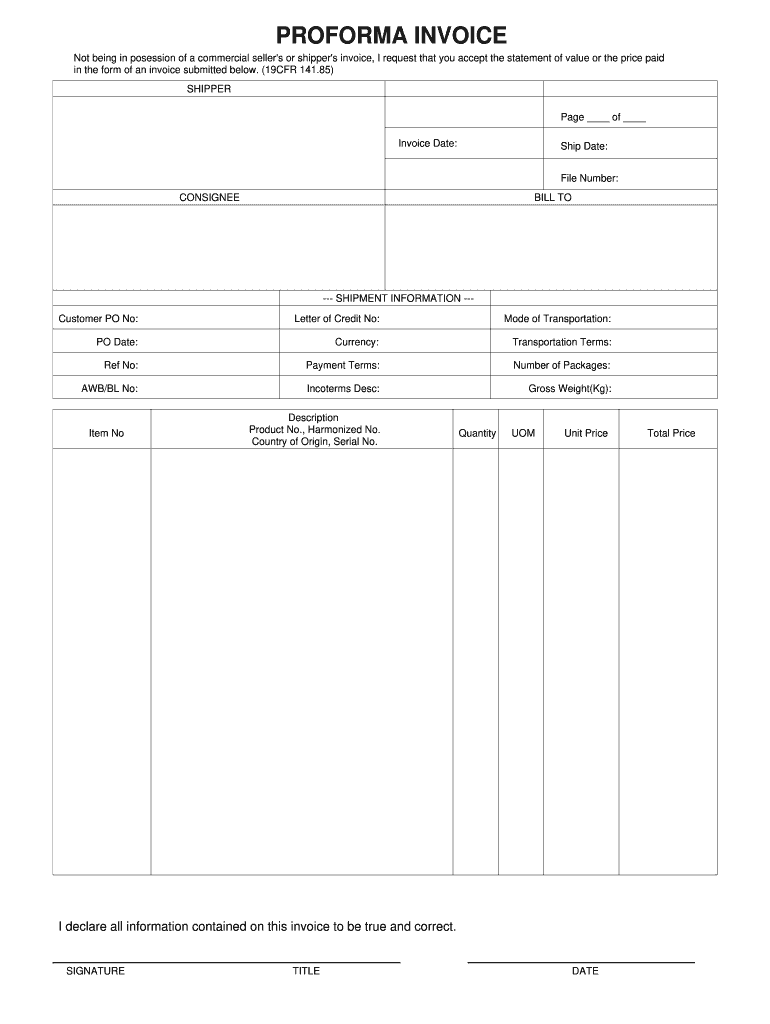
Click ‘Get Form’ to open the proforma invoice in the editor.
Begin by entering the 'Invoice Date' and 'Ship Date' at the top of the form. This information is crucial for record-keeping.
Fill in the 'Shipper' and 'Consignee' sections with relevant details, ensuring accuracy for shipping purposes.
In the 'Shipment Information' section, provide your Customer PO No, Letter of Credit No, Mode of Transportation, and other required fields. This helps in tracking and managing shipments effectively.
List each item being shipped under 'Item No', including descriptions, product numbers, country of origin, quantity, unit price, and total price. Ensure all details are correct to avoid discrepancies.
Finally, sign and date the invoice at the bottom to certify that all information is true and correct before submitting it.
Start using our platform today to streamline your proforma invoice process for free!
Mar 4, 2020 Purchaser agrees to pay any sales or use tax. No credit will be issued for returned merchandise without our consent. This invoice is aRead more
Cookie consent notice
This site uses cookies to enhance site navigation and personalize your experience.
By using this site you agree to our use of cookies as described in our Privacy Notice.
You can modify your selections by visiting our Cookie and Advertising Notice.