




Here's how it works



How to use or fill out PDF Illinois Probation Court Services Employment Promotion Application

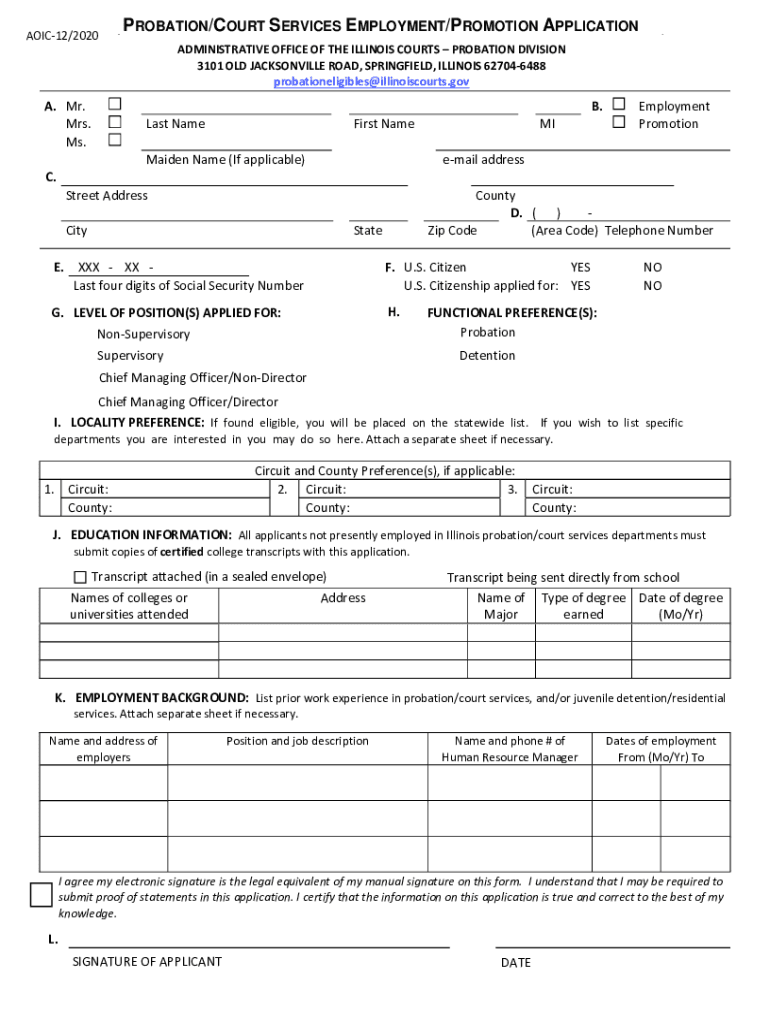
- Click ‘Get Form’ to open the PDF Illinois Probation Court Services Employment Promotion Application in our editor.
- Begin by filling out your personal information in Section B. Include your last name, first name, and any applicable maiden name. Ensure you select the correct title (Mr., Mrs., Ms.) and provide your email address and contact details.
- In Section C, indicate whether you are a U.S. citizen or if you have applied for citizenship. This is crucial for eligibility.
- Section D requires you to specify the level of position you are applying for—either non-supervisory or supervisory—and your functional preferences such as probation or detention.
- For Section J, provide your educational background. If required, attach certified college transcripts either in a sealed envelope or indicate if they will be sent directly from the institution.
- In Section K, list your employment history relevant to probation/court services. Be sure to include employer names, positions held, and dates of employment.
- Finally, review all sections for accuracy before signing electronically in Section L. Your electronic signature serves as a legal equivalent to a handwritten one.
Start using our platform today to fill out your application easily and efficiently!
It's free
See more PDF Illinois Probation Court Services Employment Promotion Application versions
Got questions?
Can I draw my electronic signature to approve my aoic illinois?
Sure, electronically drawing your signature is appropriate, but only if you utilize a tool that complies with industry regulations and policies. Try DocHub, which guarantees eSignature validity under ESIGN and UETA requirements. All you need to eSign your aoic illinois is an account with DocHub and an internet connection. Once you open your document in our editor, click Sign and select the Draw option.
How do you create an e-signature for the aoic on iOS?
In addition to a comprehensive toolset for editing PDFs on mobile phones, DocHub enables you to sign your aoic along the way. Open our editor in your internet browser, make modifications using DocHub’s toolset, and complete your editing by eSigning the completed form.
How do I get off probation early in Illinois?
What do you need to be a probation officer in Illinois?
How much do probation officers make in Illinois?
Security and compliance
At DocHub, your data security is our priority. We follow HIPAA, SOC2, GDPR, and other standards, so you can work on your documents with confidence.
Learn more


