






Definition and Purpose of the JV-536 California 2008 Form
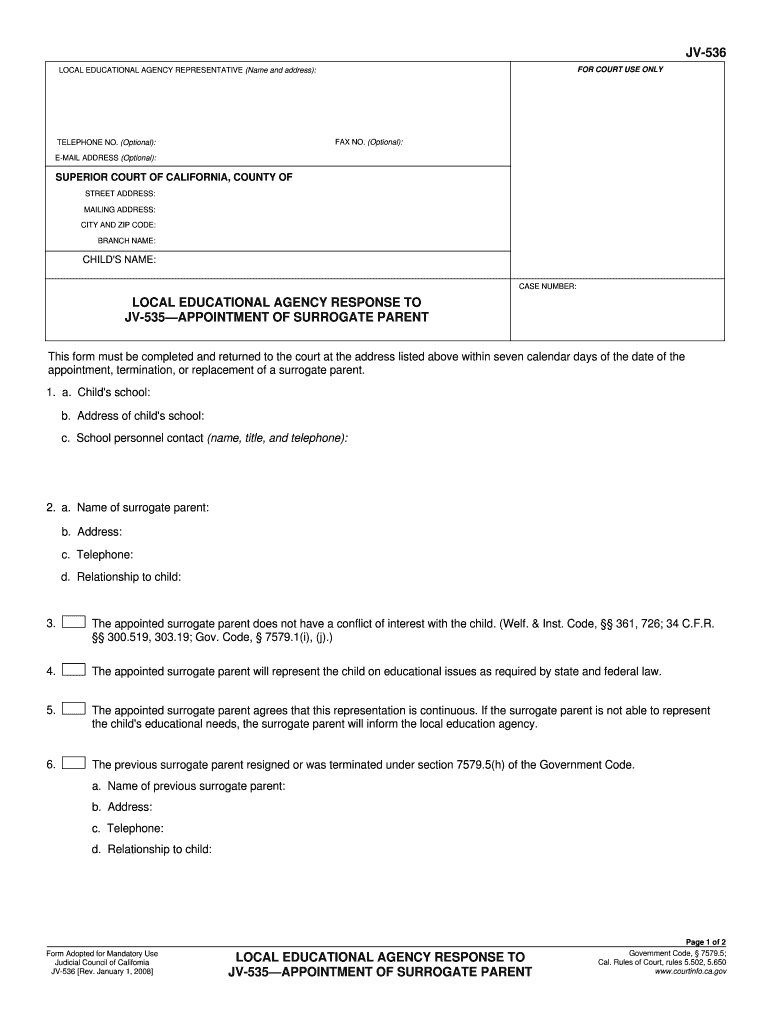
The JV-536 California 2008 Form is a legal document utilized by local educational agencies within California. It specifically addresses the process for appointing a surrogate parent for a child involved in legal proceedings. This form is essential as it holds details about the child and the appointed surrogate parent, confirming the latter's capability to represent the child's educational interests. The endorsement that the surrogate parent has no conflict of interest is also a crucial aspect of this document. It ensures that the surrogate can effectively advocate for the child's educational needs as mandated by California law.
How to Obtain the JV-536 Form
Acquiring the JV-536 California 2008 Form is straightforward and can be done through several channels:
- Local Court Offices: These forms are available at local court offices where legal proceedings involving children are handled.
- Official Websites: Some official state or educational websites may provide downloadable versions of the form.
- Legal Counsel: Attorneys involved in the child's case often have access to these forms and can provide them to relevant parties.
Key Elements of the JV-536 Form
Understanding the key elements of the JV-536 Form is crucial for proper completion:
- Child's Information: This includes the name, age, and specific educational needs of the child.
- Surrogate Parent's Details: The form necessitates details about the surrogate parent, including no conflict of interest assurances.
- Signature Field: The form requires signatures from the appropriate authorities to validate the appointment.
Detailed Completion Instructions
- Start with the child's details, ensuring accuracy as this information is foundational.
- Proceed to fill in the surrogate parent's information, focusing on any existing affiliations that might suggest a conflict of interest.
- Ensure signatures are obtained from the required authorities to finalize the form.
Steps to Complete the JV-536 Form
Completing the JV-536 California 2008 Form involves a number of steps designed to ensure precision and compliance with legal requirements:
- Gather Necessary Information: Collect all relevant details about the child and the surrogate parent.
- Fill in the Form: Use the gathered information to complete each section of the form meticulously.
- Submit for Approval: Once filled, the form should be submitted to the respective court for validation.
Subsection: Common Mistakes to Avoid
- Incorrect Information: Verify all personal data to avoid errors that could delay the process.
- Omitted Sections: Ensure no field is left blank unless it is explicitly optional.
- Delayed Submission: The form must be submitted within seven days of any change regarding the surrogate parent.
Legal Considerations of the JV-536 Form
The legal use of the JV-536 Form extends to several crucial areas:
- Conflict of Interest: The form serves to declare that the appointed surrogate has no potential conflicts of interest.
- Educational Advocacy: Legally binds the surrogate parent to advocate for the child's educational needs.
Permitted Legal Actions
- Court Submission: This form must be submitted to the appropriate court to initiate or confirm the surrogate appointment.
- Informational Use: Can be used by legal and educational bodies to stay informed about the appointment status and details.
Importance of the JV-536 California 2008 Form
Filling out and submitting the JV-536 California 2008 Form is vital for several reasons:
- Ensures Child Representation: Guarantees that the child involved in legal proceedings has a dedicated figure advocating for their education.
- Compliance with Legal Standards: Aligns with the requirements set by California law to protect the child's educational rights.
Who Typically Uses the JV-536 Form
The JV-536 Form is typically used by:
- Local Educational Agencies: Responsible for ensuring appropriate representation in educational matters.
- Courts: To document and verify the appointment of a surrogate parent.
- Surrogate Parents: To formally accept their role and responsibilities.


Examples of Using the JV-536 Form
The practical application of the JV-536 Form can be seen in several scenarios:
- Educational Planning: Local agencies use it to officially designate a person to manage the child's education.
- Legal Proceedings: Used during court cases to record and formalize the appointment of a surrogate.
- Interagency Coordination: Helps coordinate efforts between educational and legal systems to focus on the child's welfare.
By understanding and implementing the guidelines surrounding the JV-536 California 2008 Form, all parties involved can effectively contribute to the child's educational and legal support framework.