



Here's how it works



How to use or fill out ford business credit application pdf with our platform

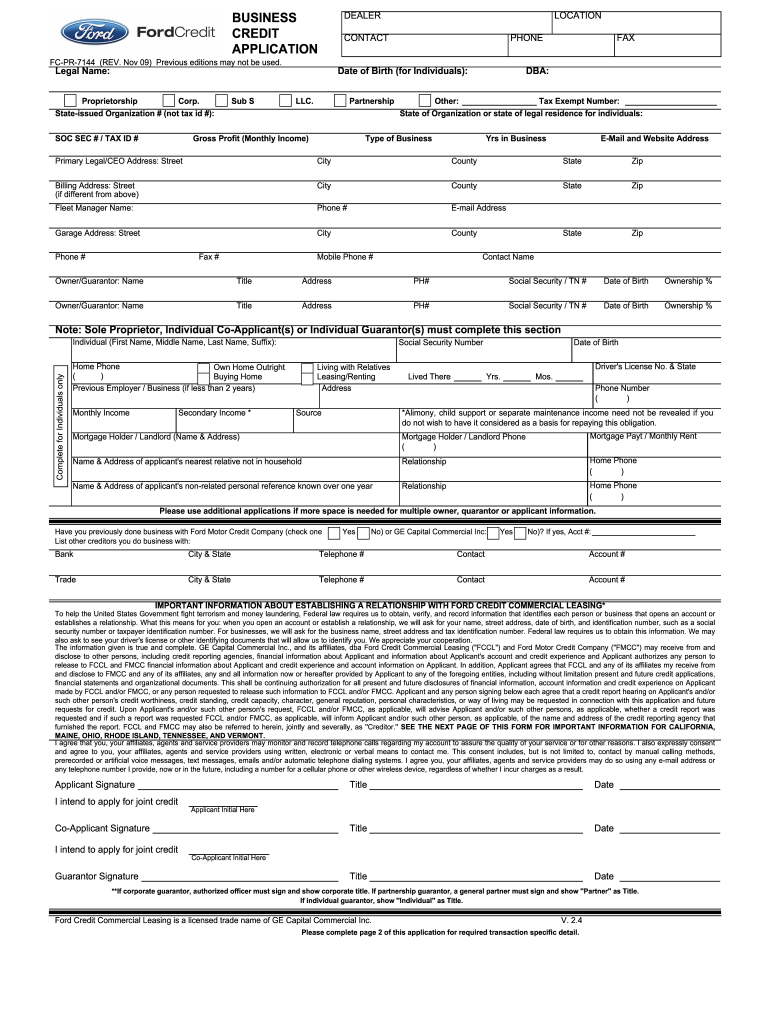
- Click ‘Get Form’ to open the ford business credit application PDF in our editor.
- Begin by entering the 'Legal Name' of your business and select the appropriate business structure (e.g., Corporation, LLC, etc.). Fill in the 'State-issued Organization #' and 'Tax ID #'.
- Provide contact information including 'Phone', 'Fax', and 'Email Address'. Ensure that all details are accurate for effective communication.
- Complete the sections regarding ownership. List each owner or guarantor's name, title, address, phone number, social security number, date of birth, and ownership percentage.
- If applicable, fill out individual applicant details such as home phone number and previous employer information. This section is crucial for personal credit assessment.
- Review the important information about establishing a relationship with Ford Credit Commercial Leasing. Ensure you understand what identification is required.
- Finally, sign and date the application at the bottom. If applying jointly, ensure both parties sign where indicated.
Start filling out your ford business credit application today using our platform for free!
It's free
Got questions?
Can I sign my ford business credit app on a mobile?
Of course, you’ll find many different applications for this on the web. However, if you need to eSign your ford business credit app without installing additional software, DocHub is the best choice you can make. This robust editor works on mobile devices just like on desktops. Open our editor in your preferred internet browser, register or log in to your account, and start managing your paperwork.
How to manage my ford credit app pdf from Gmail?
If your go-to electronic mail service is Gmail, you can easily integrate your DocHub editor into your work. Edit your ford credit app pdf with DocHub instruments and attach it to your drafts in Gmail. See how effortless it is to exchange papers and collaborate having a swift PDF editing solution at hand.
What credit bureau does Ford Motors use?
Where is my Ford Credit account number?
What is the easiest car dealership get approved?
Security and compliance
At DocHub, your data security is our priority. We follow HIPAA, SOC2, GDPR, and other standards, so you can work on your documents with confidence.
Learn more