







Definition & Meaning
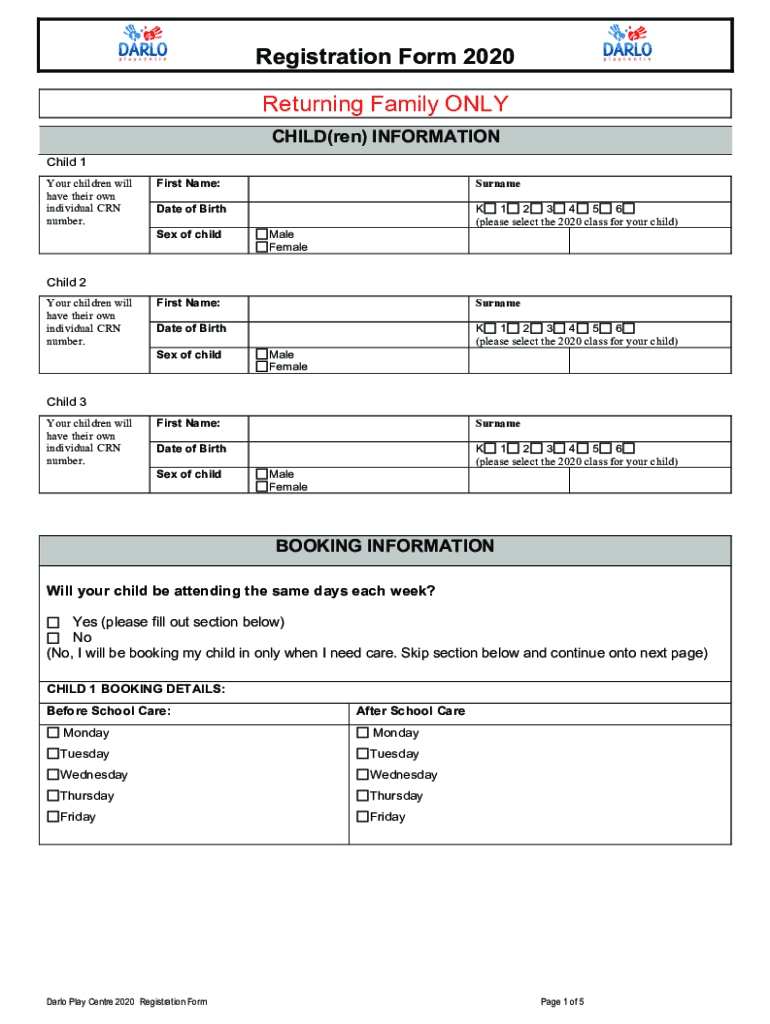
The "Registration Form 201 - Darlo Play Centre" is a crucial document for returning families enrolling their children in activities and programs at the Darlo Play Centre for 2020. It primarily serves to gather essential details about each child, ensuring the center has accurate information for class selection, child care services, and parental agreements. This form plays a fundamental role in organizing the flow of administrative tasks and securing vital consents related to privacy and medical emergencies.
How to Use the Registration Form 201 - Darlo Play Centre
Utilizing the "Registration Form 201 - Darlo Play Centre" involves a straightforward process tailored for ease and efficiency. Users start by downloading the form from the pertinent online portal or receiving it directly from the play center. The form is then filled out with accurate and up-to-date information about the child, including personal details, desired classes, and required care schedules. It’s also important to read through and understand the terms, consents, and policies before signing and submitting the form, which can typically be done either digitally or via mail.
Steps to Complete the Registration Form 201 - Darlo Play Centre
-
Personal Information: Enter the child's full name, date of birth, and gender. This section ensures the form is personalized and identifies the child in the center's records.
-
Class Selection: Specify the programs and classes the child will participate in during the enrollment year. This may include extracurricular activities, sports, or arts.
-
Child Care Booking: Indicate the required times for before and after school care. This helps the center in planning resources and staffing.
-
Parent Consent: Agree to policies concerning data privacy and medical emergencies. It's essential for legal compliance and the protection of both the child and the play center.
-
Fee Agreement: Confirm understanding and agreement of the fees associated with the child's participation. This ensures there are no discrepancies in billing and service expectations.
-
Signature and Date: Complete the form with a signature to validate the information provided and finalize the registration process.
Key Elements of the Registration Form 201 - Darlo Play Centre
- Personal Identification: Basic details about the child are used to maintain accurate records.
- Program Preferences: Options to select classes or activities that align with the child's interests and parental preferences.
- Emergency Contacts: Required fields for listing individuals to contact in case of an emergency.
- Consents and Agreements: Sections detailing the required parental consents and acknowledgments of center policies.
- Payment Details: Information capturing agreed payment methods and terms.
Required Documents
Several documents are necessary to complete the Registration Form 201 effectively. These include:
- Birth Certificate: To verify the child's age and identity.
- Proof of Residence: Confirmation of address, essential for residency-based program eligibility.
- Immunization Records: Mandatory for health safety and compliance with public health regulations.
Form Submission Methods (Online / Mail / In-Person)
The "Registration Form 201" supports multiple submission methods. Parents can opt to submit:
- Online: Upload the completed form via the play center's secure website portal.
- Mail: Send a hardcopy to the designated address provided by the play center.
- In-Person: Deliver the form directly to the center's administrative office during business hours.
Legal Use of the Registration Form 201 - Darlo Play Centre
The form must be used in accordance with U.S. federal and state laws governing children's programs and data privacy. Parents are bound by the clauses they agree to, particularly those involving emergency procedures and data handling consents. Additionally, the collection and processing of children's data must comply with the Children's Online Privacy Protection Act (COPPA) and similar regulations.
Digital vs. Paper Version
Both digital and paper versions of the Registration Form 201 have their individual merits:
-
Digital Version: Offers convenience and immediate submission capabilities. It allows for electronic signatures and swift form filling through online platforms like DocHub, ensuring security and compliance.
-
Paper Version: Provides a tangible format accessible to families without reliable internet access. This variant can be physically handed in, ensuring a direct reception confirmation.
Examples of Using the Registration Form 201 - Darlo Play Centre
Consider Lisa, who needs to register her twin daughters for after-school care and ballet classes. She downloads the form from the Darlo Play Centre website, fills in their details, selects the required services, and digitally signs the form using an electronic signature platform. Subsequently, she submits the form online and receives confirmation via email that the registrations are successful.
Similarly, John receives a paper version at an orientation event, completes it manually, and submits it in person to ensure all sections are accurately recorded before the deadline.




