
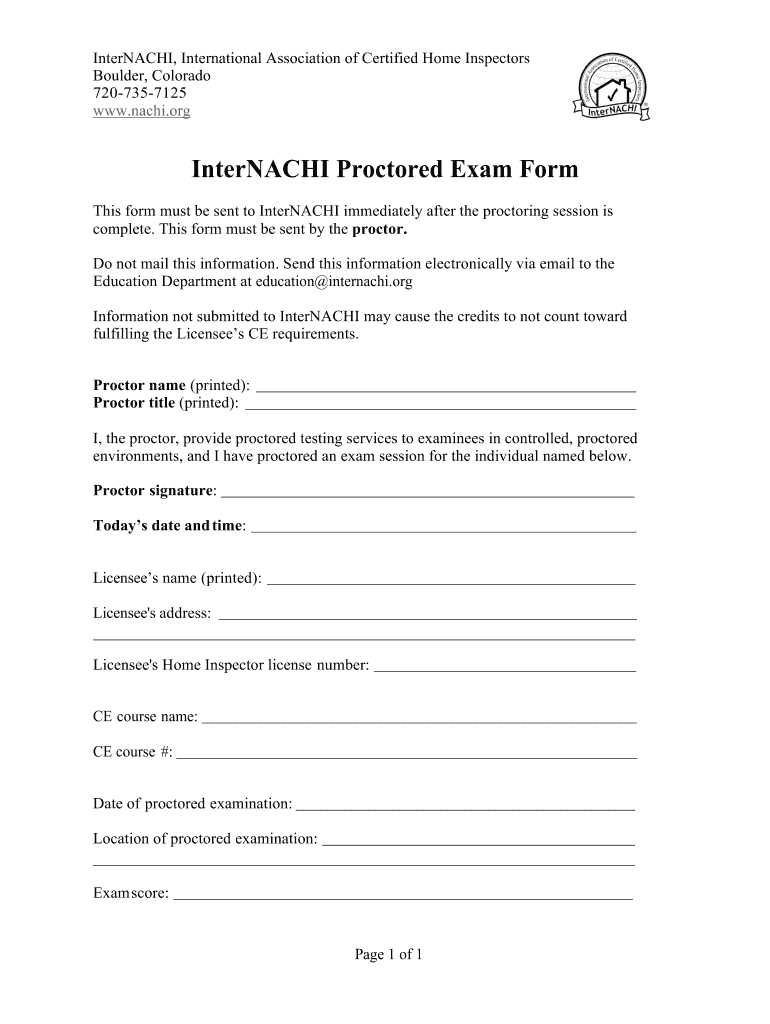







Definition and Purpose of the InterNACHI-Proctored-Exam-Form docx
The InterNACHI-Proctored-Exam-Form docx is a critical document designed for the proctor's use in authorizing and validating completed proctored exam sessions administered for InterNACHI certifications. It plays a vital role in documenting the proctor's information, licensee details, course description, and exam results. This form must be accurately completed to ensure that exam credits are properly recorded and count toward the licensee's continuing education requirements. The electronic format of the form supports easy submission and streamlined processing, enhancing both efficiency and security.
How to Use the InterNACHI-Proctored-Exam-Form docx
To effectively use the InterNACHI-Proctored-Exam-Form docx, follow these steps:
- Accessing the Form: Obtain the form by downloading it from the official InterNACHI website or receiving it from an approved proctoring organization.
- Completing Proctor Details: Fill in the proctor’s name, contact information, and certification number. Ensure accuracy to prevent processing delays.
- Adding Licensee Information: Enter the full name, contact information, and identification number of the licensee taking the exam.
- Course and Exam Details: Include precise information about the course title and code, as well as the date and location of the exam.
- Recording Exam Results: Complete the section detailing the exam outcome – whether the licensee passed or failed – alongside any relevant score.
- Electronic Submission: Save the form digitally and submit it via the designated online portal or email it to the specified InterNACHI address.
Steps to Complete the InterNACHI-Proctored-Exam-Form docx
Completing the InterNACHI-Proctored-Exam-Form docx involves several detailed steps, ensuring data integrity and procedural compliance:
- Verify Identity: Confirm the proctor's and licensee's identities to ensure that the form is filled out accurately.
- Digital Fill-Out: Use a document editor like DocHub to type directly into the provided fields, eliminating handwriting errors.
- Cross-Check Details: Review each entry for typos and mismatches. Correct data at this stage can save time later.
- Save Progress: Regularly save updates to avoid data loss. Intermittent saves prevent accidental erasure.
- Attach Supporting Documents: If required, include additional documents such as the exam schedule or proctor credentials.
- Submit Form: Upload or email the completed form to the official InterNACHI submission points by the given deadline.
Key Elements of the InterNACHI-Proctored-Exam-Form docx
The primary elements of the InterNACHI-Proctored-Exam-Form docx include:
- Proctor Information:
- Full name, certification number, contact details
- Licensee Information:
- Full name, identification number, contact details
- Course Details:
- Course title, number, and description
- Exam Information:
- Date of exam, location, time
- Results Section:
- Pass/fail status, score if applicable
- Submission Confirmation:
- Time-stamped receipt of submission for both proctor and InterNACHI records
These elements ensure that each party involved in the exam process is accounted for and that the necessary information is captured comprehensively.
Why Use the InterNACHI-Proctored-Exam-Form docx
Using the InterNACHI-Proctored-Exam-Form docx is essential due to several practical reasons:
- Compliance: Ensures adherence to standards for continuing education credits.
- Accuracy: Digital submission minimizes errors associated with manual entry.
- Efficiency: Streamlines the process of crediting certification courses.
- Record-Keeping: Provides a clear record for audit and verification purposes.
- Standardization: Facilitates uniform reporting across different proctors and exam sessions.
Who Typically Uses the InterNACHI-Proctored-Exam-Form docx
The form is typically used by:
- Certified Proctors: Individuals authorized to oversee and validate examinations.
- Licensees: Participants seeking certification or continuing education credits.
- Educational Institutions: Organizations offering InterNACHI-aligned courses.
- Certification Boards: Bodies responsible for issuing certifications based on exam results.


Software Compatibility with the InterNACHI-Proctored-Exam-Form docx
The document supports a variety of digital platforms, including:
- DocHub: Allows for seamless editing, signing, and storage of digital forms.
- Adobe Acrobat: Compatible for viewing, filling, and submission.
- Microsoft Word: Editable in .docx format for users requiring offline access.
The form’s flexibility in software compatibility ensures it meets a wide range of user environments and technical capabilities, optimizing accessibility and ease of use.
Penalties for Non-Compliance with InterNACHI-Proctored-Exam-Form docx
Non-compliance with the InterNACHI-Proctored-Exam-Form docx submission can result in:
- Delayed Certification: Potential postponement of education credits recognition.
- Invalid Exam Sessions: Exams administered without proper documentation may be deemed illegitimate.
- Financial Implications: Missed opportunities for professional advancement through uncredited courses.
- Professional Setbacks: Loss of professional credibility and potential employment consequences for missed requirements.




