







Definition and Meaning
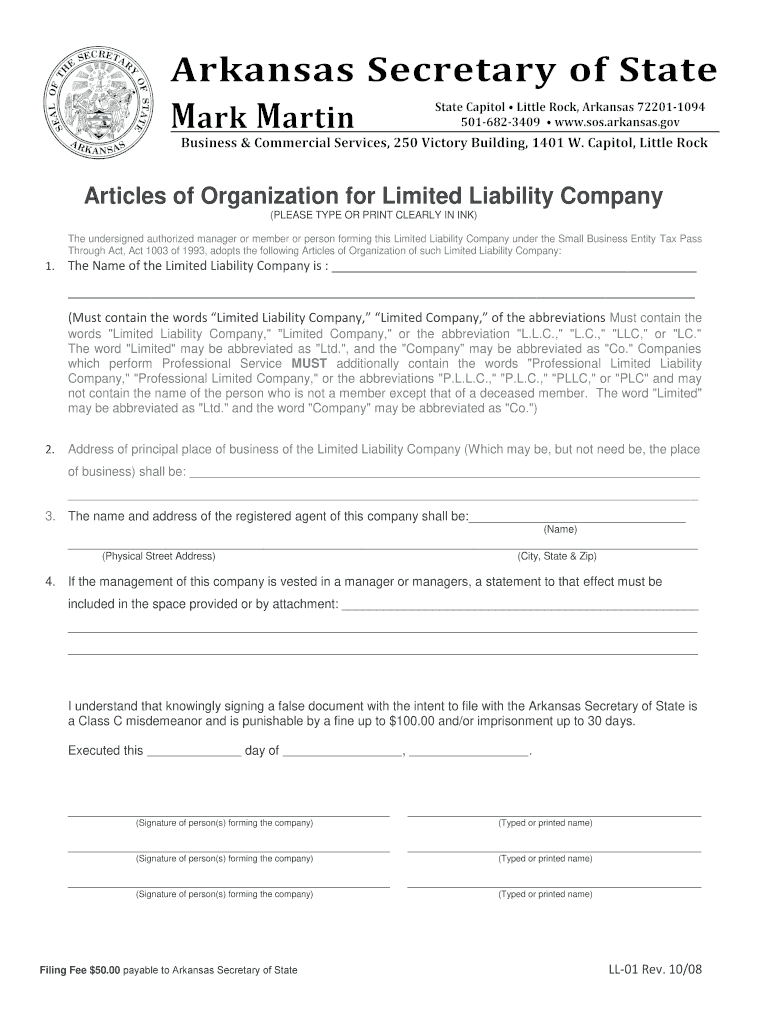
The LL 01 form, known as the Articles of Organization, is crucial for establishing a Limited Liability Company (LLC) in Arkansas. This form registers the company with the Arkansas Secretary of State, authorizing it to conduct business within the state. It outlines the LLC's name, purpose, and operational structure, serving as the foundational document for the company's creation. This form ensures that the business is compliant with state laws and provides legal recognition.
How to Use the LL 01 Form in Arkansas
Completing the LL 01 form involves several critical steps:
- Company Name: Ensure the LLC's name is unique and includes "Limited Liability Company" or an abbreviation.
- Registered Agent: Assign a registered agent with a physical address in Arkansas authorized to receive legal documents.
- Business Purpose: Clearly state the LLC's nature and purpose.
- Management Structure: Specify if the LLC is member-managed or manager-managed.
- Signatures: Obtain signatures from the organizer and, if applicable, the registered agent.
How to Obtain the LL 01 Form
The LL 01 form can be accessed through the Arkansas Secretary of State's website. It is available in both digital and paper formats, allowing for flexibility in how you prefer to complete it. You can download, print, and complete the form manually, or fill it out digitally if you choose. Online submission is typically more efficient, offering immediate processing acknowledgment.
Steps to Complete the LL 01 Form in Arkansas
- Download the Form: Access the Arkansas Secretary of State's website to download the form.
- Fill in Details: Provide the LLC's name, office address, and registered agent's details via the form fields.
- Identify the Organizers: List names and addresses of the LLC's organizers.
- Choose Management Type: Select whether the LLC will be member-managed or manager-managed.
- File the Form: Submit the document online for faster processing and pay any required filing fees, or mail it to the Secretary of State's office.
Key Elements of the LL 01 Form
The LL 01 form comprises several essential components:
- Name of the LLC: Ensure it is distinguishable from other entities.
- Registered Agent Information: Must be a resident or a registered business authorized in Arkansas.
- Principal Office Address: Physical and mailing addresses of the business.
- Duration of LLC: Define if the LLC is perpetual or has a predetermined duration.
Legal Use of the LL 01 Form
By filing the LL 01 form, businesses formally acknowledge their intent to operate as an LLC, thereby availing themselves of liability protection under state law. Ensuring accurate and honest information is crucial, as providing false details can result in legal penalties and invalidation of the registration.
State-Specific Rules for the LL 01 Form
Arkansas requires specific adherence to name and registered agent guidelines. The state mandates that the LLC's name be unique, distinguishable on its records, and that the registered agent has a verifiable Arkansas address. Understanding these rules ensures compliance and avoids registration delays.
Penalties for Non-Compliance
Failure to submit the LL 01 form correctly can result in several penalties:
- Rejection of Application: Incomplete or incorrect forms can be rejected, necessitating resubmission.
- Fines: Providing misleading or false information may incur fines.
- Personal Liability: Operating without a valid LLC registration can lead to the loss of personal liability protection.
Required Documents for Submission
When submitting the LL 01 form, ensure you include:
- Articles of Organization: Fully completed and signed form.
- Filing Fee: Payment receipt or confirmation for the required state filing fee.
- Supporting Documents: Any other documentation required based on the LLC's unique circumstances, such as additional addresses or authorization signatures.
Each of these elements contributes to forming a robust foundation for your LLC while ensuring compliance with state regulations.




