
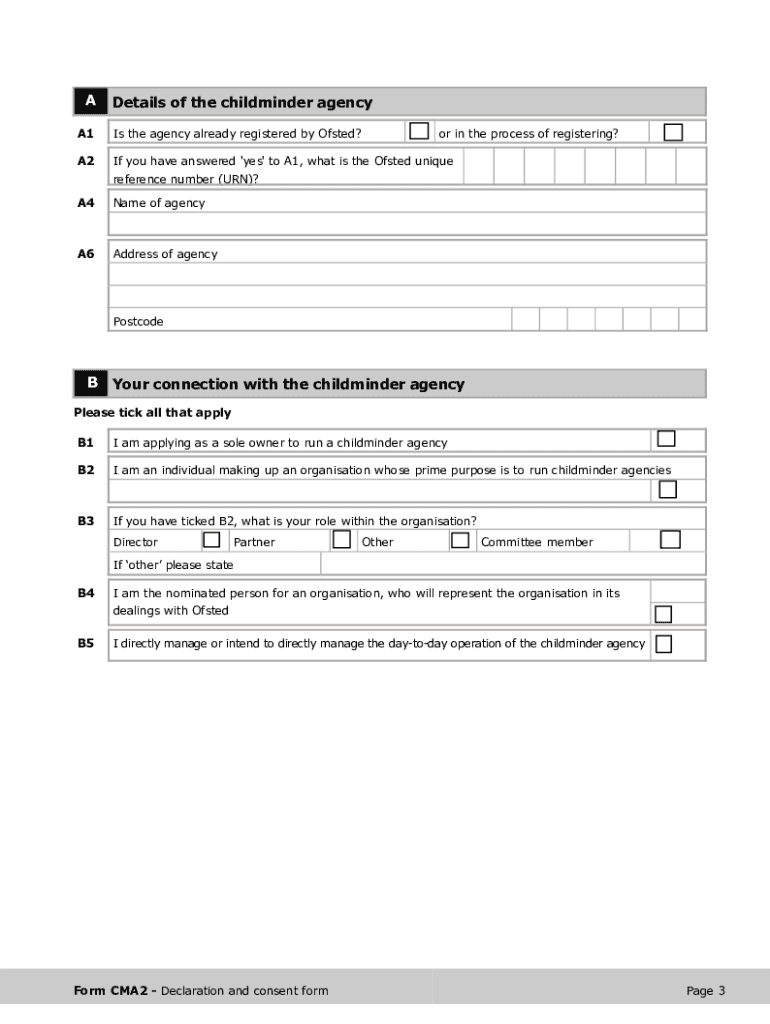







Definition and Purpose of the EY2 Form
The EY2 form is essential for individuals associated with a childminder agency seeking registration with Ofsted in the United States. This form, required by Ofsted, helps collect detailed personal information to perform thorough background checks. It ensures compliance with legal standards for safeguarding children, emphasizing the accountability and suitability of individuals involved in childcare. By understanding its significance, those engaged in the childminding business can facilitate a smooth registration process and meet necessary legal obligations efficiently.
How to Use the EY2 Form Printable
To utilize the EY2 form correctly, start by downloading and printing the form from a reliable online source. Ensure that all required fields are filled accurately, as incomplete or incorrect information can lead to delays. The form includes sections for personal details, professional background, and consent for background checks. Users should carefully review and complete each section according to the instructions provided. Filling out the form in a quiet environment can help prevent errors. It's advisable to keep a copy for personal records before submitting it to Ofsted.
Obtaining the EY2 Form Printable
The EY2 form can be obtained from official government websites or organizations related to childminding. A digital version may be more convenient, allowing users to complete and print the form from their home or workplace. When sourcing the form online, ensure the website is secure and legitimate to prevent unauthorized access to your personal information. Downloading from an authenticated government portal ensures you have the latest version of the form with up-to-date legal requirements and guidelines.
Steps to Complete the EY2 Form Printable
-
Gather Required Information: Before starting, compile all necessary personal and professional documents. This includes identification, contact details, employment history, and any previous registration details with Ofsted.
-
Complete Personal Details Section: Fill in basic personal information such as your name, address, and contact details. Ensure accuracy to avoid discrepancies during the verification process.
-
Detail Your Connection to the Agency: Specify your role and relationship with the childminder agency. Clearly define any responsibilities or duties you hold.
-
Background and Suitability Checks: Provide consent for Ofsted to perform background checks by signing the relevant sections. This step is crucial for ensuring that all childminder staff align with safety standards.
-
Review and Sign: Double-check all entries for accuracy. Sign the form in the designated areas to attest to the truthfulness of the information provided.
-
Submit to Ofsted: Once reviewed, submit the form either online through the Ofsted portal or via postal mail, ensuring all required attachments are included.
Importance of the EY2 Form Printable
The EY2 form is a critical component for maintaining safety and integrity within childminder agencies. By collecting comprehensive data about individuals associated with these agencies, the form helps Ofsted prevent unsuitable candidates from entering the profession. This process is vital for protecting children and providing peace of mind to parents. It underscores the importance of regulatory compliance in childcare services, ensuring that only qualified and trustworthy individuals gain roles in such sensitive positions.
Typical Users of the EY2 Form Printable
Usually, this form is filled out by sole owners, committee members, and nominated representatives of organizations running childminder agencies. Anyone involved in decision-making or day-to-day operations within these agencies is required to complete the form. This demographic ensures a wide-ranging assessment of everyone who influences the care environment offered to children. Understanding the users helps streamline the submission process and ensures the comprehensiveness of background checks.
Key Elements of the EY2 Form Printable
- Personal Information: Includes full name, date of birth, and contact information for accurate identification.
- Agency Connection: Details the individual's role and responsibilities within the childminder agency.
- Previous Registrations: Discloses any past interactions with Ofsted for verification.
- Consent for Background Checks: Authorizes Ofsted to conduct necessary checks.
- Declaration of Accuracy: A signed statement affirming the truthfulness of all information provided.
Legal Use and Compliance for the EY2 Form Printable
Legal compliance is mandatory when using the EY2 form, as it must adhere to regulations set by Ofsted. Users need to acknowledge their understanding of the terms and conditions outlined in the form. Completing it accurately and honestly is non-negotiable, as falsification can lead to severe penalties, including disqualification from working in childminding. The form also highlights the necessity of providing consent for background assessments, which helps uphold high standards in the childcare sector.
Penalties for Non-Compliance
Failing to complete or submit the EY2 form accurately may result in legal ramifications. Individuals might face termination of their ability to work within registered childminder agencies. Additionally, any discovered misinformation could lead to fines or penalties imposed by regulatory bodies. These penalties underscore the necessity of honesty and thoroughness when filling out the form, emphasizing the serious nature of safeguarding protocols in childcare environments.
Form Submission Methods for the EY2 Form Printable
The EY2 form can be submitted digitally or via mail, providing flexibility for users. The digital submission through the Ofsted portal is faster and ensures immediate receipt. However, paper submission remains a viable option for those preferring traditional methods. Regardless of the mode, verifying the receipt of the form is important, and users should retain a copy for their own records. This dual-option approach caters to varying technological proficiencies and preferences among users.




