Type text, add images, blackout confidential details, add comments, highlights and more.

02. Sign it in a few clicks
Draw your signature, type it, upload its image, or use your mobile device as a signature pad.

03. Share your form with others
Send nics appeal form pdf via email, link, or fax. You can also download it, export it or print it out.

How to use or fill out the FBI NICS Appeal Form with DocHub
Ease of Setup
DocHub User Ratings on G2
Ease of Use
DocHub User Ratings on G2
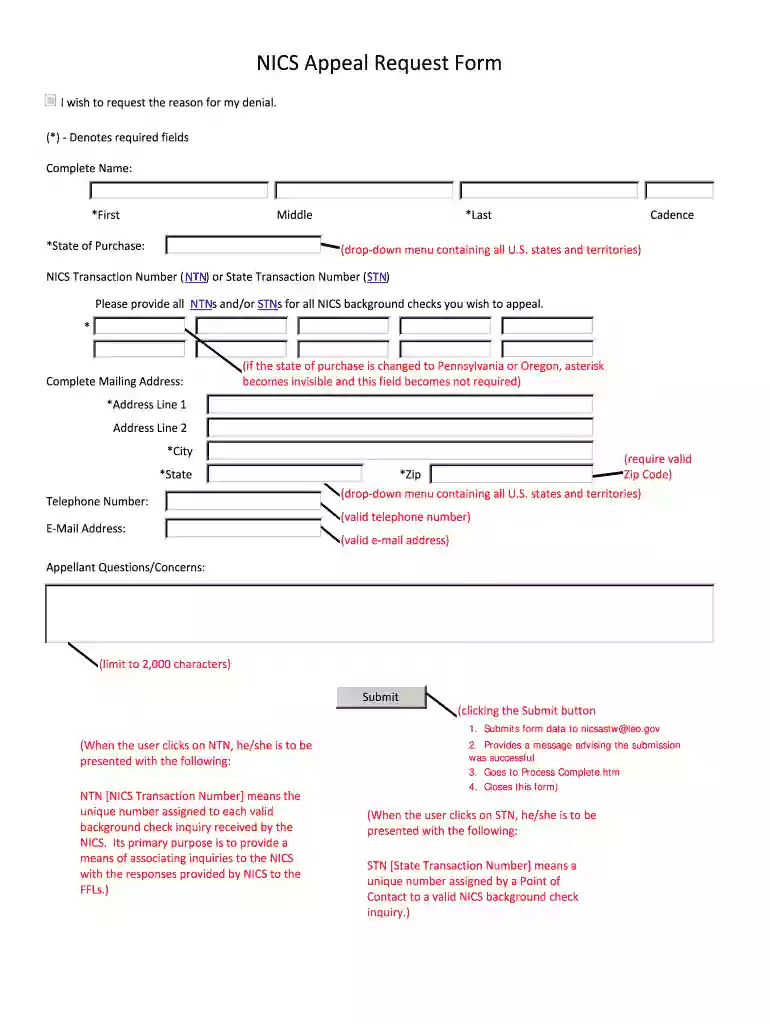
Click ‘Get Form’ to open the FBI NICS Appeal Form in our editor.
Begin by filling in your complete name. Ensure you include your first, middle, and last names as required fields.
Select your state of purchase from the drop-down menu. This is a mandatory field that helps identify where the transaction occurred.
Enter your NICS Transaction Number (NTN) or State Transaction Number (STN). You can provide multiple NTNs or STNs for all background checks you wish to appeal.
Complete your mailing address. If your state of purchase is Pennsylvania or Oregon, this field will not be required.
Fill in your telephone number and email address, ensuring both are valid as they are necessary for communication regarding your appeal.
In the 'Appellant Questions/Concerns' section, articulate any specific issues or questions you have within the 2,000 character limit.
Finally, click the 'Submit' button to send your completed form directly to nicsastw@leo.gov. A confirmation message will appear once submitted successfully.
Start using our platform today to fill out your FBI NICS Appeal Form online for free!
Nov 26, 2019 The purchase denial challenge is a classic administrative appeal, and itself makes two alternate procedures available to the wrongfully deniedRead more
Cookie consent notice
This site uses cookies to enhance site navigation and personalize your experience.
By using this site you agree to our use of cookies as described in our Privacy Notice.
You can modify your selections by visiting our Cookie and Advertising Notice.