




Here's how it works



How to use or fill out drsds10f maricopa with our platform

- Click ‘Get Form’ to open the drsds10f maricopa in the editor.
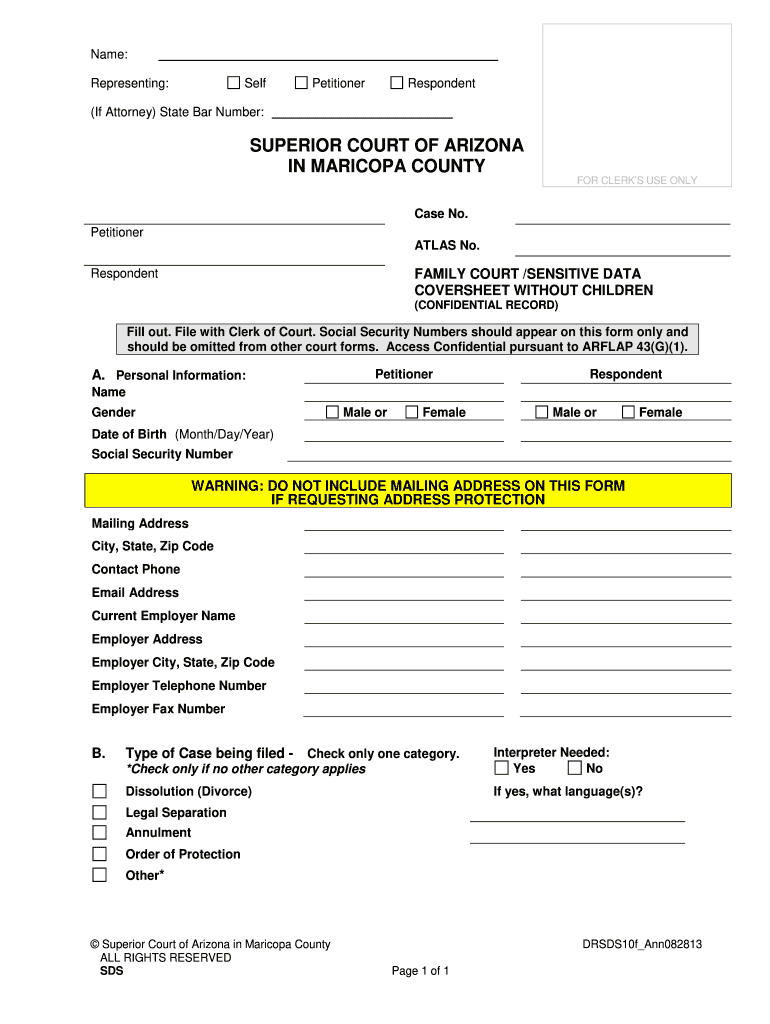
- Begin by filling out the 'Personal Information' section. Enter the names of both the Petitioner and Respondent, ensuring you select their gender as either Male or Female.
- Input the Date of Birth for both parties in the format Month/Day/Year. Be cautious to include Social Security Numbers only on this form, as they should not appear on other court documents.
- If requesting address protection, do not include your mailing address. Otherwise, provide your complete mailing address along with City, State, Zip Code, Contact Phone, and Email Address.
- Fill in details about your current employer including Employer Name, Address, City, State, Zip Code, Telephone Number, and Fax Number.
- Select the type of case being filed by checking only one category. If an interpreter is needed, indicate 'Yes' and specify the language(s).
Start using our platform today to easily fill out your drsds10f maricopa form for free!
It's free
See more drsds10f maricopa versions
| Versions | Form popularity | Fillable & printable |
|---|---|---|
| 2010 | 4.9 Satisfied (45 Votes) |
Got questions?
Can I draw my electronic signature to sign my drsds10f maricopa?
Sure, electronically drawing your signature is appropriate, but only if you utilize a tool that complies with industry laws and regulations. Try DocHub, which ensures eSignature validity under ESIGN and UETA requirements. All you need to eSign your drsds10f maricopa is an account with DocHub and an internet connection. After you open your document in our editor, click Sign and choose the Draw tool.
How do you fill out drsds10f maricopa online?
You may get and edit your drsds10f maricopa online with the help of DocHub. Its simple yet feature-rich design allows you to begin effective work right after you register your account. Create your profile and add your document, then our user interface will guide you through our stress-free form completion experience.
Security and compliance
At DocHub, your data security is our priority. We follow HIPAA, SOC2, GDPR, and other standards, so you can work on your documents with confidence.
Learn more


