DCS Ombudsman Complaint Form: IDOA Public 2026

Get Form
dcs ombudsman complaint Preview on Page 1

Here's how it works

01. Edit your dcs ombudsman complaint online
Type text, add images, blackout confidential details, add comments, highlights and more.

02. Sign it in a few clicks
Draw your signature, type it, upload its image, or use your mobile device as a signature pad.

03. Share your form with others
Send dcs ombudsman bureau complaint via email, link, or fax. You can also download it, export it or print it out.

Definition & Meaning

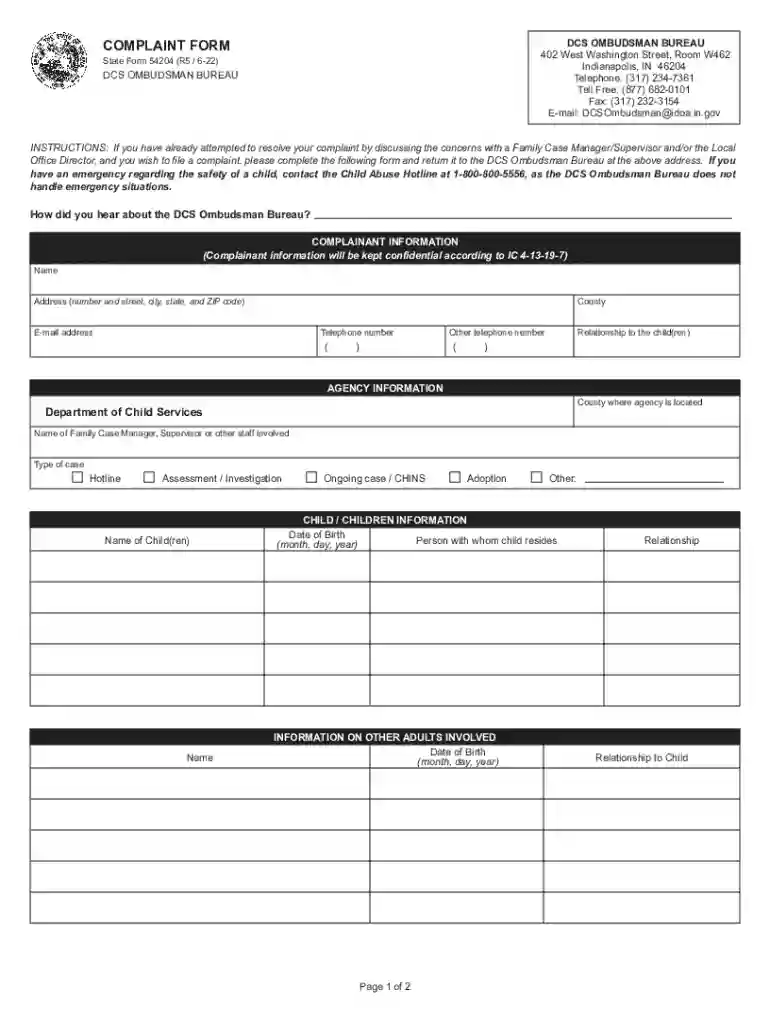
The DCS Ombudsman Complaint Form: IDOA Public is a formal document used for filing complaints with the Indiana Department of Child Services (DCS) Ombudsman Bureau. It is intended for individuals seeking resolution after unsatisfactory attempts to address concerns directly with the DCS personnel. The form is an essential tool for communicating grievances related to DCS actions or inactions, providing a structured format to ensure clarity and comprehensiveness in complaint submissions.

Key Elements of the DCS Ombudsman Complaint Form: IDOA Public

The form consists of several key sections designed to capture detailed information about the complaint:

  • Complainant Information: This section requires details about the individual filing the complaint, such as their name, contact information, and relationship to the child or children involved.
  • Agency Details: Information about the DCS personnel or agency involved in the complaint, including names and contact information, must be provided.
  • Child Details: The form includes fields to capture information about the child or children affected by the issue, such as names, ages, and case numbers.
  • Description of Complaint: Complainants need to describe the issue in detail, including specific incidents and outcomes of previous interactions with DCS.

Steps to Complete the DCS Ombudsman Complaint Form: IDOA Public

  1. Gather Necessary Information: Before filling out the form, collect all relevant details, including incident dates, correspondence with DCS, and personal information.
  2. Complete Complainant Information: Fill in the required fields with accurate contact details and personal data.
  3. Provide Agency Details: Ensure you have the correct details about the DCS personnel involved.
  4. Detail the Child's Information: Accurately enter information about the child or children, including case numbers.
  5. Articulate the Complaint: Clearly describe the nature of your grievance, providing as much context and detail as possible.
  6. Review and Submit: Double-check all entries for accuracy before submitting the form through the chosen method.

How to Obtain the DCS Ombudsman Complaint Form: IDOA Public

The form can be acquired via multiple methods:

  • Online Download: It is available for download from the official website of the Indiana Department of Child Services.
  • Request by Mail: Individuals can request a mailed copy by contacting the DCS office.
  • In-Person Visit: Copies are also available at local DCS offices for those who prefer to pick up the form physically.

Legal Use of the DCS Ombudsman Complaint Form: IDOA Public

The form is a legal document used to formally address grievances with the DCS. It adheres to state-specific guidelines ensuring that complaints are processed within a legal framework, with respect for confidentiality and privacy concerns. The submission of this form initiates an official review process managed by the DCS Ombudsman Bureau.

Who Typically Uses the DCS Ombudsman Complaint Form: IDOA Public

The primary users of this form are:

  • Caregivers and Relatives: Individuals closely associated with the child or children involved in DCS cases.
  • Legal Representatives: Attorneys or legal guardians managing child welfare issues.
  • Affected Individuals: Those directly impacted by DCS decisions or services.
decoration image ratings of Dochub

Important Terms Related to DCS Ombudsman Complaint Form: IDOA Public

Understanding relevant terminology is essential for correctly filling out the form:

  • Complainant: The person lodging the complaint.
  • Ombudsman: An official appointed to investigate individuals' complaints against maladministration.
  • Confidentiality: The assurance that the details disclosed in the complaint will be protected.

Required Documents

When submitting the DCS Ombudsman Complaint Form, certain documentation may be necessary to support the complaint:

  • Correspondence Records: Emails and letters previously exchanged with DCS.
  • Legal Documents: Copies of relevant court orders or legal agreements.
  • Supplementary Evidence: Any additional documentation that substantiates the claims made in the complaint.

Examples of Using the DCS Ombudsman Complaint Form: IDOA Public

Real-world scenarios where this form is applicable include:

  • Caseworker Disputes: Filing a complaint against a caseworker's handling of a child welfare case.
  • Service Delays: Addressing unreasonable delays in the provision of essential services or support.
  • Unresponsive DCS Personnel: Reporting lack of communication from DCS officials after requests for assistance.

By providing these comprehensive sections and detailed content, individuals can better understand how to effectively use and benefit from the DCS Ombudsman Complaint Form: IDOA Public.

See more DCS Ombudsman Complaint Form: IDOA Public versions

We've got more versions of the DCS Ombudsman Complaint Form: IDOA Public form. Select the right DCS Ombudsman Complaint Form: IDOA Public version from the list and start editing it straight away!
Versions Form popularity Fillable & printable
2022 4.1 Satisfied (43 Votes)
2012 4.3 Satisfied (44 Votes)
2000 4 Satisfied (45 Votes)
be ready to get more

Complete this form in 5 minutes or less

Get form

Got questions?

We have answers to the most popular questions from our customers. If you can't find an answer to your question, please contact us.
Contact us
The Ombudsman can investigate complaints about actions and decisions of Australian Government agencies to see if they are wrong, unjust, unlawful, discriminatory or just plain unfair. The Ombudsman also seeks remedies for those affected by administrative deficiency and acts to improve public administration generally.
Please send your requests to DCSOmbudsman@idoa.in.gov or call 877-682-0101.
The DCS Ombudsman Bureau may receive, investigate, and attempt to resolve a complaint alleging that DCS, by action or omission, failed to protect the physical or mental health or safety of any child or failed to follow specific laws, rules, or written policies.
The most common causes of complaints to the Legal Ombudsman are: delay or failure to progress. failure to advise or poor advice. failure to follow instructions. costs. failure to keep informed. failure to reply.
You can approach the Ombudsman with complaint if: Your complaint to the Ombudsman can be about: a Delay in settlement of claims, beyond the time specified in the regulations, framed under the IRDAI Act, 1999.

Security and compliance

At DocHub, your data security is our priority. We follow HIPAA, SOC2, GDPR, and other standards, so you can work on your documents with confidence.

Learn more
ccpa2
pci-dss
gdpr-compliance
hipaa
soc-compliance

People also ask

How to complain to an ombudsman. Check the ombudsmans website to see how to make a complaint - most of them have an online form. Tell the ombudsman if you need extra support making a complaint - for example help filling out forms or making the complaint in a language that isnt English.
How to file a Complaint Step 1 - Lodge a complaint with Regulated Entity i.e. Banks, NBFC, etc. Step 2 - File a Complaint with Reserve Bank of India Ombudsman (RBIO) Online: . By post: Centralized Receipt and Processing Centre (CRPC) Reserve Bank of India, 4th Floor, Sector 17, Chandigarh 160017.
Ombudsman schemes are independent, free and impartial so they dont take sides. You should try and resolve your complaint with the organisation before you complain to an ombudsman. The ombudsman might be able to deal with your complaint more quickly in some situations.

indiana dcs complaint file