Type text, add images, blackout confidential details, add comments, highlights and more.
02. Sign it in a few clicks
Draw your signature, type it, upload its image, or use your mobile device as a signature pad.
03. Share your form with others
Send gc 312 form via email, link, or fax. You can also download it, export it or print it out.
How to use or fill out GC-312 Confidential Supplemental Information Judicial Council forms with our platform
Ease of Setup
DocHub User Ratings on G2
Ease of Use
DocHub User Ratings on G2
Click ‘Get Form’ to open the GC-312 form in the editor.
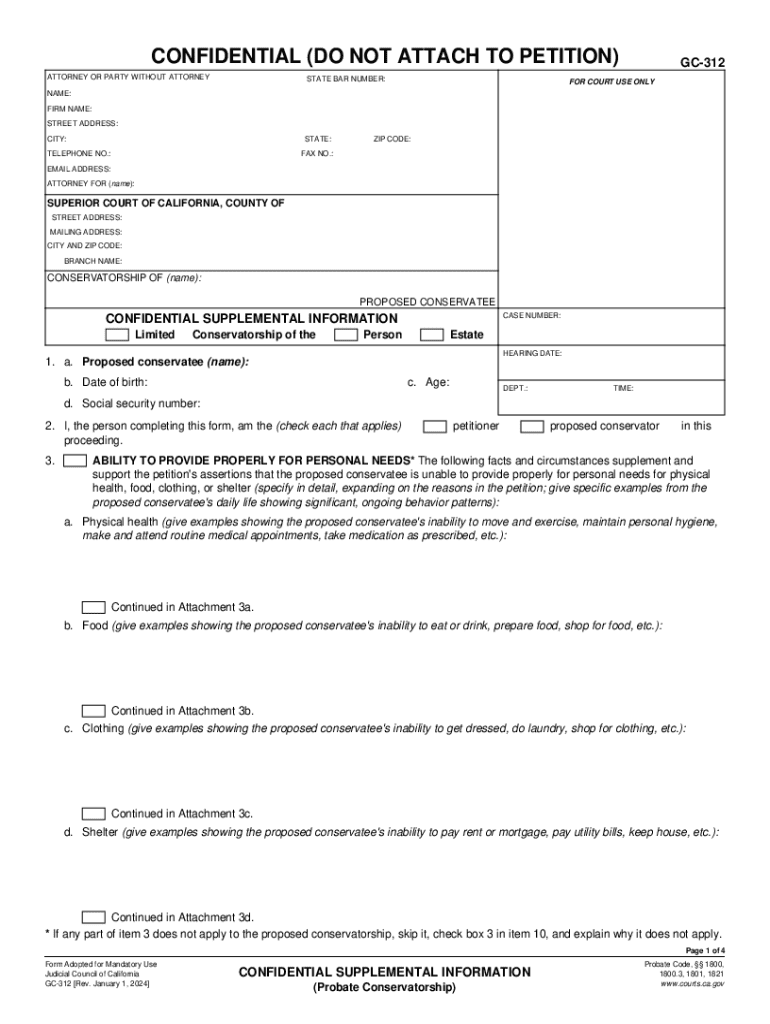
Begin by filling in your personal information, including your name, firm name, address, and contact details. Ensure accuracy as this information is crucial for court communication.
In section 1, provide details about the proposed conservatee, including their name, date of birth, age, and social security number. This establishes the identity of the individual involved.
Proceed to sections 3 and 4 to describe the proposed conservatee's ability to provide for personal needs and manage financial resources. Use specific examples from their daily life to support your claims.
Complete section 5 regarding the proposed conservatee's residence. Clearly state their current living situation and any relevant details about their ability to remain there.
In section 6, outline any alternatives to conservatorship that you have considered or attempted. Provide reasons why these alternatives are unsuitable.
Fill out sections 7 through 11 with information on health services received, knowledge of the conservatorship, sources of information used for your claims, and any items that do not apply.
Finally, review all entries for accuracy before signing and dating the declaration at the end of the form.
Start using our platform today to easily fill out your GC-312 form online for free!
Fill out GC-312 Confidential Supplemental Information Judicial Council forms online It's free
See more GC-312 Confidential Supplemental Information Judicial Council forms versions
We've got more versions of the GC-312 Confidential Supplemental Information Judicial Council forms form. Select the right GC-312 Confidential Supplemental Information Judicial Council forms version from the list and start editing it straight away!
How much does it cost to file for conservatorship in California?
Costs start at $435. You will also need to pay a fee for an investigation. If the adult who may need a conservatorship cant afford the fees, you can apply for a fee waiver. It takes at least 1 month to get a court date to become a conservator.
What are the two types of conservatorship?
The conservator, by assuming the responsibility for these matters, becomes legally accountable to the court. There are two types of conservatorship managed by the Public Guardian: Lanterman-Petris Short (LPS) Conservatorships and Probate Conservatorships.
How to get a conservatorship in California for a mentally ill person?
How Is It Started? Only designated mental health treatment facilities, agencies or the courts can make a referral to the Public Guardian for LPS. Only the Public Guardian can petition the court for the initial appointment as conservator.
How difficult is it to get conservatorship?
Petitioning the court to make major changes can be a costly, time-consuming, and cumbersome process. Although it is possible to get an emergency temporary conservatorship, the process of establishing a permanent conservatorship can take six months.
What forms do I need to file for conservatorship in California?
The Supplemental Information Regarding Parties form will aid the Court and the Clerk of the Circuit Court in identifying related cases. This will help ensure that your related cases are heard before the same judge at the same time and reduce the number of times you have to appear in court.
gc 312 confidential supplemental
GC-314 formPrintable court forms PDFConfidential Conservator Screening formWww courtinfo CA gov self help formsGC 313 formGC-348 formGC-320 formFAM 020 form PDF
Security and compliance
At DocHub, your data security is our priority. We follow HIPAA, SOC2, GDPR, and other standards, so you can work on your documents with confidence.
Cookie consent notice
This site uses cookies to enhance site navigation and personalize your experience.
By using this site you agree to our use of cookies as described in our Privacy Notice.
You can modify your selections by visiting our Cookie and Advertising Notice.