




Here's how it works



How to use or fill out dhec 24 hour report with our platform

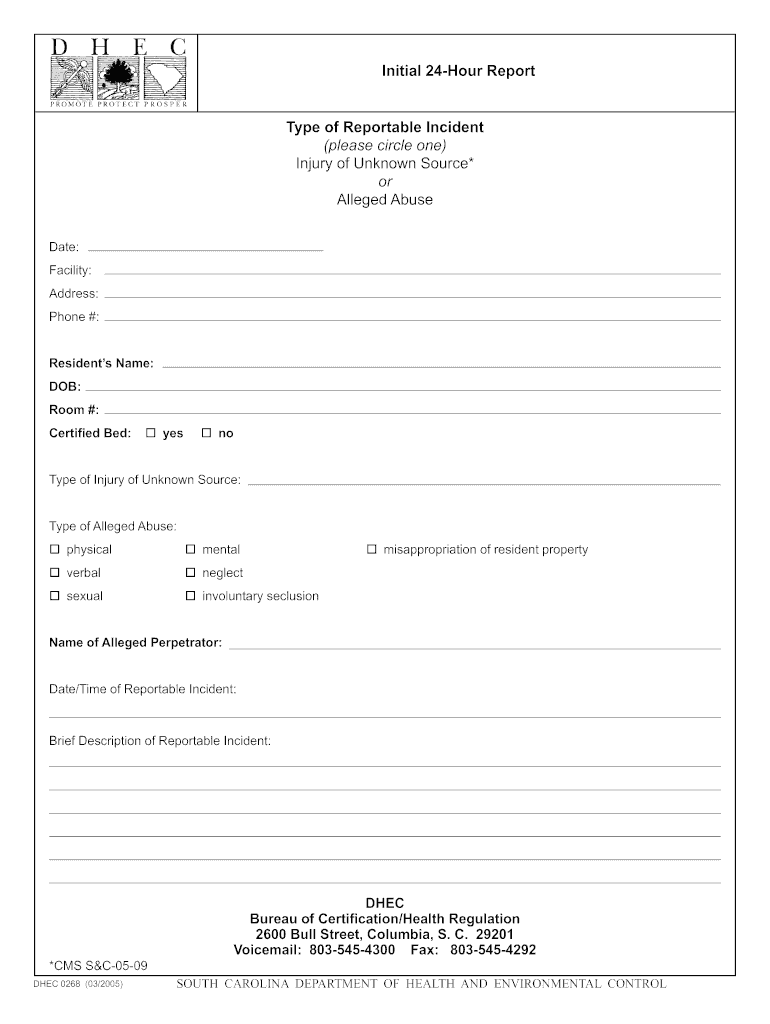
- Click ‘Get Form’ to open the dhec 24 hour report in the editor.
- Begin by selecting the type of reportable incident. Circle either 'Injury of Unknown Source' or 'Alleged Abuse' as applicable.
- Fill in the date, facility name, address, and phone number in the designated fields.
- Enter the resident’s name, date of birth (DOB), room number, and whether they are certified bed status (yes or no).
- Specify the type of injury or alleged abuse by checking the appropriate boxes for options such as physical, mental, verbal, neglect, sexual, involuntary seclusion, or misappropriation of resident property.
- Provide the name of the alleged perpetrator and the date/time of the reportable incident in their respective fields.
- Finally, include a brief description of the reportable incident in the provided space.
Start using our platform today to easily complete your dhec 24 hour report online for free!
It's free
Got questions?
How do I sign my dhec incident report for free?
Most eSignature solutions require users to have a paid subscription. With DocHub, there are two ways for you to add an electronic signature to your dhec incident report at no cost:
- You can do it during a 7-day trial period;
- You can sign up for a free plan.
The second option, however, has limitations on the number of signatures, sign requests, emails, and documents for adjusting available per month. You can check for full information here.
Can I sign my dhec 2 hour reportable while I edit it?
When you edit your dhec 2 hour reportable with DocHub, you will not need to look for other applications or services to sign it. An electronic signature is part of DocHub’s comprehensive editing toolset, which enables you to implement changes in your form without switching between platforms. Just complete your form, double-check the correctness of your information and place your electronic signature at the end to make it submission-ready in minutes.
What does DHEC stand for?
How do I report to SC DHEC?
What is a DHEC inspection?
Security and compliance
At DocHub, your data security is our priority. We follow HIPAA, SOC2, GDPR, and other standards, so you can work on your documents with confidence.
Learn more


