




Here's how it works

01. Edit your dallasisdsickbankapplication online
Type text, add images, blackout confidential details, add comments, highlights and more.

02. Sign it in a few clicks
Draw your signature, type it, upload its image, or use your mobile device as a signature pad.

03. Share your form with others
Send dallas isd sick leave bank via email, link, or fax. You can also download it, export it or print it out.
How to use or fill out dallas isd sick leave bank with DocHub

- Click ‘Get Form’ to open the dallas isd sick leave bank application in our platform.
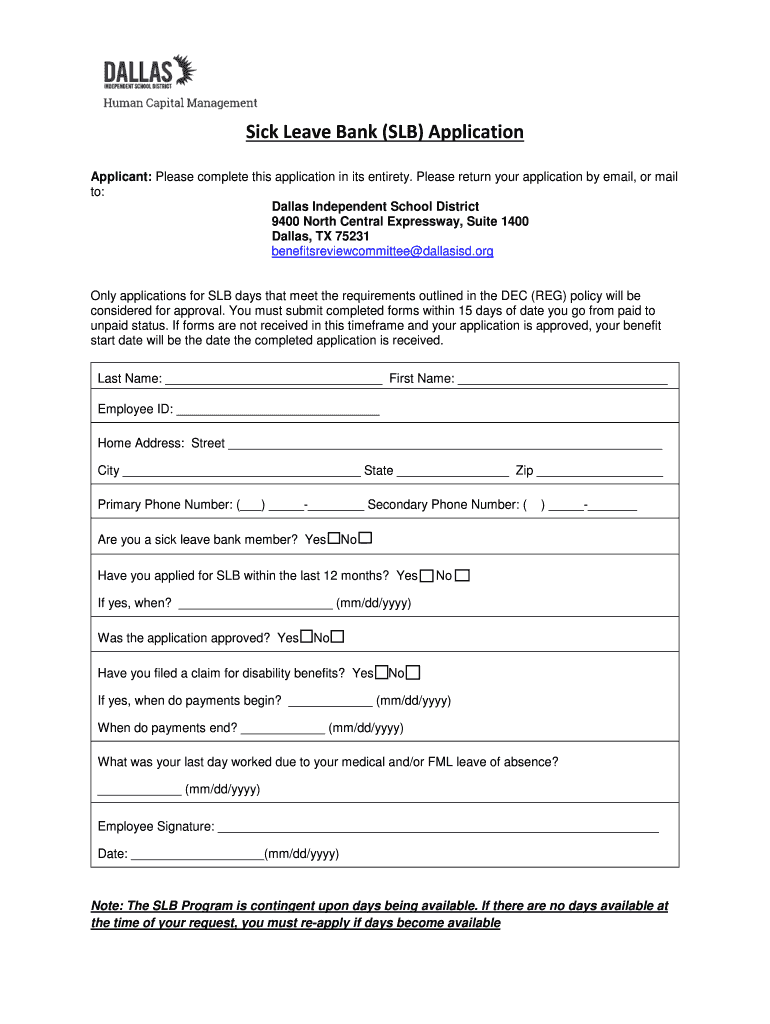
- Begin by filling in your last name, first name, and employee ID in the designated fields. Ensure accuracy as this information is crucial for processing your application.
- Next, provide your home address, including street, city, state, and zip code. This helps in verifying your identity and contacting you if necessary.
- Enter your primary and secondary phone numbers. This allows the benefits review committee to reach you regarding your application status.
- Indicate whether you are a sick leave bank member and if you have applied for SLB within the last 12 months. If applicable, provide the date of your previous application.
- Complete the sections regarding disability benefits claims by providing relevant dates for when payments begin and end.
- Finally, sign and date the application at the bottom before submitting it via email or mail to ensure it is processed promptly.
Start using our platform today to fill out your dallas isd sick leave bank application easily and for free!
Fill out dallas isd sick leave bank online
It's free
It's free
See more dallas isd sick leave bank versions
We've got more versions of the dallas isd sick leave bank form. Select the right dallas isd sick leave bank version from the list and start editing it straight away!
| Versions | Form popularity | Fillable & printable |
|---|---|---|
| 2018 | 4.9 Satisfied (20 Votes) |
Got questions?
We have answers to the most popular questions from our customers. If you can't find an answer to your question, please contact us.
Contact us
How many absences are allowed in Dallas, ISD?
The Texas State Compulsory Attendance Law, Section 25.085, requires all enrolled students to attend school on time, all day, every day school is in session. Violation of the law occurs when students get unexcused voluntary absences for 10 or more days or parts of days within a six-month period.
How does sick leave bank work?
A Leave Bank is a pooled fund of donated annual and restored leave. Eligible members draw leave from the bank to cover time out the office due to a personal or family medical emergency.
How do I request time off in Dallas ISD?
If you expect to be absent for more than five consecutive work days, you should call the Benefits Department at (972) 925-4000, Option 1, to initiate a leave of absence. Leaves are unpaid unless you choose to use your PTO. Exciting News for Expecting Parents!!
How do I request time off?
How to request time away Log in to Workday, select the Time Off icon, or go to Actions in your profile, and find Time and Leave. Select Request Time off, select the Type you need from the list, and fill in the details. Click Submit.
Does Dallas Texas have paid sick leave?
The Court has declared that the Paid Sick Leave Ordinance is, therefore, permanently enjoined and unenforceable against any person, business, or other entity. The City of Dallas Earned Paid Sick Time (Paid Sick Leave) Ordinance went into effect on August 1, 2019 for employers with 6 or more employees.
Security and compliance
At DocHub, your data security is our priority. We follow HIPAA, SOC2, GDPR, and other standards, so you can work on your documents with confidence.
Learn more


People also ask
Where do I request time off on workday?
To submit a time-off request to your manager, access the My Calendar widget. If you select the Hours as the duration for your time-off request, you need to enter the start time and length of your time-off request. Select the pay period that the time off will be requested in. Click the Request Time Off button.