01. Edit your indiana first steps annual credential online
Type text, add images, blackout confidential details, add comments, highlights and more.
02. Sign it in a few clicks
Draw your signature, type it, upload its image, or use your mobile device as a signature pad.
03. Share your form with others
Send it via email, link, or fax. You can also download it, export it or print it out.
How to use or fill out secure in filesAnnualCredentialFormIndiana First Steps Annual Credential Form - IN The
Ease of Setup
DocHub User Ratings on G2
Ease of Use
DocHub User Ratings on G2
Click ‘Get Form’ to open it in the editor.
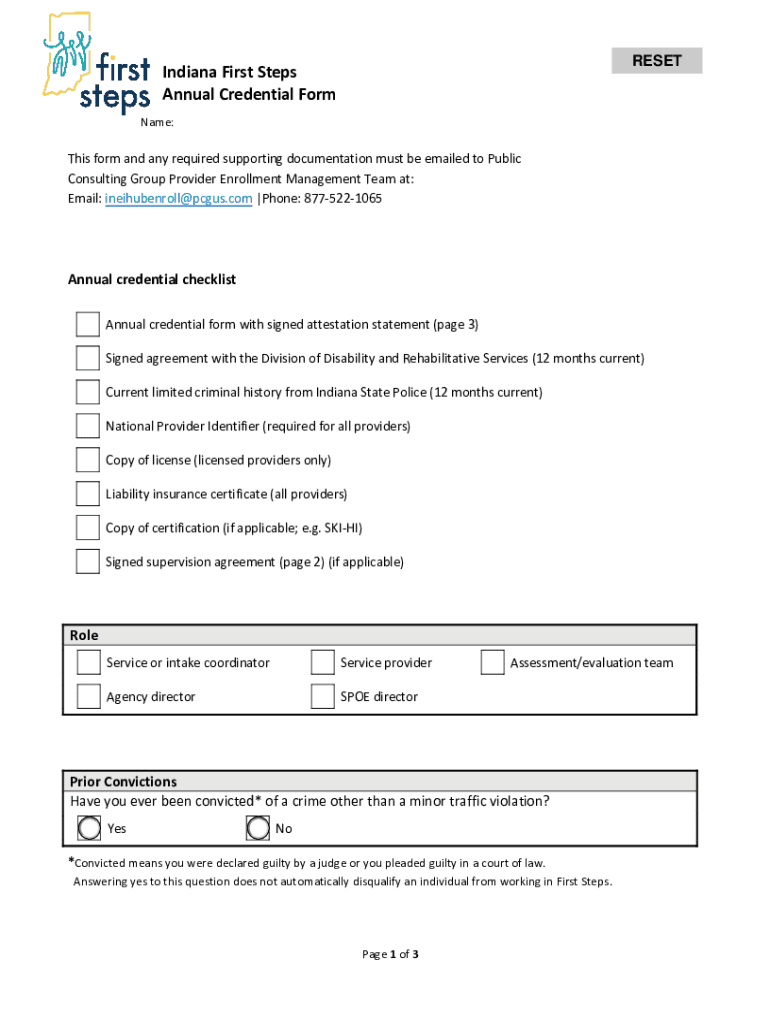
Begin by filling out your personal information in the 'Personnel Information' section. Ensure that all fields marked as required are completed accurately.
Indicate your role by selecting from the options provided, such as 'Service provider' or 'Agency director'.
If applicable, provide details regarding any prior convictions. Remember, answering 'Yes' does not automatically disqualify you.
Complete the 'Supervision Agreement' section if you are a COTA or PTA. Ensure your supervisor's details and signatures are included.
Document your training hours in the 'My Trainings' section. You can duplicate this page as needed to record all relevant training sessions.
Finally, review the attestation statement at the end of the form, print your name, sign, and date it before submission.
Start using our platform today to complete your Annual Credential Form with ease!
Fill out secure in filesAnnualCredentialFormIndiana First Steps Annual Credential Form - IN The online It's free
See more secure in filesAnnualCredentialFormIndiana First Steps Annual Credential Form - IN The versions
We've got more versions of the secure in filesAnnualCredentialFormIndiana First Steps Annual Credential Form - IN The form. Select the right secure in filesAnnualCredentialFormIndiana First Steps Annual Credential Form - IN The version from the list and start editing it straight away!
Cookie consent notice
This site uses cookies to enhance site navigation and personalize your experience.
By using this site you agree to our use of cookies as described in our Privacy Notice.
You can modify your selections by visiting our Cookie and Advertising Notice.