




Here's how it works

01. Edit your snohomish county health district clearance form online
Type text, add images, blackout confidential details, add comments, highlights and more.

02. Sign it in a few clicks
Draw your signature, type it, upload its image, or use your mobile device as a signature pad.

03. Share your form with others
Send it via email, link, or fax. You can also download it, export it or print it out.
How to use or fill out health district clearance form 2011 with our platform

- Click ‘Get Form’ to open the health district clearance form 2011 in the editor.
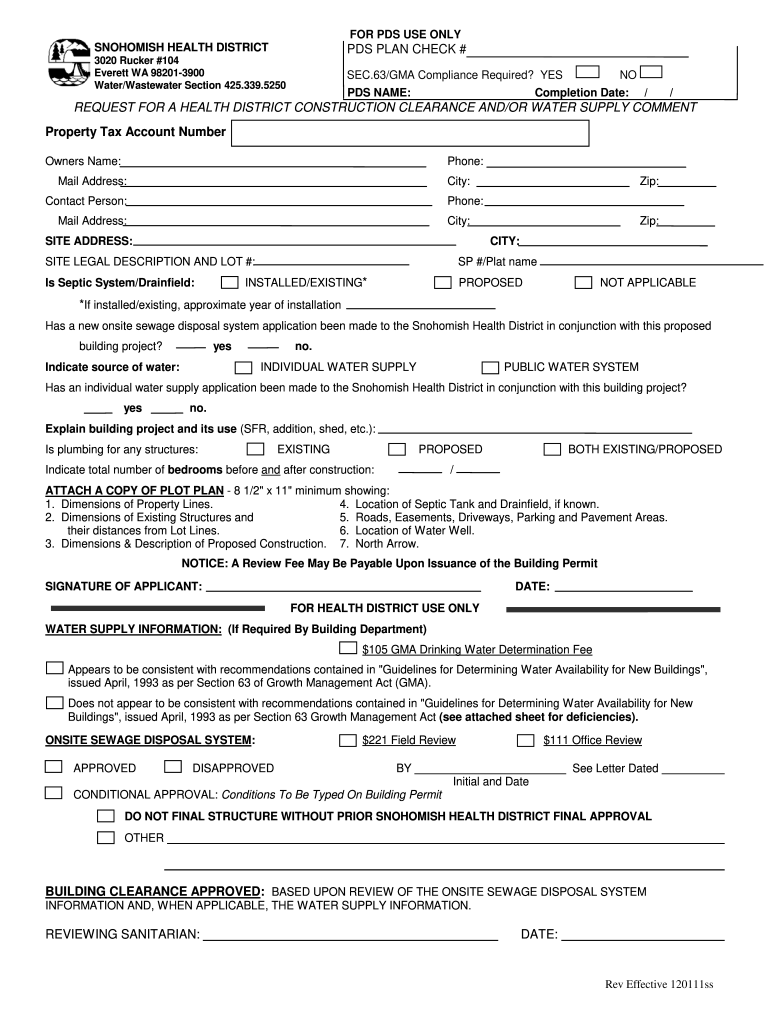
- Begin by entering the Property Tax Account Number and the Owner's Name in the designated fields. Ensure that all contact information, including phone number and mailing address, is accurate.
- Fill in the Site Address and Legal Description, including any relevant lot numbers. This information is crucial for identifying your property.
- Indicate whether a septic system or drainfield is installed or proposed. If applicable, provide the approximate year of installation.
- Answer questions regarding water supply sources by selecting either 'Individual Water Supply' or 'Public Water System'. Make sure to indicate if applications have been made for these systems.
- Describe your building project clearly, specifying its use (e.g., SFR, addition). Indicate existing and proposed plumbing structures as well as total bedroom counts before and after construction.
- Attach a plot plan showing property dimensions and locations of existing structures, septic tanks, driveways, and water wells as required.
- Finally, sign and date the application at the bottom of the form before submitting it for review.
Start using our platform today to fill out your health district clearance form easily and efficiently!
Fill out health district clearance form 2011 online
It's free
It's free
See more health district clearance form 2011 versions
We've got more versions of the health district clearance form 2011 form. Select the right health district clearance form 2011 version from the list and start editing it straight away!
Security and compliance
At DocHub, your data security is our priority. We follow HIPAA, SOC2, GDPR, and other standards, so you can work on your documents with confidence.
Learn more


