Work permit blanked 2026

Get Form
work note Preview on Page 1

Here's how it works

01. Edit your work note online
Type text, add images, blackout confidential details, add comments, highlights and more.
02. Sign it in a few clicks
Draw your signature, type it, upload its image, or use your mobile device as a signature pad.
03. Share your form with others
Send work permit cloud reviews via email, link, or fax. You can also download it, export it or print it out.

How to use or fill out work permit blanked with our platform

Form edit decoration
9.5
Ease of Setup
DocHub User Ratings on G2
9.0
Ease of Use
DocHub User Ratings on G2
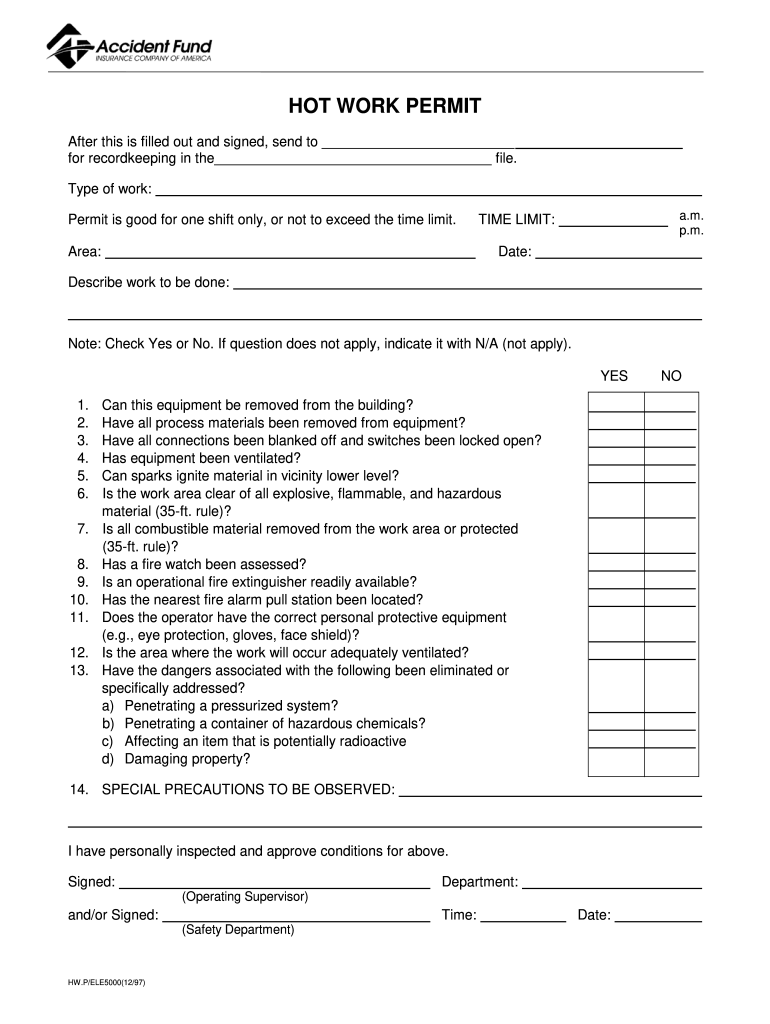
  1. Click ‘Get Form’ to open the work permit blanked in the editor.
  2. Begin by filling in the 'Type of work' section, specifying the nature of the task at hand.
  3. Indicate the 'Area' where the work will be performed, ensuring it is clearly defined.
  4. Set the 'TIME LIMIT' for the permit, noting whether it is for one shift or a specific time frame.
  5. In the 'Describe work to be done' section, provide a detailed description of the tasks involved.
  6. Proceed to answer each safety question by checking 'Yes' or 'No', and use 'N/A' where applicable.
  7. Ensure that all necessary precautions are noted under 'SPECIAL PRECAUTIONS TO BE OBSERVED'.
  8. Finally, have the appropriate personnel sign and date the form to validate it before submission.

Start using our platform today for free to streamline your work permit process!

See more work permit blanked versions

We've got more versions of the work permit blanked form. Select the right work permit blanked version from the list and start editing it straight away!
Versions Form popularity Fillable & printable
1997 4.8 Satisfied (260 Votes)
be ready to get more

Complete this form in 5 minutes or less

Get form

Got questions?

We have answers to the most popular questions from our customers. If you can't find an answer to your question, please contact us.
Contact us
Less job security, as employers often prefer workers with a closed permit. May complicate your permanent residency application, as some immigration pathways favor candidates with a stable job offer. Tied to a specific employer, ensuring stable and often higher-paying employment.
You can change your closed work permit to an open work permit through several pathways: applying for a Bridging Open Work Permit if youve submitted a permanent residence application, qualifying for a spousal open work permit through sponsorship, or obtaining protection as a vulnerable worker experiencing abuse.
If your work pass is shown as Invalid It means that your work pass has been cancelled or is expired and you can no longer continue working. You should ask your employer to log into WP Online or EP eService to check and rectify the causes that made the work pass invalid.
Closed work permits are generally role-specific and employer-specific. This means that the employee or worker can not work in any other role or with any other employer without permission from the immigration department; The worker cannot work beyond the validity of the work permit; and.
Open work permits provide docHub flexibility to the holder, as there are limited restrictions on the type of work they can pursue. For this reason, they are seen as more desirable than closed work permits.

Security and compliance

At DocHub, your data security is our priority. We follow HIPAA, SOC2, GDPR, and other standards, so you can work on your documents with confidence.

Learn more
ccpa2
pci-dss
gdpr-compliance
hipaa
soc-compliance
be ready to get more

Complete this form in 5 minutes or less

Get form

People also ask

For immigrants to work in the United States legally, they generally must obtain work authorization. Immigrants with particular legal statuses, such as those seeking parole or asylum status, request authorization by applying for Employment Authorization Documents, commonly called work permits.
Call USCIS You can contact the USCIS Customer Service Center at 1-800-375-5283 for updates. Be ready with your receipt number and personal details for verification.

Related links