



Pnb digital banking enrollment form 2026

Get Form
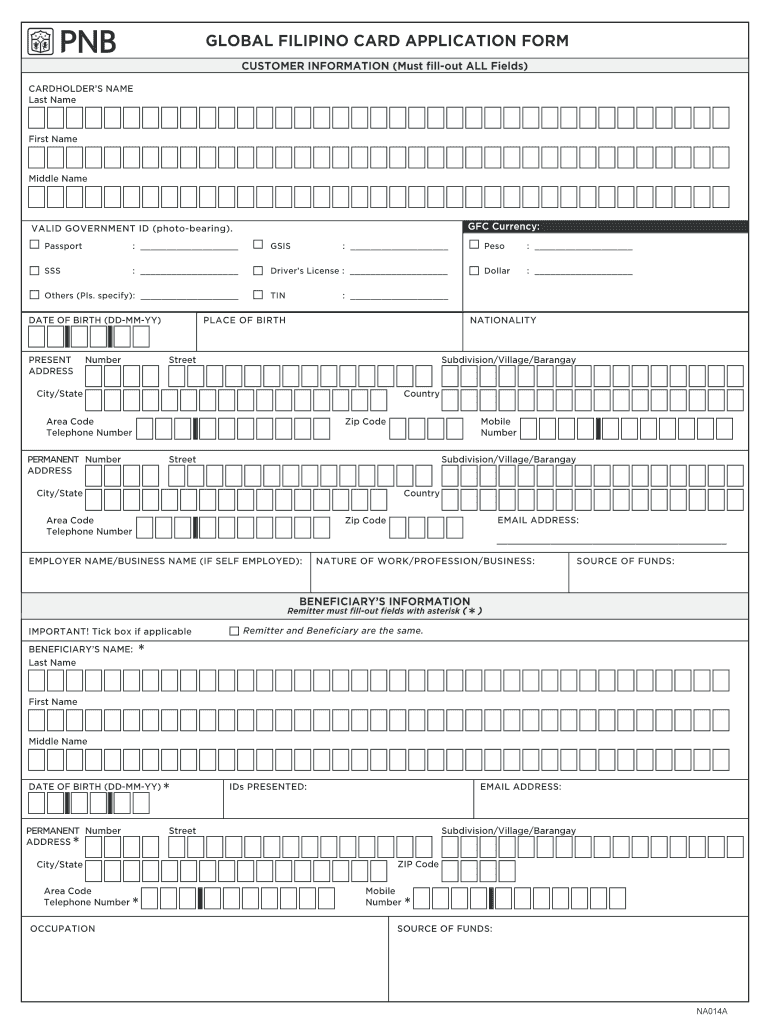
global filipino card application Preview on Page 1

Here's how it works

01. Edit your global filipino card application online
Type text, add images, blackout confidential details, add comments, highlights and more.

02. Sign it in a few clicks
Draw your signature, type it, upload its image, or use your mobile device as a signature pad.

03. Share your form with others
Send it via email, link, or fax. You can also download it, export it or print it out.

How to use or fill out pnb digital banking enrollment form with our platform

Form edit decoration
9.5
Ease of Setup
DocHub User Ratings on G2
9.0
Ease of Use
DocHub User Ratings on G2
  1. Click ‘Get Form’ to open the pnb digital banking enrollment form in the editor.
  2. Begin by filling out the 'Customer Information' section. Enter your last name, first name, and middle name as required. Select your preferred GFC currency.
  3. Provide a valid government ID number from the options listed, such as Passport or Driver’s License. Ensure all fields are completed accurately.
  4. Fill in your date of birth in the format DD-MM-YY and provide your present address, including street, subdivision, city/state, country, and zip code.
  5. Complete the 'Beneficiary’s Information' section if applicable. Fill out all required fields marked with an asterisk (*) and ensure accuracy.
  6. Review the confirmation section carefully. By signing this form, you certify that all information is true and agree to the terms and conditions.

Start using our platform today for free to streamline your pnb digital banking enrollment process!

See more pnb digital banking enrollment form versions

We've got more versions of the pnb digital banking enrollment form form. Select the right pnb digital banking enrollment form version from the list and start editing it straight away!
Versions Form popularity Fillable & printable
2015 4.1 Satisfied (48 Votes)
be ready to get more

Complete this form in 5 minutes or less

Get form

Got questions?

We have answers to the most popular questions from our customers. If you can't find an answer to your question, please contact us.
Contact us
In the app dashboard, tap More at the bottom navigation bar. Under security settings, tap on the PNB Digital Key toggle switch to enable. Log in to the app either with your password or biometrics. A notification will appear asking to authenticate your log in session. Enter your transaction details.
Enroll now! Just download the the PNB Digital App for free on the official Google Store or App Store and sign up using your account number or credit card/debit card number. To ensure a smooth sign-up process make sure your contact details such as mobile number and email address are updated with your branch of account.
PNB Retail Internet Banking Details: Anytime Anywhere Banking through Internet. Quick, simple and convenient way of Banking. Services available for NRI Customers also.
You can use the service in most countries, but some dont allow encrypted data to be sent over a public phone network. If youre in doubt, check with the relevant consulate or embassy before using Online Banking outside the UK.
For PNB Credit Cardholders with no deposit account enrolled in the app, you may call PNB Cards 24/7 Customer Service Hotline at (+632) 8818 9818 or DTF 1800 10 818 9818. Once unregistered, you may now log in to PNB Digital on your new mobile device. Can I still access my accounts online when I go abroad? Yes.

Security and compliance

At DocHub, your data security is our priority. We follow HIPAA, SOC2, GDPR, and other standards, so you can work on your documents with confidence.

Learn more
ccpa2
pci-dss
gdpr-compliance
hipaa
soc-compliance
be ready to get more

Complete this form in 5 minutes or less

Get form

People also ask

Accessing Internet banking while youre overseas So long as youve got access to a secure Internet connection, an international mobile number, or an Australian phone with global roaming, you can continue to bank in the same way you would at home.
Using Debit Card Select Register with debit card Enter Account Number, DOB/PAN Select Registration Type (Internet Banking/ Both Internet and Mobile Banking) Enter OTP (One Time password) received on your Mobile Number registered with bank. Select Type of Facility (View Only or View Transaction)